

iInteract: Communication Board
iInteract: Communication Board is made and published by iJaz Software. AppBrain is an independent app data site and isn't affiliated with iJaz Software. The app name, icon, screenshots and description belong to iJaz Software and are shown as published on the App Store.
AppBrain's verdict
Established- Rating on App Store
- 5.00
- 10 ratings
- Last updated
- July 1, 2026
- Size
- 4.54 MB
It doesn't have enough ratings yet to judge what users think.
User feedback
Ratings and reviews on the App StoreComments on iInteract: Communication Board for iOS
We don't have enough comments to show example comments. Please check back later.
Store listing
By iJaz Software, from the App Store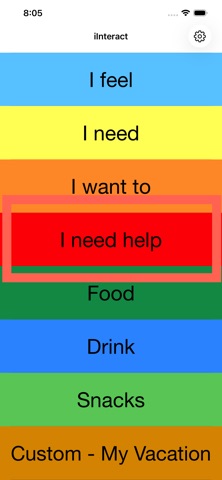




Description by iJaz Software Written by the developer, not by AppBrain. Click to read.
WHAT'S INSIDE
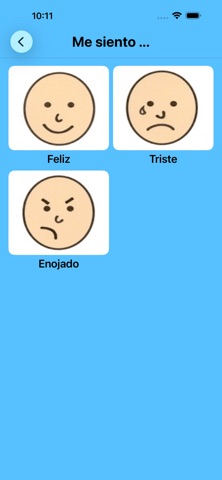
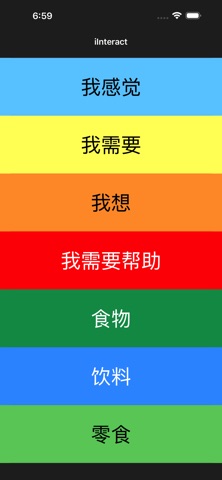
• Choose your board language — English, Español, or 中文 (Mandarin Chinese). Every built-in board shows and speaks in the language you pick, so a bilingual home or classroom finally has a board that fits.
• Seven ready-made panels covering feelings, needs, and everyday activities
• Three ways to use the app — fresh installs start with Customize so you can add your own panels right away:
– Customize — add your own panels with your own pictures and recorded voice
– Configurable — hide panels you don't use and reorder the rest
– Default — bundled panels only, nothing changes
• Make the built-in boards your own — rename any built-in panel or word to match the words your child already knows, and reset to the original any time.
• Add a picture from your camera, your photo library, or a file you've saved — including AAC symbols you already own.
• Show the word under each picture — display each interaction's word printed beneath its picture to help emerging readers connect the symbol with the word. Turn it on or off any time in Settings → Display.
• Audio feedback for every tap — each picture speaks its word aloud to reinforce the link between symbol and speech. Choose a boy or girl voice, record your own familiar voice, or turn sound off for visual-only use.
• Keep the screen on while your child is choosing — 1, 5, or 10 minutes, or "until I leave the app" for kids who study the picture board for a long time.
• Set it up once, use it everywhere. Your panels, PIN, voice choice, and settings travel with you between iPhone, iPad, and Mac.
• Pick how you reach parent settings: a visible gear icon, or hold down the "iInteract" title at the top (recommended — your child can't trigger it, and the app returns to kid view on its own after 10 minutes)
• Optional 4-digit parent PIN. Forgot it? Answer your security question and the PIN clears — no need to delete and reinstall the app.
• Guided Access integration — toggle "Lock Editor" in iOS's Guided Access Options sheet to lock down the gear icon with one tap
• Apple Watch — your built-in panels mirror to the watch for quick out-of-the-house use
• Mac app with its own settings window — same app, same panels, no separate download
WHO IT'S FOR
Parents, therapists, special-education teachers, and speech-language pathologists working with emerging communicators. Designed with — and used by — families of children with autism, apraxia, Down syndrome, and other communication needs.
PRIVACY
No data collection. No tracking. No accounts. Your panels, pictures, and voice recordings stay on your device and (if you opt in) in your private iCloud account. Apple sees CloudKit data as encrypted blobs they cannot open.
LICENSE
Proprietary — © 2010 - 2026 Jim Zucker, Cathy DeMarco, Tricia Zucker. All rights reserved. Not affiliated with or endorsed by any institution.
Safety and technology
Found in the app by AppBrain- Price
- Free
- App size
- 4.54 MB
- Content rating
- Everyone
Technologies used by iInteract: Communication Board
Releases
Updates seen on the App Store- Version
- 4.0.0
- Launched
- May 2010
No changelog data
Alternatives
Similar apps and more from iJaz SoftwareAlternatives to iInteract: Communication Board






Rankings
App Store top chartsApp Store Rankings for iInteract: Communication Board
About the app and developer
About iInteract: Communication Board
iInteract: Communication Board is an education app developed by iJaz Software.
What is the rating of iInteract: Communication Board?
iInteract: Communication Board is rated 5.00 out of 5 stars, based on 10 ratings.
Is iInteract: Communication Board free?
iInteract: Communication Board is free. The app size is 4.54 MB. The latest version available is 4.0.0. The last update was on July 1, 2026.
What are the requirements for iInteract: Communication Board?
The app has a content rating of Everyone. The app has been available on the App Store since May 2010.
Developer information for iJaz Software
Address: