

Ikaro is made and published by Estalia. AppBrain is an independent app data site and isn't affiliated with Estalia. The app name, icon, screenshots and description belong to Estalia and are shown as published on the App Store.
AppBrain's verdict
- Last updated
- April 3, 2026
- Size
- 49.9 MB
User feedback
Ratings and reviews on the App StoreComments on Ikaro for iOS
We don't have enough comments to show example comments. Please check back later.
Store listing
By Estalia, from the App Store


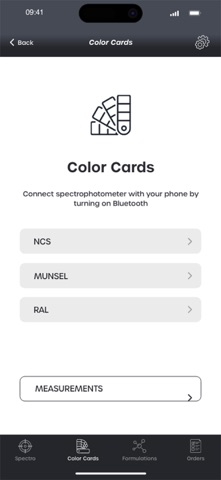


Screenshots by Estalia, from the the App Store listing
Description by Estalia Written by the developer, not by AppBrain. Click to read.
Ikaro App is distributed in association with Ikaro Spectro (digital spectrophotometer) and can therefore only be used if you have the physical instrument for color detection.
The Ikaro system consists of 4 interconnected pillars:
1) Application for mobile devices
App for smartphones: Ikaro App
2) Spectrophorometer
Sphere spectrophotometer diameter 40 mm: Ikaro Spectro
3) Software desktop
Optional desktop module to manage orders from the app: Ikaro Order Sender
4) Cloud server
Server for managing all connectable devices for color formulation: Ikaro Server
By connecting these elements it is possible to formulate and correct the shades quickly and easily and it is also possible to manage the end customer's color production order.
________
THE 4 STEPS OF USE:
STEP 1 - COLOR READING
After connecting the spectrophotometer to the Ikaro app via Bluetooth, it is possible to "read" the shade of the sample to be reproduced or choose a shade from the color charts present.
The app manages, thanks to a smart interface and through guided paths, all the operations of: color reading, choice of the product to be formulated and data sending.
STEP 2 - READING FORMULATION
All the cloud servers, through specific algorithms, perform all the calculations and return the formula for the color of the desired product and for the requested quantity.
STEP 3 - PRODUCTION AND/OR CORRECTION OF THE FORMULATION
The color shade correction step to perform quality controls on color productions.
By producing a sample of the previously formulated color, the app manages a possible correction of the same through a rereading of the sample produced with the spectrophotometer.
STEP 4 – ORDER
As an additional module, you can send the formulation to a dealer's PC who can produce the requested order on their desktop PC.
The Ikaro system consists of 4 interconnected pillars:
1) Application for mobile devices
App for smartphones: Ikaro App
2) Spectrophorometer
Sphere spectrophotometer diameter 40 mm: Ikaro Spectro
3) Software desktop
Optional desktop module to manage orders from the app: Ikaro Order Sender
4) Cloud server
Server for managing all connectable devices for color formulation: Ikaro Server
By connecting these elements it is possible to formulate and correct the shades quickly and easily and it is also possible to manage the end customer's color production order.
________
THE 4 STEPS OF USE:
STEP 1 - COLOR READING
After connecting the spectrophotometer to the Ikaro app via Bluetooth, it is possible to "read" the shade of the sample to be reproduced or choose a shade from the color charts present.
The app manages, thanks to a smart interface and through guided paths, all the operations of: color reading, choice of the product to be formulated and data sending.
STEP 2 - READING FORMULATION
All the cloud servers, through specific algorithms, perform all the calculations and return the formula for the color of the desired product and for the requested quantity.
STEP 3 - PRODUCTION AND/OR CORRECTION OF THE FORMULATION
The color shade correction step to perform quality controls on color productions.
By producing a sample of the previously formulated color, the app manages a possible correction of the same through a rereading of the sample produced with the spectrophotometer.
STEP 4 – ORDER
As an additional module, you can send the formulation to a dealer's PC who can produce the requested order on their desktop PC.
Safety and technology
Found in the app by AppBrain- Price
- Free
- App size
- 49.9 MB
- Content rating
- Everyone
Technologies used by Ikaro
Releases
Updates seen on the App Store- Version
- 2.0.5
- Launched
- March 2024
No changelog data
Rankings
App Store top chartsApp Store Rankings for Ikaro
This app is not ranked
About the app and developer
About Ikaro
Ikaro is a productivity app developed by Estalia.
User Ratings
The app has no ratings yet.
App Information
Ikaro is freely available from the App Store. The app size is 49.86 MB. The latest version available is 2.0.5. The last update was on April 3, 2026.
Technical Requirements
The app has a content rating of Everyone. The app has been available on the App Store since March 2024.
Developer information for Estalia
Address: