

Ike Organizer
Ike Organizer is made and published by Lewis Edward Garrett. AppBrain is an independent app data site and isn't affiliated with Lewis Edward Garrett. The app name, icon, screenshots and description belong to Lewis Edward Garrett and are shown as published on the App Store.
AppBrain's verdict
- Last updated
- August 6, 2026
Rankings
App Store top chartsApp Store Rankings for Ike Organizer
Competitors
Similar apps and more from Lewis Edward GarrettAlternatives to Ike Organizer


Releases
Updates seen on the App Store- Version
- 2.0.1
- Launched
- January 2026
No changelog data
User feedback
Ratings and reviews on the App StoreComments on Ike Organizer for iOS
We don't have enough comments to show example comments. Please check back later.
Technology
Found in the app by AppBrain- Price
- Free
- App size
- 4.22 MB
- Content rating
- High
Technologies used by Ike Organizer
About the app and developer
About Ike Organizer
Ike Organizer is a productivity app developed by Lewis Edward Garrett.
What is the rating of Ike Organizer?
Ike Organizer has no ratings yet.
Is Ike Organizer free?
Ike Organizer is free. The app size is 4.22 MB. The latest version available is 2.0.1. The last update was on August 6, 2026.
What are the requirements for Ike Organizer?
The app has a content rating of High Maturity. The app has been available on the App Store since January 2026.
Developer information for Lewis Edward Garrett
Address:
Frequently asked questions about Ike Organizer
Is Ike Organizer free?
Yes. Ike Organizer is free on the App Store.
Is Ike Organizer still available?
Yes. Ike Organizer is on the App Store, and the last update we saw was on August 6, 2026.
How large is Ike Organizer?
Ike Organizer is 4.22 MB.
Is Ike Organizer suitable for children?
App Store gives Ike Organizer a high maturity rating. It is meant for adults.
Who made Ike Organizer?
Ike Organizer was developed by Lewis Edward Garrett. It is listed in the productivity category on the App Store.
What are the best alternatives to Ike Organizer?
People looking at Ike Organizer also look at these productivity apps: The Next To-Do, WhatNext To-do List, IkeMatrix, Assist for Jira, Next Task: To-Do & Widgets.
Store listing
By Lewis Edward Garrett, from the App Store





Description by Lewis Edward Garrett Written by the developer, not by AppBrain. Click to read.
Universal Purchase: Create and maintain Task (To Do) lists using the Eisenhower Matrix method of prioritization on macOS, iOS and iPadOS devices synchronized via iCloud.
Multiplatform Ike Organizer provides an easy to use interface for managing Eisenhower Matrixes on Macintosh computers, as well as iOS and iPadOS devices. Matrix data is synchronized across devices via user's iCloud account.
Eisenhower matrixes provide a visual guide to organize tasks by urgency and importance, optimizing focus and productivity. It’s a vital tool that cuts through the noise, eliminates time-wasters, and leaves space for what truly matters. This could be your ticket to game-changing productivity! See Productivity Patrol (https://productivitypatrol.com/eisenhower-matrix/) for a great explanation of The Eisenhower Matrix: What It Is and How to Use It. Also see slab (https://slab.com/blog/eisenhower-matrix/) for another great explanation of The Eisenhower Matrix: Prioritize Your Time on What Matters Most.
Ike Organizer is a a multi-platform tool for creating and maintaining Eisenhower matrixes across iOS and macOS devices. Eisenhower matrix data is maintained in the user's iCloud, as well as the user's iPhone and/or Macintosh computer. Ike Organizer is a Universal Purchase: pay one price and get both the iOS and macOS Ike Organizer apps.
Multiplatform Ike Organizer provides an easy to use interface for managing Eisenhower Matrixes on Macintosh computers, as well as iOS and iPadOS devices. Matrix data is synchronized across devices via user's iCloud account.
Ike Organizer manages multiple Eisenhower Matrixes via an easy to navigate Split View interface.
Ike Organizer Features:
Multiplatform iOS, iPadOS and macOS.
Help screens available throughout.
iCloud synchronization of Matrix data.
Almost all features are present in the iOS, iPadOS and macOS apps.
Create and manage unlimited number of Eisenhower matrixes.
Sample Eisenhower matrix loadable from toolbar.
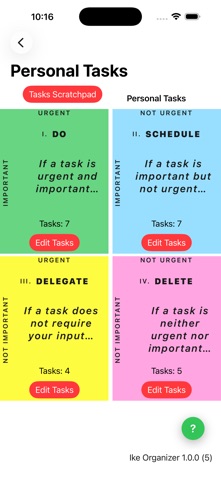
Color coded Quadrants are automatically created when adding a new Eisenhower matrix.
Each of the 4 Quadrants display a text summary of the Quadrant's mission.
Tapping on the summary text reveals a full statement of the Quadrant's mission.
Quadrant tasks can be entered in multiple ways:
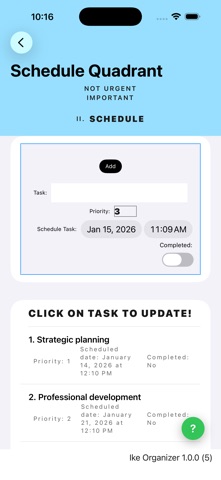
New tasks can be added to the Quadrant via the Edit Tasks mode.
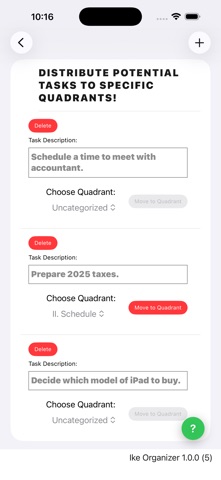
The text description of a task can be added into the Potential Tasks List and then distributed to the appropriate Quadrant.
Quadrant tasks can be easily copied or moved to another quadrant, as well as deleted.
Quadrant's task lists can easily be reordered by dragging and dropping.
All Task data is editable simply by tapping on the Task in the Quadrant Task List.
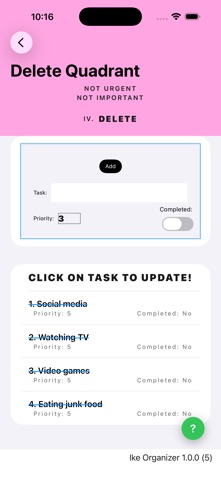
Completed Tasks are maintained in the Quadrant Task List, struck-through in red, sorted to the bottom of the list.
Tasks in the Delete Quadrant are automatically struck-through in blue to remind the user that tasks in this Quadrant are time wasters.