

ikPlayer - Media Player
ikPlayer - Media Player is made and published by IK Software. AppBrain is an independent app data site and isn't affiliated with IK Software. The app name, icon, screenshots and description belong to IK Software and are shown as published on the App Store.
AppBrain's verdict
- Last updated
- July 21, 2025
- Size
- 56.8 MB
User feedback
Ratings and reviews on the App StoreComments on ikPlayer - Media Player for iOS
We don't have enough comments to show example comments. Please check back later.
Store listing
By IK Software, from the App Store



Description by IK Software Written by the developer, not by AppBrain. Click to read.
By using a large-capacity external HDD to store the photos and videos stored on all the family's iPhones on a Windows PC set as an SMB server,
if you can access it in the same wifi environment as the Windows server, all family members can access it smoothly at home.
You can also import CDs and transfer music to the Windows server to share and enjoy with your family.
Even if you don't have a Windows SMB server, it also supports network HDDs such as RECBOX.
It's a long explanation, but I hope you'll read it all to understand what features it has.
I'd also appreciate it if you could take a look at the app preview video and screenshots.
What you can do with this app
・Find the Windows SMB servers in your home network
・You can access the SMB servers you find with a username and password
■What you can do before selecting a server
*The list can be rearranged or deleted
・Last played
・All played history
・Favorite list. Select or All play(shuffle,Repeat)
・Favorite folders
・Playlist registered in playlist groups. Select or All play(shuffle,Repeat)
・Downloaded list & total size. Select or All play(offline)
・Videos,images from the camera roll in your iPhone with this app's high-performance media player(offline)
・Videos,music,images from files stored in your iPhone with this app's high-performance media player(offline)
・You can hide server names that you do not want to display when there are multiple SMB servers
・Detailed settings for the color and design of the SMB server list
・Setting to show/hide the status bar common to all apps. Setting the color when it is displayed
・If you turn on auto login, you can skip entering your username and password
・Back up and Restore data using the sharing function
■What you can do after selecting a server
・Display folders and files
・Play all files in a folder at once(Shuffle,Repeat)
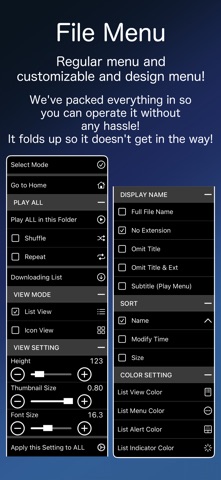
・Folder and file display can be switched between list display and icon display
・Set thumbnails for folders. Thumbnails can be set from videos or the iPhone camera roll
・Image files are automatically displayed as thumbnails
・Set the display size and font size of folders and files
・Folder and file lists can be sorted by name, modification date and time, and size
・Detailed color design for folders and file lists
・Multiple files can be selected and added to a playlist
・Files can be downloaded, and downloaded files can be played offline
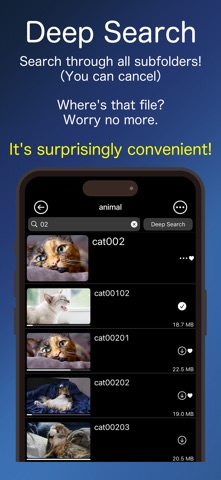
・A function to narrow down the display of files and folders using the search field
・A function to narrow down the display of files and folders by searching through sub-folders using the search field and Deep Search button
■What you can do with the media player after selecting a file
・Play videos and music. Show Image
・Switching Audio&Subtitle(Japanese and English,etc)
・Music can be played in the background (even in sleep mode)
・You can bookmark any playback position
・Check, edit, and jump to bookmark lists
・Rewind and fast forward
・Change aspect ratio
・15 second rewind and 30 second forward
・Screen lock
・Screen rotation
・Add to Favorite list
・Add to playlist
・Check playable list and jump playback.(Shuffle,Repeat)
・Set subtitle instead of file name
・Extract thumbnail from currently playing video
・Set thumbnail from camera roll
・Auto-play function when next file is available
・Function to set color design in detail
・Function related to sound as follows
・Equalizer
・Option to mute sound during playback
・Ability to adjust audio delay. (Memorized for each file)
・Ability to change playback speed
・Ability to loop playback between A & B
・The following gesture
・Change volume
・Change brightness
・Double tap left or right to fast forward or rewind 10 seconds
・Swipe left or right to fast forward or rewind(changes depending on the amount of swipe)
・Double tap for full screen(videos only)
・Swipe to end playback
・Control panel settings
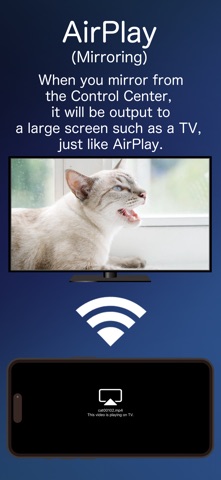
・By mirroring from the Control Center, you can display videos on your TV just like with AirPlay
Made in Japan
Safety and technology
Found in the app by AppBrain- Price
- $1.99
- App size
- 56.8 MB
- Content rating
- Everyone
Technologies used by ikPlayer - Media Player
Releases
Updates seen on the App Store- Version
- 1.9
- Launched
- June 2025
No changelog data
Alternatives
Similar apps and more from IK SoftwareMore from IK Software








Rankings
App Store top chartsApp Store Rankings for ikPlayer - Media Player
About the app and developer
About ikPlayer - Media Player
ikPlayer - Media Player is a photo & video app developed by IK Software.
User Ratings
The app has no ratings yet.
App Information
ikPlayer - Media Player costs $1.99. The app size is 56.83 MB. The latest version available is 1.9. The last update was on July 21, 2025.
Technical Requirements
The app has a content rating of Everyone. The app has been available on the App Store since June 2025.
Developer information for IK Software
Address:
Frequently asked questions about ikPlayer - Media Player
Is ikPlayer - Media Player free?
No. ikPlayer - Media Player costs $1.99 on the App Store.
Is ikPlayer - Media Player still available?
Yes. ikPlayer - Media Player is on the App Store, and the last update we saw was on July 21, 2025.
How large is ikPlayer - Media Player?
ikPlayer - Media Player is 56.83 MB.
Is ikPlayer - Media Player suitable for children?
App Store rates the content of ikPlayer - Media Player as suitable for everyone.
Who made ikPlayer - Media Player?
ikPlayer - Media Player was developed by IK Software. It is listed in the photo & video category on the App Store.