

Image Converter & Tools
Image Converter & Tools is made and published by Harihar Creation. AppBrain is an independent app data site and isn't affiliated with Harihar Creation. The app name, icon, screenshots and description belong to Harihar Creation and are shown as published on the App Store.
AppBrain's verdict
- Last updated
- August 18, 2026
- Size
- 48.9 MB
User feedback
Ratings and reviews on the App StoreComments on Image Converter & Tools for iOS
We don't have enough comments to show example comments. Please check back later.
Store listing
By Harihar Creation, from the App Store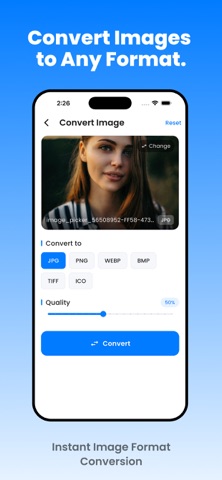



Description by Harihar Creation Written by the developer, not by AppBrain. Click to read.
Image Converter & Editor gives you the essential image tools you need to prepare photos for sharing, uploading, storing, publishing and everyday use.
Convert image formats, reduce file size, resize photos, edit images, remove metadata, add watermarks and process multiple images at once — without sending your photos to a server.
IMAGE FORMAT CONVERTER
Convert your images between popular formats quickly and easily.
• JPG and JPEG
• PNG
• HEIC
• WebP
• BMP
• TIFF
• Convert images for sharing, uploading or compatibility
• Process multiple images in batch
Need to convert HEIC to JPG? PNG to JPG? WebP to PNG? Choose your output format and convert in a few taps.
COMPRESS IMAGES
Reduce image file size while keeping the quality you need.
• Compress large photos
• Adjust compression quality
• Reduce file size before sharing
• Prepare images for uploads and forms
• Preview your results before saving
Make large MB images easier to send, upload and store.
RESIZE PHOTOS
Change image dimensions quickly and precisely.
• Set custom width and height
• Resize by percentage
• Adjust image resolution
• Maintain aspect ratio
• Prepare images for different platforms and requirements
Resize photos for websites, documents, marketplaces, social media and more.
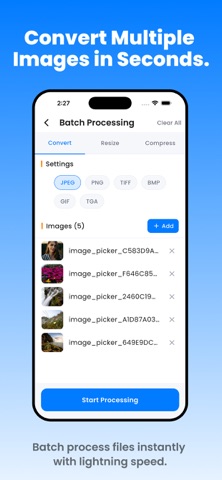
BATCH IMAGE PROCESSING
Work with multiple images at the same time.
• Batch convert images
• Batch compress photos
• Batch resize images
• Process large groups of photos faster
Perfect when you need to prepare an entire collection instead of editing images one by one.
EDIT & ENHANCE PHOTOS
Make quick adjustments without opening a complicated photo editor.
• Crop images
• Rotate photos
• Adjust brightness and contrast
• Apply filters and effects
• Draw and annotate
• Add custom watermarks
Make simple image edits in seconds.
EXIF & METADATA TOOLS
See and manage information stored inside your images.
• View image metadata
• View EXIF information
• Edit supported metadata
• Remove sensitive metadata before sharing
• Help protect location and camera information
Keep control over the information attached to your photos.
QR CODE GENERATOR
Create QR codes quickly and export them as images.
Generate useful QR codes for links, text and other supported content, then save or share them directly.
BASE64 IMAGE TOOLS
Convert supported images to Base64 and decode Base64 image data when you need it.
Useful for developers, websites, testing and technical workflows.
FAST & PRIVATE
Your images stay on your device.
Image Converter & Editor processes your images directly on-device, so you don't need to upload your personal photos to a remote server.
That means:
• No image uploads
• No server processing
• Works without an internet connection for supported tools
• Faster processing
• Better privacy for your personal images
BUILT FOR EVERYDAY IMAGE TASKS
Whether you're converting an iPhone HEIC photo to JPG, reducing a large image for an upload, resizing product photos, preparing images for a website or processing hundreds of photos at once, Image Converter & Editor gives you the tools in one place.
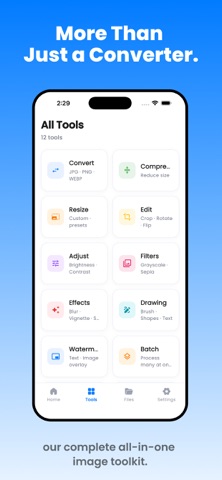
Convert. Compress. Resize. Edit.
Your complete image toolkit, right on your device.
Safety and technology
Found in the app by AppBrain- Price
- Free
- App size
- 48.9 MB
- Content rating
- Low
Technologies used by Image Converter & Tools
Releases
Updates seen on the App Store- Version
- 1.0.1
- Launched
- July 2026
No changelog data
Alternatives
Similar apps and more from Harihar CreationAlternatives to Image Converter & Tools





More from Harihar Creation


Rankings
App Store top chartsApp Store Rankings for Image Converter & Tools
About the app and developer
About Image Converter & Tools
Image Converter & Tools is an utilities app developed by Harihar Creation.
What is the rating of Image Converter & Tools?
Image Converter & Tools has no ratings yet.
Is Image Converter & Tools free?
Image Converter & Tools is free. The app size is 48.92 MB. The latest version available is 1.0.1. The last update was on August 18, 2026.
What are the requirements for Image Converter & Tools?
The app has a content rating of Low Maturity. The app has been available on the App Store since July 2026.
Developer information for Harihar Creation
Address:
Frequently asked questions about Image Converter & Tools
Is Image Converter & Tools free?
Yes. Image Converter & Tools is free on the App Store.
Is Image Converter & Tools still available?
Yes. Image Converter & Tools is on the App Store, and the last update we saw was on August 18, 2026.
How large is Image Converter & Tools?
Image Converter & Tools is 48.92 MB.
Is Image Converter & Tools suitable for children?
App Store gives Image Converter & Tools a low maturity rating, so it is meant for older children and up.
Who made Image Converter & Tools?
Image Converter & Tools was developed by Harihar Creation. It is listed in the utilities category on the App Store.
What are the best alternatives to Image Converter & Tools?
People looking at Image Converter & Tools also look at these utilities apps: Image Compressor & Resizer, Jerusalem Prayer Direction, Quick Image Editor, Image Converter ⁺, Secure Files - Personal Vault.