

Image Resizer Pro: Compress
Image Resizer Pro: Compress is made and published by CloudEx Inc. AppBrain is an independent app data site and isn't affiliated with CloudEx Inc. The app name, icon, screenshots and description belong to CloudEx Inc. and are shown as published on the App Store.
AppBrain's verdict
- Last updated
- October 1, 2026
Rankings
App Store top chartsApp Store Rankings for Image Resizer Pro: Compress
Competitors
Similar apps and more from CloudEx Inc.Alternatives to Image Resizer Pro: Compress


More from CloudEx Inc.


Releases
Updates seen on the App Store- Version
- 1.0.0
- Launched
- October 2026
No changelog data
User feedback
Ratings and reviews on the App StoreComments on Image Resizer Pro: Compress for iOS
We don't have enough comments to show example comments. Please check back later.
Technology
Found in the app by AppBrain- Price
- Free
- App size
- 6.74 MB
- Content rating
- Everyone
Technologies used by Image Resizer Pro: Compress
About the app and developer
About Image Resizer Pro: Compress
Image Resizer Pro: Compress is a photo & video app developed by CloudEx Inc.
User Ratings
The app has no ratings yet.
App Information
Image Resizer Pro: Compress is freely available from the App Store. The app size is 6.74 MB. The latest version available is 1.0.0. The last update was on October 1, 2026.
Technical Requirements
The app has a content rating of Everyone. The app has been available on the App Store since October 2026.
Developer information for CloudEx Inc.
Address:
Store listing
By CloudEx Inc., from the App Store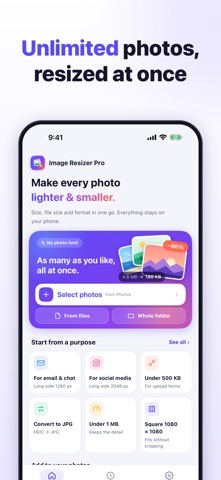

Description by CloudEx Inc. Written by the developer, not by AppBrain. Click to read.
■ BATCH RESIZE WITH NO LIMIT
• Pick as many photos as you like from Photos, choose images in Files, or take a whole folder, with or without subfolders.
• Or start from the Share Sheet with "Resize images".
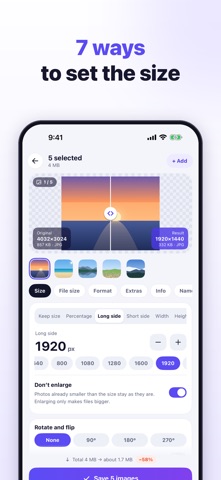
■ 7 WAYS TO SET THE SIZE
• Keep size (change only the file size or format), percentage, long side, short side, width, height, or width × height.
• For width × height: fit inside keeping the aspect ratio, crop the overflow, stretch, or add margins in any colour.
• "Don't enlarge" leaves smaller photos as they are.
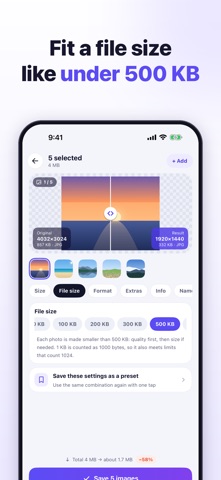
■ COMPRESS TO A TARGET FILE SIZE
• Pick 50 KB, 100 KB, 200 KB, 300 KB, 500 KB, 1 MB or 2 MB, or type any KB value.
• Quality is lowered automatically, then the dimensions shrink if needed.
• 1 KB counts as 1000 bytes, so results also fit sites that count 1024. Photos that miss the target are marked.
■ CONVERT FORMATS
• Open HEIC, HEIF, PNG, WebP, GIF (first frame), BMP and more.
• Save as JPG (accepted everywhere), PNG (lossless, keeps transparency) or WebP (usually smaller), or keep each photo's format.
• Adjust quality with a slider and pick a background colour for transparent PNGs saved as JPG.
• If re-saving would make a photo larger, the original is used.
■ NEVER SIDEWAYS
The camera's orientation is applied to the pixels, so resized photos stay upright in every app. Rotate by 90°, 180° or 270°, or flip.
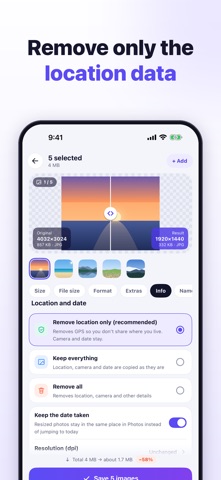
■ LOCATION AND DATE
• Remove only the location (recommended), keep everything, or remove everything.
• "Keep the date taken" keeps resized photos in the right place in Photos instead of jumping to today.
• Print resolution: 72, 96, 150, 300 or 350 dpi.
■ PREVIEW BEFORE SAVING
Drag the divider to compare the original and the result, with dimensions, file size and the estimated total saving.
■ ONE-TAP PRESETS
Email & chat (1280 px), social media (2048 px), under 500 KB, 200 KB or 1 MB, square 1080 × 1080 (no cropping), websites (1200 px WebP), half size, convert to JPG and photo prints (300 dpi). Save your own presets too.
■ SAVING, RESULTS AND HISTORY
• Name files original + text, text + original, same name, numbered, or by date taken.
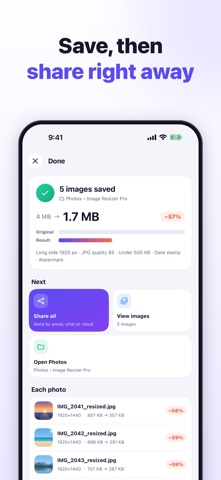
• Results are saved as new photos in an album in Photos that you can rename.
• Share them all, flip through them, or open Photos from the results screen.
• If you like, move the originals to Recently Deleted (restorable for 30 days).
• History keeps past batches. On iOS 26 and later, a batch keeps running when you switch apps and a notification tells you when it's done.
■ PREMIUM (ONE-TIME PURCHASE)
A single in-app purchase, not a subscription. "Restore purchase" brings it back on a new device with the same Apple Account. The preview shows Premium effects before you buy.
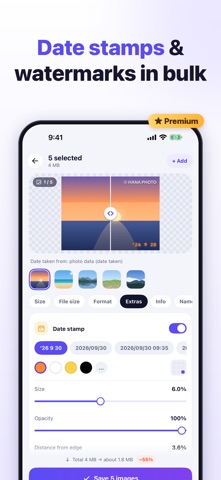
• Date stamp: the date the photo was taken, never today's, found in the photo's data, the file name or Photos, in the camera's local time. 13 formats including a film-camera style, or your own; colour, 9 positions, size, opacity, shadow, outline, band, fonts and text before the date.
• Watermark: text (your name, a shop name, several lines) or a logo on every photo, in 9 positions or tiled across it. Adjust size, opacity, angle and margin, with shadow, outline, band and fonts.
• Colour themes: Teal, Ember, Violet, Forest and Rose.
Resizing, compression, conversion, unlimited batches, location and date options, presets and history stay free.
■ PRIVACY
• Photos are chosen with the system photo picker. Access to Photos is used only to save results and, if you choose, to move originals to Recently Deleted.
• All processing happens on your device. No account, no uploads.
Light and dark appearance, iPhone and iPad, and 40 languages.