
Image to Data: OCR & AI Parser
Image to Data: OCR & AI Parser is made and published by Yuto Inagaki. AppBrain is an independent app data site and isn't affiliated with Yuto Inagaki. The app name, icon, screenshots and description belong to Yuto Inagaki and are shown as published on the App Store.
AppBrain's verdict
- Last updated
- September 2, 2025
Rankings
App Store top chartsApp Store Rankings for Image to Data: OCR & AI Parser
Competitors
Similar apps and more from Yuto InagakiMore from Yuto Inagaki




Releases
Updates seen on the App Store- Version
- 1.0
- Launched
- September 2025
No changelog data
User feedback
Ratings and reviews on the App StoreComments on Image to Data: OCR & AI Parser for iOS
We don't have enough comments to show example comments. Please check back later.
Technology
Found in the app by AppBrain- Price
- Free
- App size
- 17.4 MB
- Content rating
- Everyone
Technologies used by Image to Data: OCR & AI Parser
About the app and developer
About Image to Data: OCR & AI Parser
Image to Data: OCR & AI Parser is a productivity app developed by Yuto Inagaki.
User Ratings
The app has no ratings yet.
App Information
Image to Data: OCR & AI Parser is freely available from the App Store. The app size is 17.44 MB. The latest version available is 1.0. The last update was on September 2, 2025.
Technical Requirements
The app has a content rating of Everyone. The app has been available on the App Store since September 2025.
Developer information for Yuto Inagaki
Address:
Frequently asked questions about Image to Data: OCR & AI Parser
Is Image to Data: OCR & AI Parser free?
Yes. Image to Data: OCR & AI Parser is free on the App Store.
Is Image to Data: OCR & AI Parser still available?
Yes. Image to Data: OCR & AI Parser is on the App Store, and the last update we saw was on September 2, 2025.
How large is Image to Data: OCR & AI Parser?
Image to Data: OCR & AI Parser is 17.44 MB.
Is Image to Data: OCR & AI Parser suitable for children?
App Store rates the content of Image to Data: OCR & AI Parser as suitable for everyone.
Who made Image to Data: OCR & AI Parser?
Image to Data: OCR & AI Parser was developed by Yuto Inagaki. It is listed in the productivity category on the App Store.
Store listing
By Yuto Inagaki, from the App Store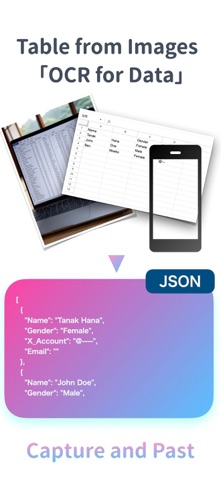
Description by Yuto Inagaki Written by the developer, not by AppBrain. Click to read.
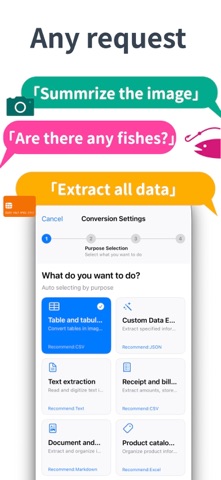
Is your photo library filled with receipts, whiteboard snapshots, and paper notes that you keep telling yourself you’ll “enter later”? This app clears that backlog instantly.
- Stop retyping receipts for expense reports
- Turn printed tables and attendee lists into editable data in seconds
- Convert meeting notes from images into searchable, structured content
- Free your photo folder from forgotten, unusable information
[Perfect for Everyday Workflows]
- Snap receipts or invoices and export them to CSV or Excel for hassle-free expense tracking
- Capture meeting whiteboards and convert them into Markdown tables or JSON for immediate use in your notes
- Digitize paper rosters, surveys, or forms while keeping rows and columns intact
- Transform handwritten checklists into reusable templates or task lists
- Scan menus, price lists, or product sheets and convert them into structured data for comparison or integration
[Who It’s For]
- Freelancers and small business owners managing expenses and estimates solo
- Professionals handling high volumes of meeting notes or interview data
- Students and researchers digitizing printed tables for analysis
- Field workers compiling reports from on-site photos
- Anyone struggling to keep up with manual data entry for personal or business records
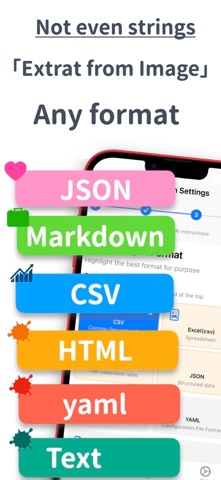
[Supported Output Formats]
- CSV / TSV
- Excel (.xlsx)
- Markdown tables
- JSON / JSONL
- XML
- Plain text
[Key Features & Advantages]
- Instant data extraction from camera or photo library
- Customizable file naming (timestamp, sequence, prefixes, etc.)
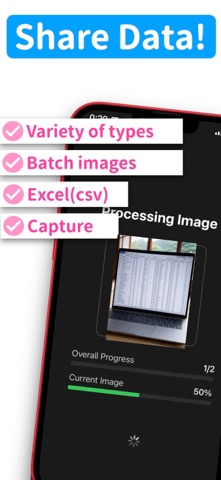
- Batch conversion with clear progress tracking
- Searchable history with editable titles
- Pay-as-you-go points system—only pay when you need it
- Earn free points by watching short ads
- Adjustable image size and crop area to balance quality and cost
[How to Get Started]
1. Take a photo or select an image from your gallery
2. Choose your output format
3. Set your file naming preferences
4. Adjust image size or crop area if needed
5. Add points by purchase or ads if necessary
6. Start extraction and track progress
7. Save, share, or revisit your results anytime
[Why It Matters]
Turn forgotten images into actionable data. Eliminate tedious manual entry and avoid costly transcription errors. This app makes “Snap → Convert → Use” part of your daily routine—keeping information flowing, organized, and ready when you need it.