

Image To Excel Converter: XLSX
Image To Excel Converter: XLSX is made and published by Abdul Rehman. AppBrain is an independent app data site and isn't affiliated with Abdul Rehman. The app name, icon, screenshots and description belong to Abdul Rehman and are shown as published on the App Store.
AppBrain's verdict
- Last updated
- September 9, 2026
- Size
- 49.1 MB
User feedback
Ratings and reviews on the App StoreComments on Image To Excel Converter: XLSX for iOS
We don't have enough comments to show example comments. Please check back later.
Store listing
By Abdul Rehman, from the App Store


Description by Abdul Rehman Written by the developer, not by AppBrain. Click to read.
What is OCR Image to XLS Converter?
Image to XLS Converter app helps you automatically transform images of invoices, receipts, bank statements, contracts, or handwritten notes into MS Excel sheets. It uses OCR algorithms to extract text and tabular data from images, then converts it into professionally structured Excel spreadsheets. It eliminates manual typing and reduces human error.
How to Convert JPG to Excel?
Follow these steps to easily convert your JPG image to XLS file;
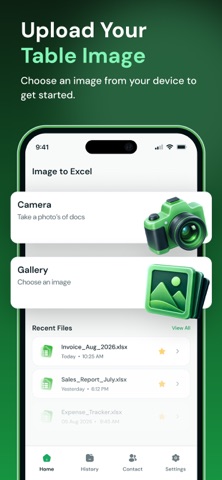
Upload image from your Gallery, or capture a photo using the app’s built-in Camera option.
Use the “Crop” option to specify the image part that you want to extract.
Once the image is selected or captured, click the “Tick” button to start.
Our image to Excel sheets app will provide XLS file that you can “Download” and “Share”.
Key Features of JPG to Excel Sheet Converter App
Here’re the main features of our OCR image to Excel Converting App;
Advanced OCR
Our JPG to Excel Converter App is powered by state-of-the-art OCR technology that ensures precise data extraction from even blurred images and handwriting. Plus, it ensures that the actual rows, columns, and values are accurately preserved in the Excel document.
Easy Conversion
The usage process of our Photo to Excel app is also quite easy. Anyone can understand its intuitive interface. There’s no need to gain technical expertise or put in human effort. Every step is clear and simple.
Batch Conversion
Another unique feature of the app is its support for converting multiple images into an Excel (XLSX) spreadsheet at once. It helps users handle bulk file conversion tasks within just a few seconds.
Convert Any Image Format
Our JPG to Excel spreadsheets converter app lets you convert any image, including JPGs, JPEGs, PNGs, WebPs, BMPs, and others, into XLSX sheets.
Supports Multiple Languages
The OCR Image to Excel sheets app supports various languages. So, you can use it in your native language as well. Just go to the app’s settings and choose the desired language.
Fast Working
Our JPG to XLSX Converter is optimized for speed. It does quick conversion while maintaining quality. No delays, no waiting, and no extra steps.
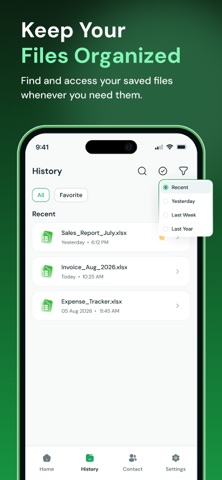
Stores History
Picture to Excel Converter OCR App stores all of your previous work history that you can access anytime, enusring nothing data is lost.
Strongly Encrypted
All of your uploaded image files and converted Excel documents are private and safe. So, use our app confidently.
We have made this app to streamline your Image to Excel (XLSX) conversion process. Download this easy, fast, secure, and reliable photo to Excel app to enhance your productivity.
Note:
We value your privacy. None of your data will be shared with third parties.
If you have any further questions or encounter any problems while using this app, please feel free to contact us so that we can resolve the issue as soon as possible.
Payment will be charged to your iTunes Account at confirmation of purchase. Your subscription will automatically renew unless auto-renew is turned off at least 24 hours before the end of the current subscription period. Your account renewal will be charged within 24 hours before the end of the current subscription period. Automatic renewals cost the same price you were originally charged for the subscription.
Terms of Use:
https://www.imagetotext.info/terms-of-services.php
Privacy Policy:
https://www.imagetotext.info/image-to-excel/mobile-application/privacy-policy
Safety and technology
Found in the app by AppBrain- Price
- Free
- App size
- 49.1 MB
- Content rating
- Everyone
Technologies used by Image To Excel Converter: XLSX
Releases
Updates seen on the App Store- Version
- 1.0.0
- Launched
- September 2026
No changelog data
Alternatives
Similar apps and more from Abdul RehmanAlternatives to Image To Excel Converter: XLSX


More from Abdul Rehman


Rankings
App Store top chartsApp Store Rankings for Image To Excel Converter: XLSX
About the app and developer
About Image To Excel Converter: XLSX
Image To Excel Converter: XLSX is a productivity app developed by Abdul Rehman.
User Ratings
The app has no ratings yet.
App Information
Image To Excel Converter: XLSX is freely available from the App Store. The app size is 49.06 MB. The latest version available is 1.0.0. The last update was on September 9, 2026.
Technical Requirements
The app has a content rating of Everyone. The app has been available on the App Store since September 2026.
Developer information for Abdul Rehman
Address:
Frequently asked questions about Image To Excel Converter: XLSX
Is Image To Excel Converter: XLSX free?
Yes. Image To Excel Converter: XLSX is free on the App Store.
Is Image To Excel Converter: XLSX still available?
Yes. Image To Excel Converter: XLSX is on the App Store, and the last update we saw was on September 9, 2026.
How large is Image To Excel Converter: XLSX?
Image To Excel Converter: XLSX is 49.06 MB.
Is Image To Excel Converter: XLSX suitable for children?
App Store rates the content of Image To Excel Converter: XLSX as suitable for everyone.
Who made Image To Excel Converter: XLSX?
Image To Excel Converter: XLSX was developed by Abdul Rehman. It is listed in the productivity category on the App Store.
What are the best alternatives to Image To Excel Converter: XLSX?
People looking at Image To Excel Converter: XLSX also look at these productivity apps: NotaTask, Chronaya: Deadline Tracker, Split PDF - Extract PDF Pages,, Humanize AI - Paraphrase Tools, Multi: Habit Tracker & To Do.