

image to file
image to file is made and published by Geert Stroom. AppBrain is an independent app data site and isn't affiliated with Geert Stroom. The app name, icon, screenshots and description belong to Geert Stroom and are shown as published on the App Store.
AppBrain's verdict
- Last updated
- December 12, 2025
- Size
- 22.2 MB
User feedback
Ratings and reviews on the App StoreComments on image to file for iOS
We don't have enough comments to show example comments. Please check back later.
Store listing
By Geert Stroom, from the App Store

Description by Geert Stroom Written by the developer, not by AppBrain. Click to read.
Whether you’re scanning receipts for expenses, homework for school, contracts for clients or drawings from your kids, Image to File makes everything feel simple and polished.
Turn Photos into Perfect PDFs
- Import one or multiple photos from your camera roll;
- Arrange pages with a simple drag & drop interface;
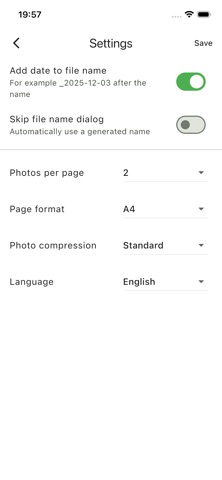
- Choose how many photos per page (1 or 2 on free, up to 4 with Premium);
- Add an optional title for each page to keep long documents clear;
- Pick your page size: A4 (free) or A4 & US Letter (Premium).
Smart Layout & Easy Sharing
- See all selected photos at a glance and reorder them in seconds;
- Automatically compress images for smaller PDF file sizes;
- Create your PDF with a single tap, then share via Mail, Messages, AirDrop, etc.;
- Keep everything tidy with automatic file naming and optional date suffix.
Built for Everyday Use
- History screen: quickly reopen, share or delete previously created PDFs;
- Option to skip the file name dialog and use an automatic name – perfect when you’re in a hurry;
- Works great on both iPhone and iPad;
- No account required; just install and start converting;
Free vs. Premium
Use Image to File for free with:
- Up to 3 PDFs per day
- 1 or 2 photos per page
- A small “Created with Photo → PDF (free)” watermark
Upgrade to Image to File Premium for a one-time purchase and get:
- Unlimited PDF creations – no daily limits;
- No watermark on your documents;
- Up to 4 photos per page for compact multi-page PDFs;
- Extra layout options and page formats (A4 & US Letter);
Stop emailing yourself photos or fighting with complex scanners. With Image to File, your documents look clean, professional and ready to share – every single time.
Safety and technology
Found in the app by AppBrain- Price
- Free
- App size
- 22.2 MB
- Content rating
- Everyone
Technologies used by image to file
Releases
Updates seen on the App Store- Version
- 1.0.1
- Launched
- December 2025
No changelog data
Rankings
App Store top chartsApp Store Rankings for image to file
About the app and developer
About image to file
image to file is a productivity app developed by Geert Stroom.
User Ratings
The app has no ratings yet.
App Information
image to file is freely available from the App Store. The app size is 22.17 MB. The latest version available is 1.0.1. The last update was on December 12, 2025.
Technical Requirements
The app has a content rating of Everyone. The app has been available on the App Store since December 2025.
Developer information for Geert Stroom
Address: