

Image to PDF · is made and published by Kiran Gajjar. AppBrain is an independent app data site and isn't affiliated with Kiran Gajjar. The app name, icon, screenshots and description belong to Kiran Gajjar and are shown as published on the App Store.
AppBrain's verdict
- Last updated
- August 26, 2026
Rankings
App Store top chartsApp Store Rankings for Image to PDF ·
Competitors
Similar apps and more from Kiran GajjarAlternatives to Image to PDF ·



More from Kiran Gajjar


Releases
Updates seen on the App Store- Version
- 1.1
- Launched
- August 2026
No changelog data
User feedback
Ratings and reviews on the App StoreComments on Image to PDF · for iOS
We don't have enough comments to show example comments. Please check back later.
Technology
Found in the app by AppBrain- Price
- Free
- App size
- 7.81 MB
- Content rating
- Everyone
Technologies used by Image to PDF ·
About the app and developer
About Image to PDF ·
Image to PDF · is an utilities app developed by Kiran Gajjar.
User Ratings
The app has no ratings yet.
App Information
Image to PDF · is freely available from the App Store. The app size is 7.81 MB. The latest version available is 1.1. The last update was on August 26, 2026.
Technical Requirements
The app has a content rating of Everyone. The app has been available on the App Store since August 2026.
Developer information for Kiran Gajjar
Address:
Store listing
By Kiran Gajjar, from the App Store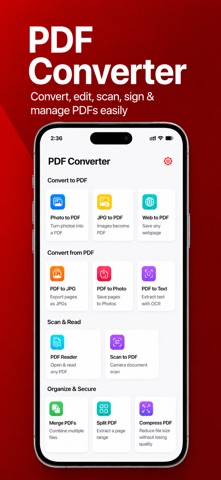

Description by Kiran Gajjar Written by the developer, not by AppBrain. Click to read.
Image to PDF ‧ PDF Converter turns photos, scans, Word documents,
Excel sheets and PowerPoint slides into clean, shareable PDFs in
seconds. No account. No upload. No watermark.
WHAT YOU CAN DO
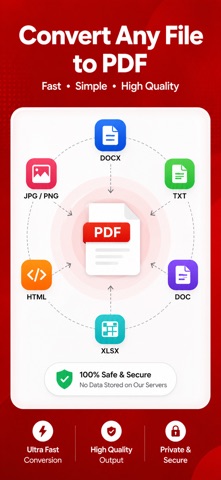
- Photos & images to PDF — JPG, PNG, HEIC, multi-page
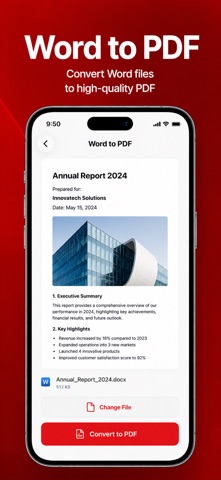
- Word, Excel and PowerPoint to PDF, formatting preserved
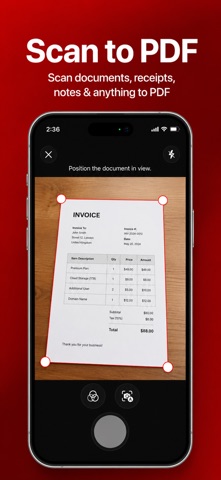
- Scan paper documents with your camera, with edge detection
- Merge several PDFs into one file
- Compress a PDF to email or upload it
- Sign documents with your finger
- Extract text from any scan with on-device OCR
- Reorder, rotate and delete pages
PRIVATE BY DESIGN
Every conversion runs on your iPhone using Apple's own frameworks.
Your documents are never uploaded to a server, never stored in the
cloud and never seen by anyone but you. Works fully offline — on a
plane, on the subway, anywhere.
BUILT FOR EVERYONE
Full VoiceOver support and Dynamic Type throughout.
Works with the iOS Share Sheet, the Files app and Shortcuts, so you
can convert without opening the app at all.
App offers premium features through auto-renewable subscriptions. Payment will be charged to your Apple ID account upon confirmation of purchase. Subscriptions automatically renew unless canceled at least 24 hours before the end of the current period. You can manage your subscription and turn off auto-renewal in your account settings.
For more details on managing subscriptions, visit: support.apple.com/en-us/HT202039
Privacy Policy: https://sites.google.com/view/thepdfconverter/privacy-policy
Terms of Use: https://sites.google.com/view/thepdfconverter/terms-of-use