

Image To PDF Converter: Pro
Image To PDF Converter: Pro is made and published by Mark Tan. AppBrain is an independent app data site and isn't affiliated with Mark Tan. The app name, icon, screenshots and description belong to Mark Tan and are shown as published on the App Store.
AppBrain's verdict
- Last updated
- January 22, 2026
- Size
- 46.6 MB
User feedback
Ratings and reviews on the App StoreComments on Image To PDF Converter: Pro for iOS
We don't have enough comments to show example comments. Please check back later.
Store listing
By Mark Tan, from the App Store

Description by Mark Tan Written by the developer, not by AppBrain. Click to read.
Fast. Offline. High-quality.
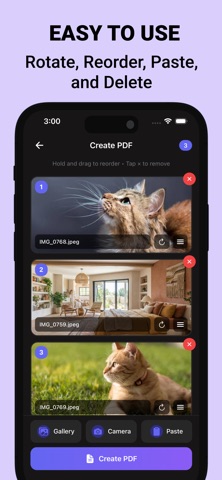
Image To PDF Converter: Pro is a powerful image to PDF converter that lets you turn photos into professional PDF documents in seconds. Convert images from your gallery, camera, or clipboard and export clean, high-quality PDFs — even without an internet connection.
Whether you’re creating documents, saving receipts, scanning notes, or organizing work files, this app makes photo to PDF simple and reliable.
• Convert Images to PDF Faster
- Convert photos to PDF in one tap
- Combine multiple images into a single PDF
- Supports JPG to PDF, PNG to PDF
- High-quality PDF export with clear text and sharp images
Perfect for paperwork, homework, forms, contracts, and everyday documents.
• Import Your Images Your Way
- Select images from your photo gallery
- Take photos directly with your camera
- Paste images from your clipboard
Turn anything into a PDF — anytime.
• Organize Before You Export
- Reorder images into the correct page order
- Rotate images for perfect alignment
- Preview your PDF before saving
Create clean, professional PDFs without needing a scanner.
• 100% Offline PDF Converter
Your files stay on your device.
- Works completely offline
- No uploads, no accounts
- Fast processing and full privacy
Ideal for sensitive documents and on-the-go use.
• Why Image To PDF Converter: Pro?
- Simple, focused image to PDF workflow
- Offline photo to PDF converter
- High-quality export
- Fast and lightweight
- Built for users who want control and clarity
• Use it for:
Documents • Receipts • Notes • Homework • Work files • Contracts • Forms • Travel papers • School projects
Turn your images into PDFs — clean, organized, and ready to share.
Terms of Service: https://www.marktandev.com/terms-and-conditions
Privacy Policy: https://www.marktandev.com/privacy-policy
Safety and technology
Found in the app by AppBrain- Price
- Free
- App size
- 46.6 MB
- Content rating
- Everyone
Technologies used by Image To PDF Converter: Pro
Releases
Updates seen on the App Store- Version
- 1.0.1
- Launched
- January 2026
No changelog data
Alternatives
Similar apps and more from Mark TanAlternatives to Image To PDF Converter: Pro


More from Mark Tan


Rankings
App Store top chartsApp Store Rankings for Image To PDF Converter: Pro
About the app and developer
About Image To PDF Converter: Pro
Image To PDF Converter: Pro is a productivity app developed by Mark Tan.
User Ratings
The app has no ratings yet.
App Information
Image To PDF Converter: Pro is freely available from the App Store. The app size is 46.62 MB. The latest version available is 1.0.1. The last update was on January 22, 2026.
Technical Requirements
The app has a content rating of Everyone. The app has been available on the App Store since January 2026.
Developer information for Mark Tan
Address: