




AppBrain's verdict
Established- Rating on App Store
- 1.00
- 1 ratings
- Last updated
- February 10, 2025
- Size
- 14.1 MB
It doesn't have enough ratings yet to judge what users think.
User feedback
Ratings and reviews on the App StoreComments on Image To PDF : Image Compresor for iOS
We don't have enough comments to show example comments. Please check back later.
Store listing
By Nitin Katrodiya, from the App StoreDescription by Nitin Katrodiya Written by the developer, not by AppBrain. Click to read.
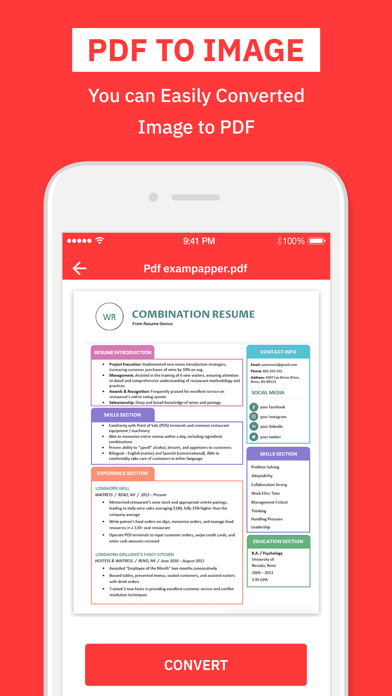
Pdf to Iamge converter can be used to convert pdf documents into png.
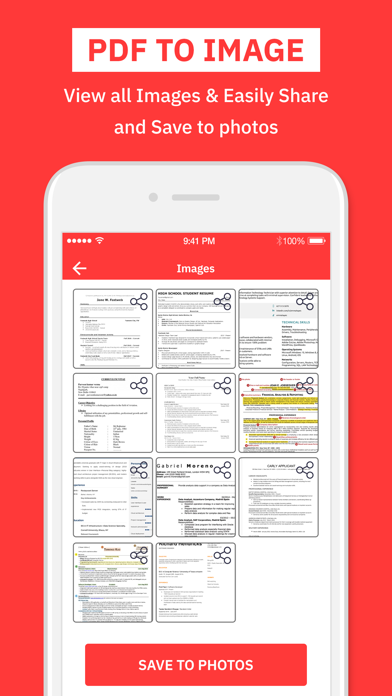
You can save the individual pages of the pdf file into png files.
On the top of that this PDF to JPG Converter - Image Converter is really fast, lightweight and stable. The application is also straightforward and easy to use. Convert all pages in a PDF to JPG or extract all images in a PDF to JPG.
Image To PDF uses multi threading to improve conversion speed. It only takes a few seconds to convert hundreds of image files.
This app can be used to convert jpg, jpeg, png files into pdf or pdf to png files.
Photo Compress helps you quickly reduce your picture size or resolution. Optimize your images with a perfect balance in quality and file size.
Photo Compress uses smart lossy compression techniques to reduce the file size of your photos.
Image compressior basic features of this Photo Compress & Resize app :-
* Small app size
* Simple UI
* Powerful Compression Mode
* Powerful PDF Generator Mode
* Powerful PDF To Image Extrator Mode
* Batch Image Compressor
* Very good quality of the compressed photos and optional compress quality
* Multiple Photo Compressor at one time
* Direct Share
* 90% Compression Result
* Share photos with your friends via social networks.
How PDF To Image works:
1) select the PDF From Device
2) PDF file preview in screen
3) Press Conver Button.
4) PDF file converted to images
5) download or share image direct from app
How Image To PDF works:
1) select the Images
2) images show up as preview
3) press Convert button
4) images converted to PDF File
5) share PDF direct from app
How Image Compress Works:
1) select multiple images
2) press start compress button
3) preview screen display all image with total size of image before and after compress process.
4) download or share image direct from app.
share the app with your friends and family member if you like it.
SUBSCRIPTION INFORMATION : -
Subscribe for unlimited access to all the Premium features. -
- Subscription is automatically renewed unless canceled 24 hours before the renewal - Payment will be charged to iTunes Account at confirmation of purchase - Account will be charged for renewal within 24-hours prior to the end of the current period, at the same price - Subscriptions may be managed by the user and auto-renewal may be turned off by going to the user’s Account Settings after purchase - Any unused portion of a free trial period, if offered, will be forfeited when the user purchases a subscription to that publication, where applicable Privacy Policy : https://nitinkatrodiya.wordpress.com/privacy-policy/ & Terms of Service: https://nitinkatrodiya.wordpress.com/terms-and-condition/
Safety and technology
Found in the app by AppBrain- Price
- Free
- App size
- 14.1 MB
- Content rating
- Everyone
Technologies used by Image To PDF : Image Compresor
Releases
Updates seen on the App Store- Version
- 1.2
- Launched
- September 2020
No changelog data
Alternatives
Similar apps and more from Nitin KatrodiyaAlternatives to Image To PDF : Image Compresor




More from Nitin Katrodiya







Rankings
App Store top chartsApp Store Rankings for Image To PDF : Image Compresor
About the app and developer
About Image To PDF : Image Compresor
Image To PDF : Image Compresor is an utilities app developed by Nitin Katrodiya.
User Ratings
Image To PDF : Image Compresor is rated 1.00 out of 5 stars. The rating is based on one rating ratings.
App Information
Image To PDF : Image Compresor is freely available from the App Store. The app size is 14.13 MB. The latest version available is 1.2. The last update was on February 10, 2025.
Technical Requirements
The app has a content rating of Everyone. The app has been available on the App Store since September 2020.
Image To PDF : Image Compresor is made and published by Nitin Katrodiya. AppBrain is an independent app data site and isn't affiliated with Nitin Katrodiya. The app name, icon, screenshots and description belong to Nitin Katrodiya and are shown as published on the App Store.
Developer information for Nitin Katrodiya
Address:
Frequently asked questions about Image To PDF : Image Compresor
Is Image To PDF : Image Compresor free?
Yes. Image To PDF : Image Compresor is free on the App Store.
Is Image To PDF : Image Compresor still available?
Yes. Image To PDF : Image Compresor is on the App Store, and the last update we saw was on February 10, 2025.
How large is Image To PDF : Image Compresor?
Image To PDF : Image Compresor is 14.13 MB.
Is Image To PDF : Image Compresor suitable for children?
App Store rates the content of Image To PDF : Image Compresor as suitable for everyone.
How do people rate Image To PDF : Image Compresor?
Image To PDF : Image Compresor has one rating of 1.00 stars on the App Store.
Who made Image To PDF : Image Compresor?
Image To PDF : Image Compresor was developed by Nitin Katrodiya. It is listed in the utilities category on the App Store.
What are the best alternatives to Image To PDF : Image Compresor?
People looking at Image To PDF : Image Compresor also look at these utilities apps: PDF Editor - Merge & Split, Photos to PDF: Image Converter, PDF Converter - JPG to PDF, PDF Converter, Word to Pdf, PDF to Image - JPG, PNG, HEIC.