

Image to PDF : PDF Maker
Image to PDF : PDF Maker is made and published by Uchharang Radadiya. AppBrain is an independent app data site and isn't affiliated with Uchharang Radadiya. The app name, icon, screenshots and description belong to Uchharang Radadiya and are shown as published on the App Store.
AppBrain's verdict
Loved by users- Rating on App Store
- 4.52
- 124 ratings
- Last updated
- December 11, 2025
- Size
- 23.9 MB
Users love it: 4.5 stars from 124 ratings.
User feedback
Ratings and reviews on the App StoreComments on Image to PDF : PDF Maker for iOS
We don't have enough comments to show example comments. Please check back later.
Store listing
By Uchharang Radadiya, from the App Store


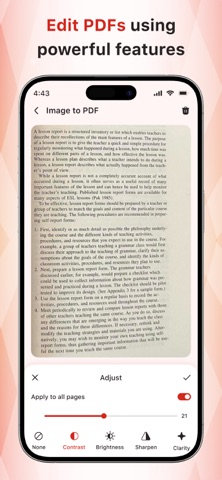
Description by Uchharang Radadiya Written by the developer, not by AppBrain. Click to read.
With Image to PDF - PDF Maker, you can:
- Convert all kinds of images to PDF
Import images or scan paper files with your camera and convert them to PDFs - notes, receipts, invoices, forms, business cards, certificates, whiteboards, ID cards, etc., all supported.
- Read all PDFs
Automatically scan and list all PDFs on your device, giving you quick access to them all. Easily doodle, add text, and sign with different colors, enjoying a lot of convenience with this PDF Reader.
- Compress PDF files
Support to reduce PDF size through compression. Set the image quality - low, medium, high, and original as needed.
- Share converted PDF files
Easily send and share converted PDF files via social media, Bluetooth, Email, quick share, etc.
- Quick search
Try the quick search function, and you will find it’s easy to find your target files. Just enter the keywords and the results will be displayed automatically.
Convert image to PDF
Want to convert picture to pdf? The powerful features make this app an ultimate pdf creator for your device to convert jpg to pdf. You can convert jpg to pdf from gallery or take photos with the camera, and then convert photo to pdf. It's quite easy, right? Have a try!
A reliable PDF scanner to convert jpg to pdf
Your files will be 100% safe when scanning with this pdf scanner. The entire process of file generation is done locally, we guarantee that the files will not be transferred to the server, so this free pdf converter app can be used for business purposes as well to convert image to pdf. It's the pdf scanner you can trust to convert jpg to pdf!
PDF creator
Convert image to pdf easily and safely! You can use a password to protect pdf with this pdf creator (also can be regarded as a pdf editor). With a user-friendly interface design, this free pdf converter app makes it easy for you to convert photo to pdf. You can merge multiple pictures to a single pdf file and share it as you like.
Free PDF converter app
Your first choice pdf maker. Easily convert your picture to pdf. All features are free and there is no limitation to convert jpg to pdf. You can convert all formats of photos to pdf by our app. Try this awesome pdf maker and convert your photos to pdf in no time!
Convert to pdf
We now present you this handy app to convert photos to pdf! You only need to select the document you want to convert to pdf, and the conversion will be done in seconds! We also support resizing images, auto sorting & compressing pdf files! Enjoy the great experience with this convert to pdf app!
SUBSCRIPTION AND TERMS:
You may purchase an auto-renewing subscription through an In-App Purchase to enjoy all App Features without Ads:
• Auto-renewable subscription.
• Weekly ($2.99), 1 month ($4.99), and 1 year ($29.49) durations.
• Your subscription will be charged to your iTunes account at confirmation of purchase and will automatically renew (at the duration selected) unless auto-renewal is turned off at least 24 hours before the end of the current period.
• Current subscription may not be cancelled during the active subscription period; however, you can manage your subscription and/or turn off auto-renewal by visiting your iTunes Account Settings after purchase.
Read our full Terms of Service and our Privacy Policy at:
* Link to Privacy Policy: https://pdfmakeraimagetopdf.blogspot.com/2025/11/privacy-policy.html
* Link to EULA: https://pdfmakeraimagetopdf.blogspot.com/2025/11/eula.html
* Link to Terms of use: https://pdfmakeraimagetopdf.blogspot.com/2025/11/terms-conditions.html
Safety and technology
Found in the app by AppBrain- Price
- Free
- App size
- 23.9 MB
- Content rating
- Everyone
Technologies used by Image to PDF : PDF Maker
Releases
Updates seen on the App Store- Version
- 2.0
- Launched
- November 2025
No changelog data
Alternatives
Similar apps and more from Uchharang RadadiyaMore from Uchharang Radadiya




Rankings
App Store top chartsApp Store Rankings for Image to PDF : PDF Maker
About the app and developer
About Image to PDF : PDF Maker
Image to PDF : PDF Maker is a productivity app developed by Uchharang Radadiya.
User Ratings
Image to PDF : PDF Maker is rated 4.52 out of 5 stars. The rating is based on 120 ratings.
App Information
Image to PDF : PDF Maker is freely available from the App Store. The app size is 23.94 MB. The latest version available is 2.0. The last update was on December 11, 2025.
Technical Requirements
The app has a content rating of Everyone. The app has been available on the App Store since November 2025.
Developer information for Uchharang Radadiya
Address:
Frequently asked questions about Image to PDF : PDF Maker
Is Image to PDF : PDF Maker free?
Yes. Image to PDF : PDF Maker is free on the App Store.
Is Image to PDF : PDF Maker still available?
Yes. Image to PDF : PDF Maker is on the App Store, and the last update we saw was on December 11, 2025.
How large is Image to PDF : PDF Maker?
Image to PDF : PDF Maker is 23.94 MB.
Is Image to PDF : PDF Maker suitable for children?
App Store rates the content of Image to PDF : PDF Maker as suitable for everyone.
How do people rate Image to PDF : PDF Maker?
Image to PDF : PDF Maker scores 4.52 out of 5 stars, from 124 ratings on the App Store.
Who made Image to PDF : PDF Maker?
Image to PDF : PDF Maker was developed by Uchharang Radadiya. It is listed in the productivity category on the App Store.