


AppBrain's verdict
- Last updated
- February 3, 2026
- Size
- 74.0 MB
User feedback
Ratings and reviews on the App StoreComments on Image to PDF – PDF Maker for iOS
We don't have enough comments to show example comments. Please check back later.
Store listing
By HUBRION LIMITED, from the App StoreDescription by HUBRION LIMITED Written by the developer, not by AppBrain. Click to read.
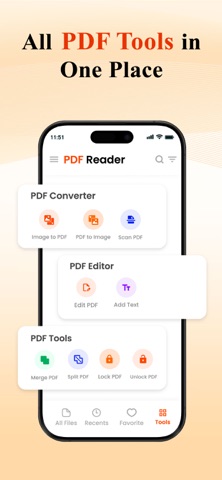
Image to PDF – PDF Maker is a fast, easy and free app that helps you convert images to PDF, scan documents, compress PDFs and protect files with passwords — all directly on your iPhone.
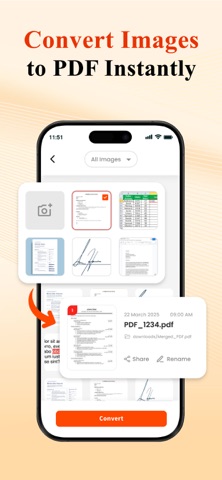
Convert JPG to PDF, PNG to PDF, JPEG to PDF, or scan documents using your camera and create professional PDF files anytime, anywhere.
Convert Images to PDF
Convert photos to PDF, image to PDF, jpg to pdf
Import images from Photos or scan documents
Perfect for receipts, invoices, notes, certificates, ID cards and more
This powerful image to pdf converter makes PDF creation simple and quick.
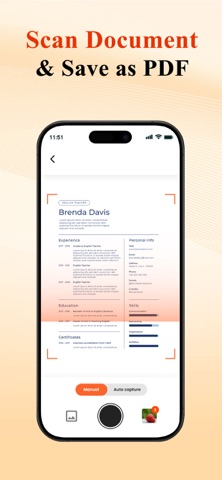
PDF Scanner & Document Scanner
Turn your iPhone into a PDF scanner and document scanner.
Scan documents to PDF using camera
Works offline — no internet required
Your files stay on your device
A secure and reliable pdf scanner free app.
Edit & Optimize PDF Files
Crop, resize and rotate images before converting
Compress PDF files to reduce file size
Choose image quality: low, medium, high or original
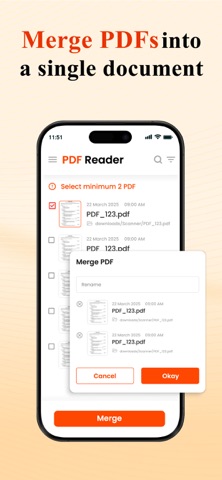
Merge multiple images into one PDF file
Ideal for users looking for a free pdf editor and pdf maker free app.
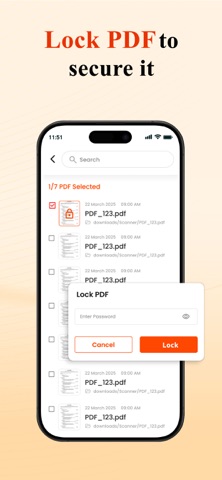
Protect & Share PDFs
Add password protection to PDFs
Encrypt sensitive documents
Share PDFs via Mail, Messages, AirDrop and other apps
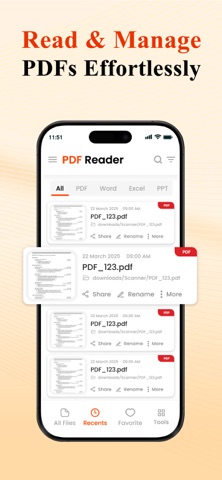
Smart PDF File Management
Auto-sort PDFs by name, size or date
Manual sorting supported
Quick search to find files instantly
Why Choose Image to PDF – PDF Maker?
Image to PDF converter
PDF scanner & document scanner
JPG to PDF converter
Compress PDF files
Password-protected PDFs
Works offline
Simple, fast and free
Free PDF Converter for iPhone
All features are 100% FREE with no limits.
Convert photos to PDF, scan documents to PDF, and manage files easily.
Download Image to PDF – PDF Maker and simplify your PDF tasks today.
Safety and technology
Found in the app by AppBrain- Price
- Free
- App size
- 74.0 MB
- Content rating
- Everyone
Technologies used by Image to PDF – PDF Maker
Releases
Updates seen on the App Store- Version
- 1.0.1
- Launched
- December 2025
No changelog data
Alternatives
Similar apps and more from HUBRION LIMITEDAlternatives to Image to PDF – PDF Maker


More from HUBRION LIMITED


Rankings
App Store top chartsApp Store Rankings for Image to PDF – PDF Maker
About the app and developer
About Image to PDF – PDF Maker
Image to PDF – PDF Maker is a productivity app developed by HUBRION LIMITED.
What is the rating of Image to PDF – PDF Maker?
Image to PDF – PDF Maker has no ratings yet.
Is Image to PDF – PDF Maker free?
Image to PDF – PDF Maker is free. The app size is 73.98 MB. The latest version available is 1.0.1. The last update was on February 3, 2026.
What are the requirements for Image to PDF – PDF Maker?
The app has a content rating of Everyone. The app has been available on the App Store since December 2025.
Image to PDF – PDF Maker is made and published by HUBRION LIMITED. AppBrain is an independent app data site and isn't affiliated with HUBRION LIMITED. The app name, icon, screenshots and description belong to HUBRION LIMITED and are shown as published on the App Store.
Developer information for HUBRION LIMITED
Address: