

Image to Table Scanner
Image to Table Scanner is made and published by VADZIM TSITKO. AppBrain is an independent app data site and isn't affiliated with VADZIM TSITKO. The app name, icon, screenshots and description belong to VADZIM TSITKO and are shown as published on the App Store.
AppBrain's verdict
- Last updated
- March 26, 2026
Rankings
App Store top chartsApp Store Rankings for Image to Table Scanner
Competitors
Similar apps and more from VADZIM TSITKOAlternatives to Image to Table Scanner


More from VADZIM TSITKO



Releases
Updates seen on the App Store- Version
- 1.0
- Launched
- March 2026
No changelog data
User feedback
Ratings and reviews on the App StoreComments on Image to Table Scanner for iOS
We don't have enough comments to show example comments. Please check back later.
Technology
Found in the app by AppBrain- Price
- Free
- App size
- 1.16 MB
- Content rating
- Everyone
Technologies used by Image to Table Scanner
About the app and developer
About Image to Table Scanner
Image to Table Scanner is an utilities app developed by VADZIM TSITKO.
What is the rating of Image to Table Scanner?
Image to Table Scanner has no ratings yet.
Is Image to Table Scanner free?
Image to Table Scanner is free. The app size is 1.16 MB. The latest version available is 1.0. The last update was on March 26, 2026.
What are the requirements for Image to Table Scanner?
The app has a content rating of Everyone. The app has been available on the App Store since March 2026.
Developer information for VADZIM TSITKO
Address:
Store listing
By VADZIM TSITKO, from the App Store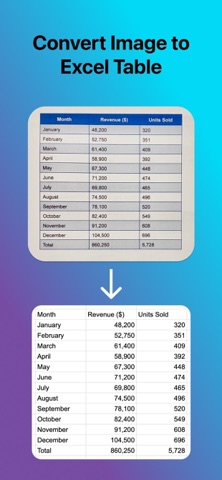
Description by VADZIM TSITKO Written by the developer, not by AppBrain. Click to read.
Snap a photo of any table and get clean, editable data in seconds. Image To Table uses advanced AI to detect and extract tables from images, then exports them as CSV or Excel files, ready to use anywhere.
HOW IT WORKS
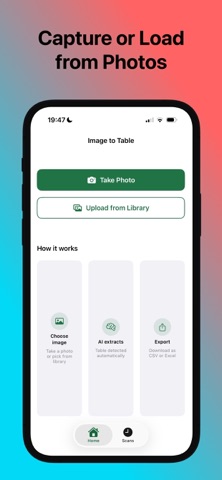
1. Choose image. Take a photo or pick one from your library.
2. AI extracts. The app automatically detects the table and pulls out all rows and columns.
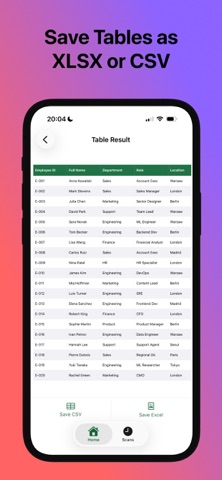
3. Export. Save as CSV or Excel (.xlsx) and share to any app, cloud storage, or email.
FEATURES
• AI-Powered Table Detection. Works on printed tables, spreadsheets, receipts, invoices, and more.
• Export as CSV & Excel. Both formats supported. Open in Numbers, Excel, Google Sheets, or any data app.
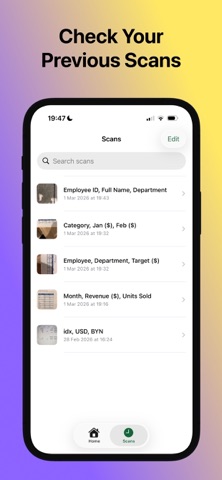
• Scan History. All your extractions are saved. Browse, search, and re-export anytime.
• Share Anywhere. Send files directly from the app via email, AirDrop, Files, or any share target.
• Fast & Private. Images are processed securely and never stored on our servers after extraction.
PERFECT FOR
Students digitizing data from textbooks or research papers, professionals pulling figures from reports and invoices, researchers working with printed or scanned tables, and anyone tired of retyping data by hand.
SUBSCRIPTION
Image To Table offers 1 free scan to try the app. Unlock unlimited scans with a weekly or yearly subscription.
• Subscription automatically renews unless cancelled at least 24 hours before the end of the current period.
• Manage or cancel your subscription anytime in iOS Settings → Apple ID → Subscriptions.
• Payment is charged to your Apple ID account at confirmation of purchase.
Terms of Use:
https://vadbeg.github.io/image-to-excel/terms-of-use/
Privacy Policy:
https://vadbeg.github.io/image-to-excel/privacy-policy/