

Image Video PDF Compressor
Image Video PDF Compressor is made and published by Youssef Ismaili. AppBrain is an independent app data site and isn't affiliated with Youssef Ismaili. The app name, icon, screenshots and description belong to Youssef Ismaili and are shown as published on the App Store.
AppBrain's verdict
- Rating on App Store
- 4.50
- 16 ratings
- Last updated
- July 23, 2026
It doesn't have enough ratings yet to judge what users think.
Rankings
App Store top chartsApp Store Rankings for Image Video PDF Compressor
Competitors
Similar apps and more from Youssef IsmailiAlternatives to Image Video PDF Compressor





More from Youssef Ismaili


Releases
Updates seen on the App Store- Version
- 1.4
- Launched
- September 2025
No changelog data
User feedback
Ratings and reviews on the App StoreComments on Image Video PDF Compressor for iOS
We don't have enough comments to show example comments. Please check back later.
Technology
Found in the app by AppBrain- Price
- Free
- App size
- 72.5 MB
- Content rating
- Everyone
Technologies used by Image Video PDF Compressor
About the app and developer
About Image Video PDF Compressor
Image Video PDF Compressor is an utilities app developed by Youssef Ismaili.
User Ratings
Image Video PDF Compressor is rated 4.50 out of 5 stars. The rating is based on 16 ratings.
App Information
Image Video PDF Compressor is freely available from the App Store. The app size is 72.46 MB. The latest version available is 1.4. The last update was on July 23, 2026.
Technical Requirements
The app has a content rating of Everyone. The app has been available on the App Store since September 2025.
Developer information for Youssef Ismaili
Address:
Frequently asked questions about Image Video PDF Compressor
Is Image Video PDF Compressor free?
Yes. Image Video PDF Compressor is free on the App Store.
Is Image Video PDF Compressor still available?
Yes. Image Video PDF Compressor is on the App Store, and the last update we saw was on July 23, 2026.
How large is Image Video PDF Compressor?
Image Video PDF Compressor is 72.46 MB.
Is Image Video PDF Compressor suitable for children?
App Store rates the content of Image Video PDF Compressor as suitable for everyone.
How do people rate Image Video PDF Compressor?
Image Video PDF Compressor scores 4.50 out of 5 stars, from 16 ratings on the App Store.
Who made Image Video PDF Compressor?
Image Video PDF Compressor was developed by Youssef Ismaili. It is listed in the utilities category on the App Store.
What are the best alternatives to Image Video PDF Compressor?
People looking at Image Video PDF Compressor also look at these utilities apps: Photo to PDF: Scanner & Sign, Password Cube, Watermark pdf and photo, HelpRead -Help read small text, MoTings.
Store listing
By Youssef Ismaili, from the App Store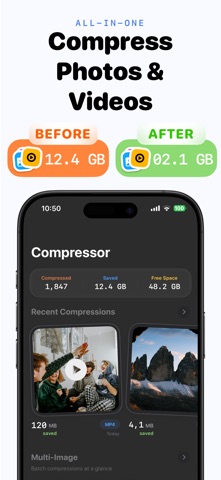



Description by Youssef Ismaili Written by the developer, not by AppBrain. Click to read.
Effortlessly reduce image, video, and PDF file sizes while maintaining stunning quality.
Transform your media with our powerful, intuitive compression app. Whether you're freeing up storage space, preparing files for web upload, or optimizing media for sharing, Compressor delivers professional results with just a few taps.
Key Features
Smart Image Compression
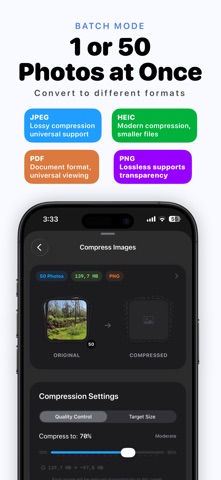
- Quality Control - Fine-tune compression from 10% to 100%
- Target Size - Set specific file size goals in KB or MB
- Custom Dimensions - Resize to exact pixel dimensions or preset ratios
- Format Conversion - Convert between JPEG, HEIC, PNG, and PDF
Video Compression
- Compress videos with High, Medium, or Low quality presets
- Choose between H.264 and HEVC codecs
- Adjust resolution: 4K, 1080p, 720p, 480p, or keep original
- Real-time progress tracking with size estimates
PDF Compression
- Compress PDF documents while preserving readability
- Multiple quality presets: Lossless, Balanced, or Maximum
- Text remains searchable and selectable after compression
- Perfect for email attachments, form submissions, and archiving
Batch Processing
- Compress multiple images at once
- Proportional target sizing across batches
- Save or share all results in one tap
Compression History & Stats
- Timeline view grouped by date with thumbnail previews
- Track total compressions, space saved, and average reduction
- Detailed breakdowns for every compression you've made
Professional Tools
- Preserve or strip photo metadata (EXIF, GPS, timestamps)
- Maintain aspect ratios or set custom dimensions
- Export to Photos, share, or save to Files
- Auto-save option for faster workflows
Perfect For:
- Content Creators - Optimize images, videos, and PDFs for social media and websites
- Students & Professionals - Shrink PDFs and images to meet upload size limits
- Travelers - Free up storage space without losing precious memories
- Everyone - Reduce storage usage and speed up sharing
Why Choose Compressor?
- No Quality Loss - Advanced algorithms preserve clarity
- Lightning Fast - Process media in seconds, not minutes
- Privacy First - All processing happens on your device, nothing leaves your phone
- Smart Presets - Automatically calculated optimal compression settings
- iCloud Sync - Your compression history syncs across devices
- Beautiful Design - Clean interface with iOS 26 support
Download Compressor today and discover the easiest way to optimize your photos, videos, and PDFs without compromising quality.
Terms of Use: https://www.theblackholecompany.com/termsConditions.html