

ImageKit – Convert & Resize
ImageKit – Convert & Resize is made and published by Knyaz Harutyunyan. AppBrain is an independent app data site and isn't affiliated with Knyaz Harutyunyan. The app name, icon, screenshots and description belong to Knyaz Harutyunyan and are shown as published on the App Store.
AppBrain's verdict
- Last updated
- July 17, 2025
Rankings
App Store top chartsApp Store Rankings for ImageKit – Convert & Resize
Competitors
Similar apps and more from Knyaz HarutyunyanAlternatives to ImageKit – Convert & Resize


More from Knyaz Harutyunyan


Releases
Updates seen on the App Store- Version
- 1.1
- Launched
- July 2025
No changelog data
User feedback
Ratings and reviews on the App StoreComments on ImageKit – Convert & Resize for iOS
We don't have enough comments to show example comments. Please check back later.
Technology
Found in the app by AppBrain- Price
- Free
- App size
- 9.85 MB
- Content rating
- Everyone
Technologies used by ImageKit – Convert & Resize
About the app and developer
About ImageKit – Convert & Resize
ImageKit – Convert & Resize is a photo & video app developed by Knyaz Harutyunyan.
What is the rating of ImageKit – Convert & Resize?
ImageKit – Convert & Resize has no ratings yet.
Is ImageKit – Convert & Resize free?
ImageKit – Convert & Resize is free. The app size is 9.85 MB. The latest version available is 1.1. The last update was on July 17, 2025.
What are the requirements for ImageKit – Convert & Resize?
The app has a content rating of Everyone. The app has been available on the App Store since July 2025.
Developer information for Knyaz Harutyunyan
Address:
Store listing
By Knyaz Harutyunyan, from the App Store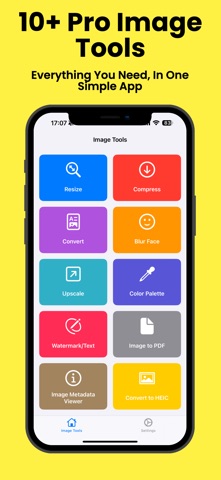



Description by Knyaz Harutyunyan Written by the developer, not by AppBrain. Click to read.
Powerful, easy-to-use photo tools—right in your pocket! Whether you're a casual user or a pro, ImageKit gives you everything you need to work with images quickly and effortlessly.
Features:
Resize – Quickly resize your images to any dimension
Compress – Reduce file size without losing quality
Convert Formats – JPG, PNG, PDF, HEIC and more
Blur Faces – Protect privacy with automatic face blurring
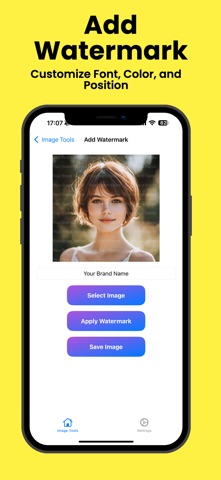
Watermark – Add text or logos to protect your content
Upscale – Improve image quality with AI-powered upscaling
Color Palette – Extract dominant colors from any photo
Image to PDF – Instantly convert images into multi-page PDFs
Metadata Viewer – View and analyze EXIF data
HEIC Converter – Convert images to Apple’s HEIC format
Try Every Tool Once – Then Go Premium!
We believe in fair access. You can try each feature once for free. Love it? Unlock unlimited access with a single Premium upgrade.
Why ImageKit?
Fast, clean, and intuitive interface
Offline-ready for most tools
No unnecessary clutter — just useful tools that work
Regular updates and new features based on your feedback
Perfect For:
Content creators
Photographers
Students
Designers
Anyone who works with images!
Download Now
Get ImageKit and make your image tasks easier than ever.
Terms of Use (EULA): https://languagekitvocabulary.wordpress.com/terms-of-use-eual/
Terms of Service: https://languagekitvocabulary.wordpress.com/about/
Privacy Policy: https://languagekitvocabulary.wordpress.com/privacy-policy/