

iMencius is made and published by 天从 何. AppBrain is an independent app data site and isn't affiliated with 天从 何. The app name, icon, screenshots and description belong to 天从 何 and are shown as published on the App Store.
AppBrain's verdict
- Last updated
- September 16, 2026
Rankings
App Store top chartsApp Store Rankings for iMencius
This app is not ranked
Competitors
Similar apps and more from 天从 何Alternatives to iMencius


More from 天从 何






Releases
Updates seen on the App Store- Version
- 1.2.0
- Launched
- September 2026
No changelog data
User feedback
Ratings and reviews on the App StoreComments on iMencius for iOS
We don't have enough comments to show example comments. Please check back later.
Technology
Found in the app by AppBrain- Price
- $0.99
- App size
- 20.4 MB
- Content rating
- Everyone
Technologies used by iMencius
About the app and developer
About iMencius
iMencius is an education app developed by 天从 何.
User Ratings
The app has no ratings yet.
App Information
iMencius costs $0.99. The app size is 20.41 MB. The latest version available is 1.2.0. The last update was on September 16, 2026.
Technical Requirements
The app has a content rating of Everyone. The app has been available on the App Store since September 2026.
Developer information for 天从 何
Address:
Store listing
By 天从 何, from the App Store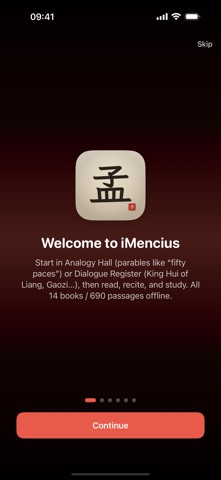





Screenshots by 天从 何, from the the App Store listing
Description by 天从 何 Written by the developer, not by AppBrain. Click to read.
iMencius is an offline study companion for the Works of Mencius. Not a quote scrapbook, and not a page torn from a multi-classic set. Close reading, recitation, Yangqi Study, Daily Saying, Analogy Hall, and Dialogue Atlas grow around this book alone.
Seven books, fourteen juan, 690 passages. Classical Chinese, vernacular, and James Legge public-domain English from The Chinese Classics, Volume II stand in three layers. Both glosses cover all 690 passages. Also 100 famous lines, 26 analogies, and seven interlocutors. No account, no ads, no tracking.
1. Three-layer close reading
• Bilingual, Chinese only, or English only, independent of the interface language
• Vernacular, English, and pinyin toggle on their own
• Horizontal, vertical, and centered layouts, with adjustable type size
• Long passages split by sentence, then page. Immersive mode hides chrome
• Guides, appreciations, and public-domain Zhu Xi excerpts sit with the text
• Traditional glyphs can apply to the body only
• Adjacent passages and famous lines jump back to the full chapter
2. Analogy Hall and Dialogue Atlas
• 26 analogies such as fifty paces and climbing a tree for fish, each linked to its chapter
• Read by person: King Hui, Gaozi, Wan Zhang, and others
• Seven themes: benevolent rule, the people as root, goodness of nature, flood-like qi, righteousness and profit, king and hegemon, analogy
• Browse by collection, juan, theme, analogy, dialogue, famous lines, or all
• List, grid, and card. Multi-select to favorite, list, recite, or study
3. Recitation workbench
• Paragraph highlighting, plus voice, rate, pitch, and volume
• Playback content is separate from the view. Hear source, vernacular, English, or a mix
• Continuous play, queues, background play, and lock-screen Now Playing
• Optional Live Activities, including Dynamic Island
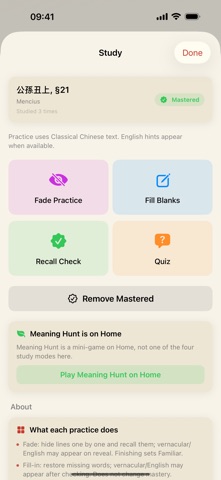
4. Yangqi Study and Meaning Hunt
• Fade, fill-in, recall, and quiz. Mastery is written as flood-like qi
• Levels: Known, Learned, Mastered. Practice by section or in a batch
• Meaning Hunt finds a line by one character
• Finishing Study checks you in for the day
5. Daily Saying
• Solar terms, festivals including Teachers Day, and seasons shape today
• Local notifications. Home opens on today. Continue Reading returns to the last place
• 100 famous lines. Tap one and open the whole chapter
6. Favorites, lists, notes, and history
• Reading lists, notes, history, and Last Read
• Multi-select to recite or batch study. Group by person, theme, or juan
• Optional iCloud key-value sync.
7. Search and handwriting
• Search titles, authors, source, vernacular, English, and famous lines
• Traditional input folds to Simplified. Handwriting recognizes on device
• Optional system search stays off until you turn it on
8. Mencius Cards
• Twelve styles and four ratios. Add vernacular or English. Share or save to Photos
9. Home Screen, Lock Screen, and system doors
• Widgets for Daily Saying, Famous Lines, Favorites, and Study progress, plus extra-large on iPad
• Lock Screen accessories and StandBy
• Eleven Control Center doors on system 18 and later
• Siri, Shortcuts, Home Screen quick actions, and deep links
10. More than one screen
• Phones stack languages. A wide iPad can split left and right
• iPad opens Recite, Study, notes, and Cards as a full-screen workbench
• iPhone, iPad, and Mac. Simplified, Traditional, and English
11. Look and habit
• Nine accents plus a custom color. Light, dark, or follow the system
• Six alternate icons on iPhone. Tabs can hide
• Guides and a six-page welcome
12. Privacy and sources
• All body text works offline. No sign-in, no ads, no analytics
• Study data stays on device by default
• Chinese source is public domain. English follows James Legge, 1861, Volume II, for study
• Vernacular covers all 690 passages as a learning aid
• This app does not claim copyright in the classical texts
One Mencius, one companion, walking with flood-like qi. May a little clarity stay in a busy day.
Seven books, fourteen juan, 690 passages. Classical Chinese, vernacular, and James Legge public-domain English from The Chinese Classics, Volume II stand in three layers. Both glosses cover all 690 passages. Also 100 famous lines, 26 analogies, and seven interlocutors. No account, no ads, no tracking.
1. Three-layer close reading
• Bilingual, Chinese only, or English only, independent of the interface language
• Vernacular, English, and pinyin toggle on their own
• Horizontal, vertical, and centered layouts, with adjustable type size
• Long passages split by sentence, then page. Immersive mode hides chrome
• Guides, appreciations, and public-domain Zhu Xi excerpts sit with the text
• Traditional glyphs can apply to the body only
• Adjacent passages and famous lines jump back to the full chapter
2. Analogy Hall and Dialogue Atlas
• 26 analogies such as fifty paces and climbing a tree for fish, each linked to its chapter
• Read by person: King Hui, Gaozi, Wan Zhang, and others
• Seven themes: benevolent rule, the people as root, goodness of nature, flood-like qi, righteousness and profit, king and hegemon, analogy
• Browse by collection, juan, theme, analogy, dialogue, famous lines, or all
• List, grid, and card. Multi-select to favorite, list, recite, or study
3. Recitation workbench
• Paragraph highlighting, plus voice, rate, pitch, and volume
• Playback content is separate from the view. Hear source, vernacular, English, or a mix
• Continuous play, queues, background play, and lock-screen Now Playing
• Optional Live Activities, including Dynamic Island
4. Yangqi Study and Meaning Hunt
• Fade, fill-in, recall, and quiz. Mastery is written as flood-like qi
• Levels: Known, Learned, Mastered. Practice by section or in a batch
• Meaning Hunt finds a line by one character
• Finishing Study checks you in for the day
5. Daily Saying
• Solar terms, festivals including Teachers Day, and seasons shape today
• Local notifications. Home opens on today. Continue Reading returns to the last place
• 100 famous lines. Tap one and open the whole chapter
6. Favorites, lists, notes, and history
• Reading lists, notes, history, and Last Read
• Multi-select to recite or batch study. Group by person, theme, or juan
• Optional iCloud key-value sync.
7. Search and handwriting
• Search titles, authors, source, vernacular, English, and famous lines
• Traditional input folds to Simplified. Handwriting recognizes on device
• Optional system search stays off until you turn it on
8. Mencius Cards
• Twelve styles and four ratios. Add vernacular or English. Share or save to Photos
9. Home Screen, Lock Screen, and system doors
• Widgets for Daily Saying, Famous Lines, Favorites, and Study progress, plus extra-large on iPad
• Lock Screen accessories and StandBy
• Eleven Control Center doors on system 18 and later
• Siri, Shortcuts, Home Screen quick actions, and deep links
10. More than one screen
• Phones stack languages. A wide iPad can split left and right
• iPad opens Recite, Study, notes, and Cards as a full-screen workbench
• iPhone, iPad, and Mac. Simplified, Traditional, and English
11. Look and habit
• Nine accents plus a custom color. Light, dark, or follow the system
• Six alternate icons on iPhone. Tabs can hide
• Guides and a six-page welcome
12. Privacy and sources
• All body text works offline. No sign-in, no ads, no analytics
• Study data stays on device by default
• Chinese source is public domain. English follows James Legge, 1861, Volume II, for study
• Vernacular covers all 690 passages as a learning aid
• This app does not claim copyright in the classical texts
One Mencius, one companion, walking with flood-like qi. May a little clarity stay in a busy day.