

img2pdf: Image to PDF Scanner
img2pdf: Image to PDF Scanner is made and published by Quan Dang. AppBrain is an independent app data site and isn't affiliated with Quan Dang. The app name, icon, screenshots and description belong to Quan Dang and are shown as published on the App Store.
AppBrain's verdict
- Rating on App Store
- 5.00
- 1 ratings
- Last updated
- October 26, 2026
- Size
- 5.18 MB
It doesn't have enough ratings yet to judge what users think.
User feedback
Ratings and reviews on the App StoreComments on img2pdf: Image to PDF Scanner for iOS
We don't have enough comments to show example comments. Please check back later.
Store listing
By Quan Dang, from the App Store


Description by Quan Dang Written by the developer, not by AppBrain. Click to read.
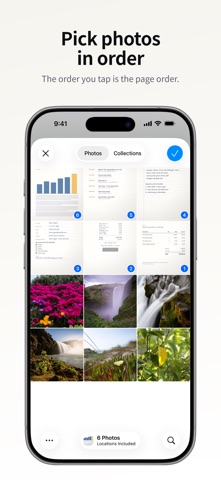
Pick your photos in order, drag pages where you want them, see the file size, and share. That is the whole flow. When you need more, you can sign, password-protect, redact and search your PDFs too.
PICK, ORDER, SHARE
• Pick photos in the order you want the pages; the picker numbers each one as you tap
• Scan pages with the document scanner, take a photo, or import PDFs from Files, including password-protected ones
• Hold and drag to reorder, or select pages to rotate, move, duplicate, share or delete them
• Reverse the order or sort by the date the photos were taken
• Tap a page to see it full size, then swipe through the rest
• Combine both sides of an ID card on one page, or split a two-page book spread
SEE THE SIZE BEFORE YOU SHARE
• Small, Standard and Best, each with a size estimate before you share
• Colour stays on unless you turn it off; black and white makes the file smaller
• Your country's page size (A4 or US Letter) with automatic orientation, plus Legal and original size
• Compress any saved PDF again before you share it
CLEAN UP EVERY PAGE
• Crop with four-corner perspective correction and automatic edge detection
• Rotate, and adjust brightness and contrast
• Document, Enhance, Whiteboard and Crisp looks that lift shadows off paper
• Erase marks, or black out private details: redactions are burned into the page and cannot be undone
SIGN AND FILL
• Draw a signature in black, blue or red and place it on any page
• Add initials, text boxes and ticks to forms
• Everything is flattened into the PDF on your iPhone
FIND IT AGAIN
• Searchable PDFs: text on your pages is recognised on-device and added as an invisible layer
• Recents searches the text inside those PDFs, not just file names, and shows where the match is
• Find a word inside an open PDF
• Tag, pin, sort and merge PDFs in Recents
• Copy, edit or share a page's text, turn a table into CSV, or save a business card as a contact
PROTECT IT
• Password-protect a PDF with 128-bit AES encryption when you export
• Lock the app with Face ID or your passcode
SHARE YOUR WAY
• Share as PDF, or as JPG, PNG or HEIC images
• Print directly with AirPrint
• Name files automatically from the document's title and date, or use your own template
• Start a scan from Siri, Shortcuts or a Home Screen quick action
PRIVACY, PLAINLY
• No account required
• No tracking: the app's privacy manifest declares no tracking and no collected data
• Scanning, text recognition, signing, redaction and compression all happen on your iPhone
• Page images, recognised text and signatures stay on your iPhone. Exported PDFs stay on your iPhone in Recents; a copy goes to Files only when you choose Save to Files
• No watermark unless you add one
Free, with nothing to unlock.
Safety and technology
Found in the app by AppBrain- Price
- Free
- App size
- 5.18 MB
- Content rating
- Everyone
Technologies used by img2pdf: Image to PDF Scanner
Releases
Updates seen on the App Store- Version
- 1.7
- Launched
- April 2026
No changelog data
Alternatives
Similar apps and more from Quan DangAlternatives to img2pdf: Image to PDF Scanner


More from Quan Dang


Rankings
App Store top chartsApp Store Rankings for img2pdf: Image to PDF Scanner
About the app and developer
About img2pdf: Image to PDF Scanner
img2pdf: Image to PDF Scanner is a productivity app developed by Quan Dang.
User Ratings
img2pdf: Image to PDF Scanner is rated 5.00 out of 5 stars. The rating is based on one rating ratings.
App Information
img2pdf: Image to PDF Scanner is freely available from the App Store. The app size is 5.18 MB. The latest version available is 1.7. The last update was on October 26, 2026.
Technical Requirements
The app has a content rating of Everyone. The app has been available on the App Store since April 2026.
Developer information for Quan Dang
Address: