It doesn't have enough ratings yet to judge what users think.
Imgs2PDF - Image to PDF is made and published by
书培 王.
AppBrain is an independent app data site and isn't affiliated with 书培 王.
The app name, icon, screenshots and description belong to 书培 王 and are shown as
published on the App Store.
About Imgs2PDF - Image to PDF
Imgs2PDF - Image to PDF is an utilities app developed by 书培 王.
User Ratings
Imgs2PDF - Image to PDF is rated 5.00 out of 5 stars. The rating is based on 6 ratings.
App Information
Imgs2PDF - Image to PDF is freely available from the App Store. The app size is 16.99 MB. The latest version available is 2.1.5. The last update was on October 10, 2026.
Technical Requirements
The app has a content rating of Everyone. The app has been available on the App Store since March 2025.
Description by 书培 王(from the App Store)
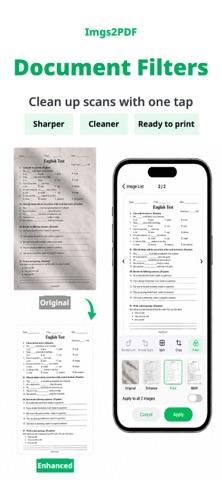
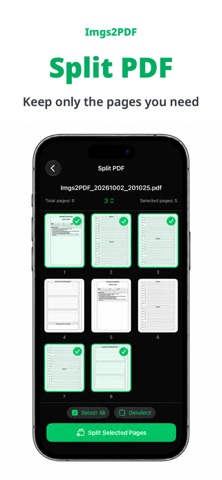
Imgs2PDF is a lightweight PDF tool for converting images to PDF, PDF to images, and for merging, splitting and compressing PDFs. Files are processed locally without uploads, making it ideal for photos, scans, homework, contracts, receipts and everyday documents.
Features
- Image to PDF - Batch convert JPG, PNG and more into a single PDF, then share or save to Files - Document scanning (iPhone/iPad) - Scan multiple pages with automatic cropping and perspective correction, arrange them and create a PDF - Document filters - Apply Original, Enhance, Grayscale or Black & White to scanned pages and selected images, with live previews, undo and batch application - PDF to Images - Export PDF pages as images, then save or share them - Merge PDF - Combine multiple PDF files in order into one document - Split PDF - Select the pages you need and create a new PDF file - Compress PDF - Choose light, standard or deep compression to balance file size and clarity - Crop and Split Images - Crop an image to a selected area, or split it into multiple images with a grid - OCR Text Recognition - Recognize text in images or PDF pages and copy it - PDF Layout Settings - Supports A3, A4, A5, A6, B4, B5, Letter, Legal and Tabloid paper sizes, with portrait or landscape output - Custom Watermark - Set watermark text, position, angle and size to add your own mark to exported PDFs or images - Image Quality Settings - Adjust output quality to balance clarity and file size - Conversion History - Browse, preview, rename and re-export previous results - Cross-platform - Works on iPhone, iPad and Mac - Free use - Access core conversion, merge, split, export, and compression tools for free - Premium - Unlock higher limits, batch compression, custom watermarks, and advanced features
How to cancel an App Store subscription
Open Settings on your iPhone or iPad Tap your Apple ID at the top Tap Subscriptions Find the subscription you want to cancel Tap Cancel Subscription Confirm the cancellation Note: after cancellation, you can continue using the service until the end of the current subscription period.
Terms of Use: https://www.apple.com/legal/internet-services/itunes/dev/stdeula/ Privacy Policy: https://hp60.com/imgs2pdf/about/privacy/
Each subscription will automatically renew 3 days before the expiration date for
the same time period. Subscriptions can be cancelled at any time before the renewal.