

Immersive Border
Immersive Border is made and published by 全鹏 宋. AppBrain is an independent app data site and isn't affiliated with 全鹏 宋. The app name, icon, screenshots and description belong to 全鹏 宋 and are shown as published on the App Store.
AppBrain's verdict
New- Rating on App Store
- 5.00
- 2 ratings
- Last updated
- November 4, 2026
- Size
- 11.0 MB
Immersive Border came out 58 days ago. It doesn't have enough ratings yet to judge what users think.
User feedback
Ratings and reviews on the App StoreComments on Immersive Border for iOS
We don't have enough comments to show example comments. Please check back later.
Store listing
By 全鹏 宋, from the App Store


Description by 全鹏 宋 Written by the developer, not by AppBrain. Click to read.
CHOOSE A LOOK
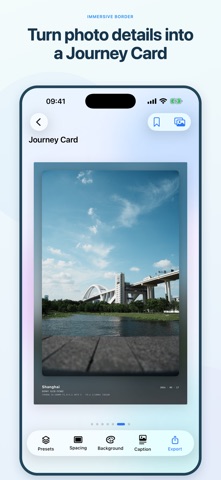
Start with 24 curated presets, from classic white borders and immersive backgrounds to tickets, postage stamps, 35mm film, a camera viewfinder, vinyl records, and a realistic museum gallery. Swipe between styles while keeping your selected photo.
COMPOSE YOUR PHOTO AND FRAME
Double-tap the photo or open Compose to choose the ratio of the complete framed image and adjust the photo together. Standard border themes can fill the photo window while keeping the theme’s margins: drag and zoom to frame your subject, switch portrait and landscape, or choose Full Photo to keep the entire image. Free mode retains recommended, common, and custom photo crop ratios. Creative canvas themes keep their distinctive layouts. Changes apply only when you tap Done, and your original photo is preserved. The museum frame adapts to the photo’s shape, with four gallery backgrounds to choose from.
MAKE A STYLE YOUR OWN
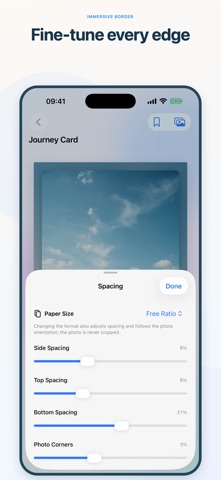
Adjust the available margins, colors, corners, and shadows with full-screen previews. Changes are temporary until you tap Save Preset to save a custom style. Personalize text on tickets, stamps, and other text-based themes. Keep text specific to one photo, or turn on Include Custom Text when saving a preset to reuse your edited text across a project. Fields you leave automatic continue to update with each photo. Ticket colors can match your photo automatically or use your own palette. Favorite and duplicate presets with a long press, and reuse your custom styles later.
DETAILS FROM YOUR CAMERA
Display available camera model, lens, exposure, date, and place information from your photo’s metadata. Film and vinyl themes use the actual camera model when it is available.
STANDARD AND HIGH QUALITY EXPORTS
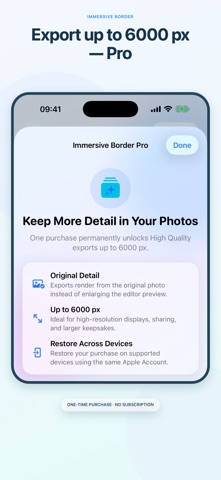
Save the finished image to a dedicated album in Photos or share through the iOS share sheet. Standard export, up to 2400 px on the longest edge, is free and selected by default. An optional one-time Pro purchase unlocks High Quality export up to 6000 px.
PRIVATE BY DESIGN
Your photos are processed on your device. No account, ads, analytics, tracking, or developer server. When a selected photo contains coordinates, Apple system geocoding may be used to display a place name.
No subscription. No sign-in. Standard export stays free.
READY TO SHARE OR PRINT
Choose the ratio of the entire framed image: square, 3:2, 4:3, 4:5, 5:7, 16:9, or 100 × 148 mm. Save the format, orientation, and framing preference with your custom preset. Every format exports an ordinary image at your selected Standard or High Quality setting, ready to use with your preferred printing service or app.
Safety and technology
Found in the app by AppBrain- Price
- Free
- App size
- 11.0 MB
- Content rating
- Everyone
Technologies used by Immersive Border
Releases
Updates seen on the App Store- Version
- 1.5
- Launched
- September 2026
No changelog data
Alternatives
Similar apps and more from 全鹏 宋Alternatives to Immersive Border


More from 全鹏 宋

Rankings
App Store top chartsApp Store Rankings for Immersive Border
About the app and developer
About Immersive Border
Immersive Border is a photo & video app developed by 全鹏 宋.
User Ratings
Immersive Border is rated 5.00 out of 5 stars. The rating is based on 2 ratings.
App Information
Immersive Border is freely available from the App Store. The app size is 11.00 MB. The latest version available is 1.5. The last update was on November 4, 2026.
Technical Requirements
The app has a content rating of Everyone. The app has been available on the App Store since September 2026.
Developer information for 全鹏 宋
Address: