

Inbox — Save For Later
Inbox — Save For Later is made and published by Pavel Voloshin. AppBrain is an independent app data site and isn't affiliated with Pavel Voloshin. The app name, icon, screenshots and description belong to Pavel Voloshin and are shown as published on the App Store.
AppBrain's verdict
- Last updated
- June 3, 2026
Rankings
App Store top chartsApp Store Rankings for Inbox — Save For Later
Competitors
Similar apps and more from Pavel VoloshinAlternatives to Inbox — Save For Later


Releases
Updates seen on the App Store- Version
- 1.0.0
- Launched
- June 2026
No changelog data
User feedback
Ratings and reviews on the App StoreComments on Inbox — Save For Later for iOS
We don't have enough comments to show example comments. Please check back later.
Technology
Found in the app by AppBrain- Price
- Free
- App size
- 48.6 MB
- Content rating
- Everyone
Technologies used by Inbox — Save For Later
About the app and developer
About Inbox — Save For Later
Inbox — Save For Later is a productivity app developed by Pavel Voloshin.
User Ratings
The app has no ratings yet.
App Information
Inbox — Save For Later is freely available from the App Store. The app size is 48.62 MB. The latest version available is 1.0.0. The last update was on June 3, 2026.
Technical Requirements
The app has a content rating of Everyone. The app has been available on the App Store since June 2026.
Developer information for Pavel Voloshin
Address:
Store listing
By Pavel Voloshin, from the App Store

Description by Pavel Voloshin Written by the developer, not by AppBrain. Click to read.
Inbox is a universal save-for-later app that brings together articles, videos, links, notes, photos, files, tasks, and events — all in one clean, organized space.
SAVE ANYTHING
Capture content from any app using the Share Extension, save links with one tap from Safari or Chrome, or create notes and tasks right inside the app. Inbox automatically extracts article text, fetches video metadata, and pulls link previews — so everything looks great without extra effort.
READ WITHOUT DISTRACTIONS
Enjoy a beautiful Reader Mode with customizable themes, fonts, and column widths. Highlight important passages and revisit them anytime in your Highlights feed.
STAY ORGANIZED
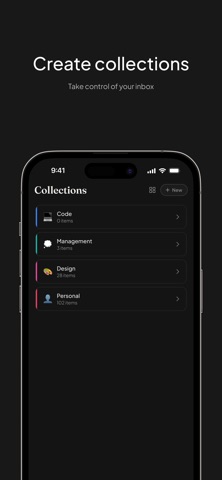
Create Collections to group related content. Add color Tags for quick filtering. Archive what you've finished. Search across everything instantly with full-text search.
WORKS OFFLINE
Save items even without internet — they sync automatically when you're back online. Read saved articles anywhere, anytime.
MAKE IT YOURS
• Light, Dark, and System themes
• 9 accent colors
• List, Grid, and Magazine layouts
• English and Russian language support
KEY FEATURES
• 9 content types: Articles, Videos, Links, Notes, Files, Photos, Stickers, Tasks, Events
• Share Extension for saving from any app
• Safari and Chrome browser extensions
• Reader Mode with 5 themes and 3 fonts
• Text highlights and annotations
• Full-text search
• Collections and color tags
• Bulk actions
• Import from Pocket and Raindrop.io
• Keyboard shortcuts for iPad and Mac
• Reading statistics