Download Android Apps and Games
AppBrain
  • Apps
  • Apps being viewed right now Trending apps today Most popular apps All-time most downloaded apps Top rated apps iPhone and iPad apps
  • Intelligence ▾
    Intelligence overview → Track any Android app or your whole market
    Track & analyze
    Keyword Tracker & OptimizerTrack & improve Play rankings App Performance ReportOne-off PDF for any app StatisticsFree Android & Play market stats
    Promote your app
    Featured Apps App Links
  • Intelligence
  • Pricing
  • Dashboard
  • Sign up
  • Log in
Last updated on: 2026-09-22
App Store Apps > Productivity > InfiniteX2P Pro — Pro Desktop
InfiniteX2P Pro — Pro Desktop icon

InfiniteX2P Pro — Pro Desktop

2.0.1
Joonwoo Kim
0.00
0 reviews
Free

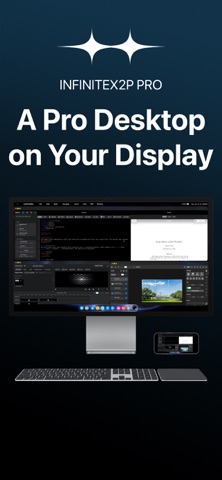
InfiniteX2P Pro — Pro Desktop Screenshot 1 of 4
InfiniteX2P Pro — Pro Desktop Screenshot 2 of 4
InfiniteX2P Pro — Pro Desktop Screenshot 3 of 4
InfiniteX2P Pro — Pro Desktop Screenshot 4 of 4
Download from the App Store

About InfiniteX2P Pro — Pro Desktop

InfiniteX2P Pro — Pro Desktop is a productivity app developed by Joonwoo Kim.

User Ratings

The app has no ratings yet.

App Information

InfiniteX2P Pro — Pro Desktop is FREE to download. The download size is 437.95 MB. The latest version available is 2.0.1. The last update was on September 22, 2026.

Technical Requirements

The app has a content rating of High Maturity. The app has been available on App Store July 2026.

Description
InfiniteX2P Pro transforms iPhone into a Pro Desktop and gives iPad a powerful desktop-style creative workspace.

Built for both iPhone and iPad, InfiniteX2P Pro brings movable windows, pro creation tools, Files integration, iCloud Calendar, Contacts, Apple Music, a rebuilt Web Browser, rebuilt Web Apps, and external display support into one unified environment.

Use it directly on iPhone with external display as a pocket Pro Desktop Computer. Connect an external display when you want more room for editing, browsing, writing, files, and multitasking.

PRO TOOLS BUILT IN

Video Editor:
• Create video projects
• Import media
• Arrange clips on a timeline
• Work with video and audio tracks
• Preview edits
• Adjust audio and color settings
• Configure export options
• Export completed videos

Image Editor:
• Create image projects with layers
• Add text, shapes, fills, brush strokes, and effects
• Crop, arrange, rotate, resize, and flip content
• Adjust opacity and blend modes
• Export as PNG, JPEG, or HEIC

LaTeX Editor:
• Create and manage LaTeX projects
• Edit source files and compile locally with bundled LaTeX/Tectonic support
• Preview generated PDFs and view compile logs
• Use templates, snippets, symbols, tables, images, citations, and bibliography tools
• Run package, document class, accessibility, arXiv, and review checks
• Export ZIP projects and app archives

IPHONE & IPAD INTEGRATION

InfiniteX2P Pro works with the tools and data already on your device.

• Files integration for browsing, organizing, importing, and exporting documents
• iCloud Calendar access for viewing, creating, and editing events
• Contacts access for browsing your address book
• Apple Music access inside the workspace
• Photo and media import workflows for creative projects
• Local document, download, and project storage

DESKTOP-STYLE WORKSPACE

InfiniteX2P Pro gives iPhone and iPad a flexible window-based interface.

• Movable, resizable app windows
• Minimize and maximize controls
• Dock, Launchpad, Mission Control, and multiple Spaces
• Keyboard shortcut support
• Pointer and touch-friendly controls
• Workspace restoration and profiles

Keep your browser, files, calendar, contacts, music, notes, and creative editors open together instead of constantly switching between separate full-screen apps.

REBUILT WEB BROWSER

The Web Browser in InfiniteX2P Pro has been reworked from the ground up.

• Rebuilt browser architecture
• Improved SSO sign-in flow
• Tab view with page previews
• Tabbed browsing
• Bookmarks and downloads
• Address and search tools
• Mobile/desktop website switching
• Find and page tools
• Better workspace integration

REBUILT WEB APPS

Web Apps have also been reworked from the ground up, making websites feel more integrated inside the InfiniteX2P Pro workspace.

• Add websites as workspace apps
• Launch saved web apps from the desktop-style environment
• Keep web apps alongside files, editors, calendar, contacts, and other tools
• Use web apps as part of a larger multitasking workflow

FILES & DOCUMENT MANAGEMENT

Manage documents and project files from inside InfiniteX2P Pro.

• Browse Documents and Downloads
• Create files and folders
• Rename, move, copy, and delete items
• Add sidebar shortcuts
• Switch between list and icon views
• Use drag-and-drop where supported
• Preview files through Lookup
• Import and export project content
• Work with documents used by the Pro editors

EXTERNAL DISPLAY SUPPORT

Use InfiniteX2P Pro directly on iPhone or iPad, or connect to an external display for a larger desktop-style setup with mirroring support, external display resolution options, and more room for editing, browsing, writing, and file management.


Terms of Use (EULA): https://www.apple.com/legal/internet-services/itunes/dev/stdeula/
Privacy Policy: https://github.com/kjwamlex/InfiniteX2P-Pro-Privacy-Policy/blob/main/README.md
Show more Show less

More data about InfiniteX2P Pro — Pro Desktop

Price Free to download
Rating No ratings
Ranking Not ranked
Version 2.0.1
App download size 438.0 MB
Maturity High Maturity

More from Joonwoo Kim

infiniteX2P - Multitasking icon infiniteX2P - Multitasking
Joonwoo Kim
3.9
Free
48 ratings
Cascade Wallpaper icon Cascade Wallpaper
Joonwoo Kim
3.0
Free
1 ratings
MusicAPX — Lyrics & Themes icon MusicAPX — Lyrics & Themes
Joonwoo Kim
2.0
Free
1 ratings
Gommy & Blue icon Gommy & Blue
Joonwoo Kim
0.0
Free
MathIsland icon MathIsland
Joonwoo Kim
0.0
Free
Learn Abstract Data Type icon Learn Abstract Data Type
Joonwoo Kim
0.0
Free
NewsIsland icon NewsIsland
Joonwoo Kim
0.0
Free

Changelog of InfiniteX2P Pro — Pro Desktop

No changelog data

Developer information for Joonwoo Kim

Joonwoo Kim

Address:

Share InfiniteX2P Pro — Pro Desktop

Comments on InfiniteX2P Pro — Pro Desktop for iOS

We don't have enough comments to show example comments. Please check back later.

App Store Rankings for InfiniteX2P Pro — Pro Desktop

This app is not ranked

Technologies used by InfiniteX2P Pro — Pro Desktop

Frequently asked questions about InfiniteX2P Pro — Pro Desktop

Is InfiniteX2P Pro — Pro Desktop free?

Yes. InfiniteX2P Pro — Pro Desktop is free to download from App Store.

Is InfiniteX2P Pro — Pro Desktop still available?

Yes. InfiniteX2P Pro — Pro Desktop is on App Store, and the last update we saw was on September 22, 2026.

How large is the InfiniteX2P Pro — Pro Desktop download?

InfiniteX2P Pro — Pro Desktop is 437.95 MB to download.

Is InfiniteX2P Pro — Pro Desktop suitable for children?

App Store gives InfiniteX2P Pro — Pro Desktop a high maturity rating. It is meant for adults.

Who made InfiniteX2P Pro — Pro Desktop?

InfiniteX2P Pro — Pro Desktop was developed by Joonwoo Kim. It is listed in the productivity category on App Store.

Popular Productivity Apps Apps on sale Top new apps Apps other people are watching Today's trending apps
More hot apps 🔥

Back to top
AppBrain Intelligence premium content

Subscribe now to get full and unlimited access to AppBrain Intelligence. You'll have access to:

  • App Intelligence dashboard (performance timeline, competitor comparison, country rankings, insight cards)
  • Detailed ranking data per app
  • Full timeline per developer
  • Device market shares data per country
  • Unlimited keyword tracking
1 Month

$75/mo
(billed every month)

SAVE 0%
Subscribe
3 Months

$65/mo
($195 billed every 3 months)

SAVE 13%
Subscribe
1 Year

$57.50/mo
($690 billed every year)

SAVE 23%
Subscribe
Each subscription will automatically renew 3 days before the expiration date for the same time period. Subscriptions can be cancelled at any time before the renewal.

AppBrain is a directory focused on discovering great apps and games. We give statistics, rankings and search options that Google Play and the App Store don't have. All trademarks are owned by their respective owners. AppBrain doesn't offer APKs or binaries, and always lets users install the official version from Google Play or the App Store.

More apps

  • Top Android apps being viewed
  • Stack Runner for Android
  • Kali Chalisa
  • Bridge Card Game stats

App statistics

  • Android statistics
  • Google Play Developer stats
  • Trending Android Apps
  • Trending iOS apps
  • Top popular Apps
  • Buy the best Android phone

About AppBrain

  • Contact
  • Privacy
  • Documentation
  • DMCA takedowns
  • Articles
  • Blog
  • Android App Marketing: Learn how to better market your Android app
© 2010-2026 - AppBrain