InfoGen - Multi-functional app is made and published by
Takashi Shikone.
AppBrain is an independent app data site and isn't affiliated with Takashi Shikone.
The app name, icon, screenshots and description belong to Takashi Shikone and are shown as
published on the App Store.
About InfoGen - Multi-functional app
InfoGen - Multi-functional app is a lifestyle app developed by Takashi Shikone.
User Ratings
The app has no ratings yet.
App Information
InfoGen - Multi-functional app is freely available from the App Store. The app size is 17.45 MB. The latest version available is 2.3.5. The last update was on August 30, 2026.
Technical Requirements
The app has a content rating of Everyone. The app has been available on the App Store since February 2021.
Description by Takashi Shikone(from the App Store)
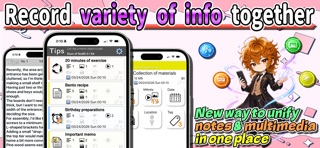
■ About this app An ultra-high performance memo app that allows you to centrally manage information such as text, multimedia, income and expenditures. It records information generated daily using various approaches and supports future decision-making!
The carefully designed UI allows for extremely fast data writing/reading! It can be effectively used in a variety of fields.
The information you record can be organized into data containers called "memo objects."
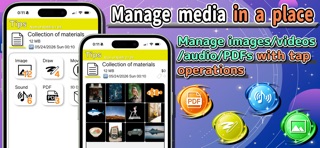
■ Main Features ▼ Versatile Memo Features You can record not only text but also multiple items such as images, drawings, videos, audio, PDFs, and 3D data (USDZ files), and organize them together. With intuitive operation, you can record and view your entries within just a few taps, making daily documentation smooth and stress‑free.
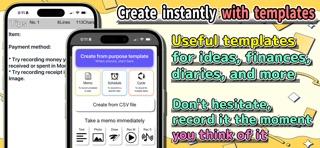
▼ Create Purpose‑Specific Memos from Templates Convenient templates are available so you can instantly create memos tailored to your needs. Whether it’s ideas, income/expense notes, diaries, or other general‑purpose types, these templates make memo creation extremely efficient.
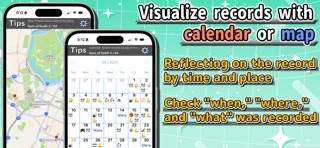
▼ Calendar & Map Views In addition to the standard list view, you can use a time‑based calendar view and a location‑based map view. Perfect for travel, business trips, and many other situations.
▼ Separate “Content” View In the “Content” section where text is recorded, you can compare and edit the content of completely different memo objects side by side. No need to switch back and forth between memos, enabling an unprecedented level of fast and efficient editing.
▼ Income & Expense Management Alongside your memo content, you can also record daily income and expenses. Useful for tracking travel costs, household budgets, or tax‑related records. You can also check monthly and yearly financial statistics.
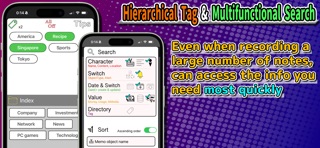
▼ Hierarchical Tags & Advanced Search Even if you a large amount of record entries, organization is easy. Tagging and search filtering help you quickly find the memo you need. Tags use a hierarchical structure, minimizing the effort required to navigate large numbers of tags.
▼ Create PDF Files from “Content” and Images Using the “Content” and images you’ve saved as manuals, recipes, or catalogs, you can generate PDF files. You can prepare manuals in advance and instantly share them using this feature.
▼ Easy Text Extraction with OCR & Speech Recognition OCR lets you extract text from images, and speech recognition converts audio into text. Perfect for moments when typing feels like too much work.
▼ Pinned Memo Feature Pin frequently checked memos so they always appear at the top of the main list. Great for reminders you tend to forget.
▼ Notifications for Scheduled Times You can record not only past entries but also future schedules, and set notifications for them. Combined with the “Cycle” memo type, it works as a daily habit reminder.
▼ Tip to Clear Up Any Confusion Tap the Tips button on each screen to view a quick guide to that screen’s operations. If you’re unsure how to use a feature or what a button does, just tap Tips for help.
■ Notes - This app has been developed with the utmost care, but in the unlikely event that any written data is lost or damage occurs as a result of using the app, we cannot provide any compensation.
- Please try not to close the app while writing multimedia or other data. This may cause problems.
- When the image size saved by this app exceeds 1024 pixels in either direction, it will be resized so that the larger pixel count is 1024.
- Please avoid using the app in a way that places an excessive load on the device.
■ Sample image credits Zhenyu Luo Michael Fousert Marek Piwnicki Bram Bergers Danny Greenberg Colin Watts (from Unsplash)
Each subscription will automatically renew 3 days before the expiration date for
the same time period. Subscriptions can be cancelled at any time before the renewal.