Download Android Apps and Games
AppBrain
  • Apps
  • Apps being viewed right now Trending apps today Most popular apps All-time most downloaded apps Top rated apps
  • Intelligence ▾
    Intelligence overview → Track any Android app or your whole market
    Track & analyze
    Keyword Tracker & OptimizerTrack & improve Play rankings App Performance ReportOne-off PDF for any app StatisticsFree Android & Play market stats
    Promote your app
    Featured Apps App Links
  • Intelligence
  • Pricing
  • Dashboard
  • Sign up
  • Log in
Last updated on: 2026-07-02
App Store Apps > Productivity > Ink: Notes, Lists & To-Dos
Ink: Notes, Lists & To-Dos icon

Ink: Notes, Lists & To-Dos

3.2
Sean Trapani
5.00
1 reviews
Free

Ink: Notes, Lists & To-Dos Screenshot 1 of 10
Ink: Notes, Lists & To-Dos Screenshot 2 of 10
Ink: Notes, Lists & To-Dos Screenshot 3 of 10
Ink: Notes, Lists & To-Dos Screenshot 4 of 10
Ink: Notes, Lists & To-Dos Screenshot 5 of 10
Ink: Notes, Lists & To-Dos Screenshot 6 of 10
Ink: Notes, Lists & To-Dos Screenshot 7 of 10
Ink: Notes, Lists & To-Dos Screenshot 8 of 10
Ink: Notes, Lists & To-Dos Screenshot 9 of 10
Ink: Notes, Lists & To-Dos Screenshot 10 of 10
Download from the App Store

About Ink: Notes, Lists & To-Dos

Ink: Notes, Lists & To-Dos is an overall app developed by Sean Trapani.

Download Statistics

User Ratings

Ink: Notes, Lists & To-Dos is rated 5.00 out of 5 stars. The rating is based on one rating ratings.

App Information

Ink: Notes, Lists & To-Dos is FREE to download. The APK download size is 25.40 MB. The latest version available is 3.2. The last update was on June 25, 2026.

Technical Requirements

The app has a content rating of Everyone. The app has been available on Google Play May 2026.

Description
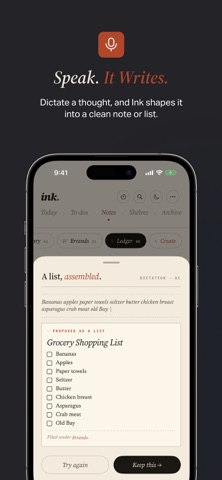
Ink turns your voice into finished notes and lists, no re-typing, no cleanup, no wasted time.

Tap the microphone, speak naturally, and watch your words land as a clean list, a structured note, or a tidy paragraph. Ink's AI shapes the transcript while you watch, so you always see the result before it's saved. Then keep editing. Add subtasks, section headers, due dates, make it as detailed or as simple as you want.

DESIGNED LIKE A BOOK, NOT AN APP

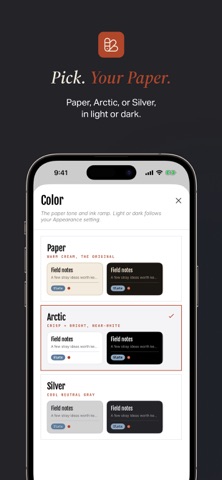
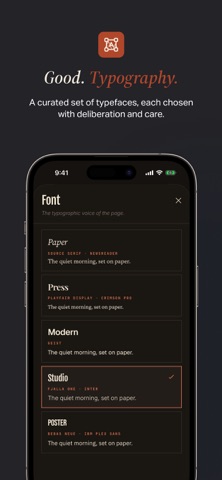
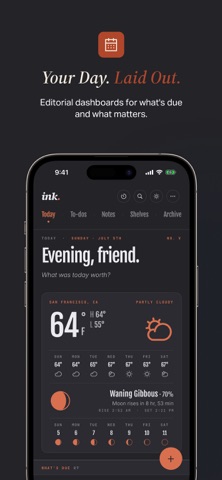
Ink's interface draws from print, warm cream paper, ink-dark serif type, and the kind of editorial details you find in well-made books and magazines. Every screen is something you'd want to look at, not just use.

SHARE A LIST, KEEP IT IN SYNC

Invite another Ink user by email and share a to-do list between you. Check things off, add items, reorder, and both copies stay in sync. A people icon marks a shared list, a line shows who edited it last, and you can manage who's on the list, or stop sharing, right from the list itself.

YOUR SHELVES, YOUR WAY

Notes and lists live on shelves you name and rearrange. No rigid folders. No nested hierarchies. Move things freely, see counts at a glance, and find what you need without digging.

THREE WAYS TO START YOUR DAY

The Today view offers three layouts: an editorial dashboard that shows everything at once, a focused planner that narrows your attention, and a calendar view paired with your daily anchor task. Pick the one that matches your energy.

LISTS THAT KEEP A LEDGER

Flip any list into Ledger mode and it starts keeping score. Type signed amounts on items (+$25, -$10, +200) and Ink totals each section, then totals the whole list. Track a budget, a grocery run, a side gig, or anything that needs a running balance, without leaving your to-do list.

PRINT, BEAUTIFULLY

Tap the printer icon on any list, ledger, or note and Ink lays it out for paper, editorial typography, page-break-aware sections, black-and-white by design. The output is the same on iPhone, iPad, and Mac.

KNOW HOW YOU WORK

The Statistics view tracks the rhythm of your writing: words written, notes versus lists, voice versus typed, daily activity, salty words, items completed. Quiet numbers that show you something about yourself over time.

BRING IT WITH YOU, OR TAKE IT SOMEWHERE ELSE

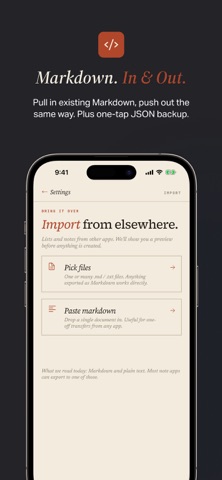
• Import and export Markdown, HTML, plain text, or rich text
• One-tap JSON backup and one-tap restore
• iCloud sync across iPhone and Mac, with conflict resolution when devices disagree
• Universal purchase, buy once, use everywhere

Terms of Use: https://www.apple.com/legal/internet-services/itunes/dev/stdeula/
Privacy Policy: https://basicapps.tech/privacy
Show more Show less

More data about Ink: Notes, Lists & To-Dos

Price Free to download
Rating 5.00 based on a single rating
Ranking Not ranked
Version 3.2
App download size 25.4 MB
Suitable for Everyone

More from Sean Trapani

Basic Fidgit: Digital Fidget icon Basic Fidgit: Digital Fidget
Sean Trapani
5.0
Free
4 ratings
Drift — 60 Second Calm icon Drift — 60 Second Calm
Sean Trapani
5.0
Free
2 ratings
Basic Checkbook: Spending Log icon Basic Checkbook: Spending Log
Sean Trapani
5.0
Free
2 ratings

Changelog of Ink: Notes, Lists & To-Dos

No changelog data

Developer information for Sean Trapani

Sean Trapani

Address:

Share Ink: Notes, Lists & To-Dos

Comments on Ink: Notes, Lists & To-Dos for iOS

We don't have enough comments to show example comments. Please check back later.

App Store Rankings for Ink: Notes, Lists & To-Dos

This app is not ranked

Technologies used by Ink: Notes, Lists & To-Dos

Apps other people are watching Popular Overall Apps on sale Top new apps Today's trending apps
More hot apps 🔥

Back to top
AppBrain Intelligence premium content

Subscribe now to get full and unlimited access to AppBrain Intelligence. You'll have access to:

  • App Intelligence dashboard (performance timeline, competitor comparison, country rankings, insight cards)
  • Detailed ranking data per app
  • Full timeline per developer
  • Device market shares data per country
1 Month

$75/mo
(billed every month)

SAVE 0%
Subscribe
3 Months

$65/mo
($195 billed every 3 months)

SAVE 13%
Subscribe
1 Year

$57.50/mo
($690 billed every year)

SAVE 23%
Subscribe
Each subscription will automatically renew 3 days before the expiration date for the same time period. Subscriptions can be cancelled at any time before the renewal.

AppBrain is a directory focused on discovering great apps and games. We give statistics, rankings and search options that Google Play and the App Store don't have. All trademarks are owned by their respective owners. AppBrain doesn't offer APKs or binaries, and always lets users install the official version from Google Play or the App Store.

More apps

  • Top Android apps being viewed
  • View LuckyShort —— AI Dramas
  • Heavy Rain Wallpaper
  • View Lucky Looter

Android Statistics

  • Android statistics
  • Google Play Developer stats
  • Trending Android Apps
  • Top popular Apps
  • Buy the best Android phone

About AppBrain

  • Contact
  • Privacy
  • Documentation
  • DMCA takedowns
  • Articles
  • Blog
  • Android App Marketing: Learn how to better market your Android app
© 2010-2026 - AppBrain