

InkBrook
InkBrook is made and published by Dalian Junjing Xiyu Technology Co., Ltd. AppBrain is an independent app data site and isn't affiliated with Dalian Junjing Xiyu Technology Co., Ltd. The app name, icon, screenshots and description belong to Dalian Junjing Xiyu Technology Co., Ltd. and are shown as published on the App Store.
AppBrain's verdict
- Last updated
- September 30, 2026
Rankings
App Store top chartsApp Store Rankings for InkBrook
Competitors
Similar apps and more from Dalian Junjing Xiyu Technology Co., Ltd.Alternatives to InkBrook





Releases
Updates seen on the App Store- Version
- 1.3.0
- Launched
- July 2026
No changelog data
User feedback
Ratings and reviews on the App StoreComments on InkBrook for iOS
We don't have enough comments to show example comments. Please check back later.
Technology
Found in the app by AppBrain- Price
- Free
- App size
- 21.0 MB
- Content rating
- Everyone
Technologies used by InkBrook
About the app and developer
About InkBrook
InkBrook is a productivity app developed by Dalian Junjing Xiyu Technology Co., Ltd.
User Ratings
The app has no ratings yet.
App Information
InkBrook is freely available from the App Store. The app size is 21.04 MB. The latest version available is 1.3.0. The last update was on September 30, 2026.
Technical Requirements
The app has a content rating of Everyone. The app has been available on the App Store since July 2026.
Developer information for Dalian Junjing Xiyu Technology Co., Ltd.
Store listing
By Dalian Junjing Xiyu Technology Co., Ltd., from the App Store


Description by Dalian Junjing Xiyu Technology Co., Ltd. Written by the developer, not by AppBrain. Click to read.
THE METHODS BEHIND IT
• A goal first (goal setting): one sentence on what you want to work out, so the session has a purpose.
• Takeaways and questions after: saying what you learned in your own words is the generation effect; writing down what is still unclear is metacognitive monitoring — how far your understanding goes.
• Reviews spaced out (spaced repetition): the FSRS algorithm sets when each card comes back, from your own ratings.
STUDY LOGS
• Before studying: write a one-sentence goal, or leave it blank.
• While studying: use a 15, 20, 25 or 30-minute Pomodoro timer, with an eye-rest reminder at the end. Capture ideas and questions at any time.
• After studying: record takeaways and questions in your own words, using voice-to-text or photos of problems.
• Add to review: select takeaway cards for review. Question cards can also be added once you have written an answer.
SPACED REPETITION
During review, rate your recall as "Got it" or "Forgot". The FSRS spaced repetition algorithm uses each card's review history to estimate its next review date and adjusts the interval based on your ratings. Cards repeatedly rated "Forgot" are grouped for reworking.
Exam mode lets you link exams and dates to subjects. As an exam approaches, reviews for those subjects become more frequent, with intervals capped at the exam date.
RECORDS AND STATISTICS
• Voice-to-text: dictate study entries.
• Problem photos: attach photos to cards and refer to the original when reviewing.
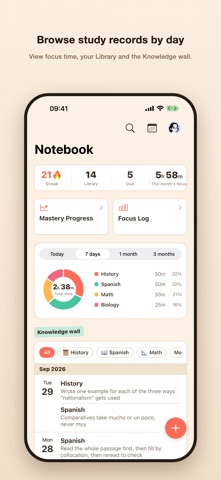
• Knowledge wall: browse recorded takeaways by day.
• Streak and Focus Log: track study streaks from actual study activity, daily focus time this week and a study heatmap. No leaderboards, only your past self.
• Widgets: view your streak and Library card count on the Home and Lock Screen.
• Data export and import: back up the full database as a zip file and import it from a backup.
DATA AND PRIVACY
Study content is stored on your device by default. If you enable iCloud sync, it is saved to your own iCloud.
Crash diagnostics are off by default. You can enable them through a separate checkbox on the first-launch consent screen and change the setting later. When enabled, an installation identifier, device model, OS and app version, and error stack are sent to the developer for troubleshooting. See the Privacy Policy for details.
STUDY USES
For school study and exam preparation, IGCSE / A-Level / IB, graduate and professional exams, language learning and self-directed study.
FREE AND SUBSCRIPTION
Free and unlimited: study logs, logging past study, card creation, review, voice input, photos, resolving questions, data export and import, and all Pomodoro chimes. The Knowledge wall and statistics include the last 30 days for free.
A subscription unlocks exam mode (countdown and more frequent pre-exam reviews), iCloud sync across devices, full-history Knowledge wall and all statistics, Markdown batch import, and Flip-card practice (choose a set of cards for self-testing without waiting for their due dates).
Subscriptions are auto-renewing, monthly or yearly; prices are shown in the app and on the purchase confirmation. Eligible first-time subscribers can receive a 7-day free trial, as determined by the App Store and shown on that same confirmation. Payment is charged to your Apple Account on confirmation of purchase, and renews automatically unless cancelled at least 24 hours before the current period ends. Cancel any time in Settings › your name (Apple Account) › Subscriptions; cancelling during the free trial costs nothing.
Privacy Policy: https://junjingxiyu.cn/privacy.en.html
Terms of Use: https://junjingxiyu.cn/terms.en.html