

Inkiostro: Markdown Editor
Inkiostro: Markdown Editor is made and published by Carlo Di Giuseppe. AppBrain is an independent app data site and isn't affiliated with Carlo Di Giuseppe. The app name, icon, screenshots and description belong to Carlo Di Giuseppe and are shown as published on the App Store.
AppBrain's verdict
- Rating on App Store
- 3.40
- 5 ratings
- Last updated
- October 15, 2026
It doesn't have enough ratings yet to judge what users think.
Rankings
App Store top chartsApp Store Rankings for Inkiostro: Markdown Editor
Competitors
Similar apps and more from Carlo Di GiuseppeAlternatives to Inkiostro: Markdown Editor


More from Carlo Di Giuseppe



Releases
Updates seen on the App Store- Version
- 1.13.1
- Launched
- September 2025
No changelog data
User feedback
Ratings and reviews on the App StoreComments on Inkiostro: Markdown Editor for iOS
We don't have enough comments to show example comments. Please check back later.
Technology
Found in the app by AppBrain- Price
- Free
- App size
- 20.9 MB
- Content rating
- Everyone
Technologies used by Inkiostro: Markdown Editor
About the app and developer
About Inkiostro: Markdown Editor
Inkiostro: Markdown Editor is a productivity app developed by Carlo Di Giuseppe.
User Ratings
Inkiostro: Markdown Editor is rated 3.40 out of 5 stars. The rating is based on 5 ratings.
App Information
Inkiostro: Markdown Editor is freely available from the App Store. The app size is 20.93 MB. The latest version available is 1.13.1. The last update was on October 15, 2026.
Technical Requirements
The app has a content rating of Everyone. The app has been available on the App Store since September 2025.
Developer information for Carlo Di Giuseppe
Address:
Frequently asked questions about Inkiostro: Markdown Editor
Is Inkiostro: Markdown Editor free?
Yes. Inkiostro: Markdown Editor is free on the App Store.
Is Inkiostro: Markdown Editor still available?
Yes. Inkiostro: Markdown Editor is on the App Store, and the last update we saw was on October 15, 2026.
How large is Inkiostro: Markdown Editor?
Inkiostro: Markdown Editor is 20.93 MB.
Is Inkiostro: Markdown Editor suitable for children?
App Store rates the content of Inkiostro: Markdown Editor as suitable for everyone.
How do people rate Inkiostro: Markdown Editor?
Inkiostro: Markdown Editor scores 3.40 out of 5 stars, from 5 ratings on the App Store.
Who made Inkiostro: Markdown Editor?
Inkiostro: Markdown Editor was developed by Carlo Di Giuseppe. It is listed in the productivity category on the App Store.
What are the best alternatives to Inkiostro: Markdown Editor?
People looking at Inkiostro: Markdown Editor also look at these productivity apps: Markdown.md - Notes & Preview, Merkdown, GitWriter - Markdown Anywhere, Artificial PDF — PDF to Text, neverlabs AI Writer.
Store listing
By Carlo Di Giuseppe, from the App Store




Description by Carlo Di Giuseppe Written by the developer, not by AppBrain. Click to read.
Buy once, no subscription. No account, no tracking.
WRITE, SEE, FINISH
• Two ways to write: the Markdown editor shows the symbols, the visual editor formats as you type, like a word processor. Either way the file stays plain Markdown. (Visual editor: Pro, free for 7 days)
• A complete Markdown toolbar: headings, lists, tables and code blocks, one tap away.
• A side-by-side preview that comes back exactly where you left it.
• LaTeX formulas typeset by KaTeX, and Mermaid diagrams drawn as you type.
• 27 preview styles, 11 of them free: GitHub, Sepia, Nord, Solarized and more. With Pro, Manuscript, Book, Report, Academic and others set the page like print.
• Focus and Typewriter modes, a live word count and a daily writing goal.
FROM DRAFT TO BOOK
• PDF with selectable text, formulas and diagrams included. Free, with a small credit line in the footer.
• A professional ePub: real chapters, a cover, ISBN, series, footnotes that open over the page, and the accessibility declaration Europe requires. The export sheet tells you what a store would reject — before you send it. (Pro)
• A book made of many files: one chapter per file, in a folder, in the order you choose. Arranging it is free; exporting it as a single ePub is Pro.
• Self-contained HTML, and page setup for PDF: paper, margins, headers and page numbers. (Pro)
NEVER LOSE A WORD
• Version history: Inkiostro saves versions as you write. Search them, compare them line by line, and bring back a single word or a whole draft. (Pro)
• Backups of your whole library: a dated zip archive with your version history inside, offered when one is due, while the app is open, in a folder you pick. Open it in the Files app and your Markdown files are right there. (Pro)
YOUR FILES, YOUR RULES
• Unlimited documents, as plain .md files you can open anywhere.
• Folders, color labels and tags, with search that filters by tag.
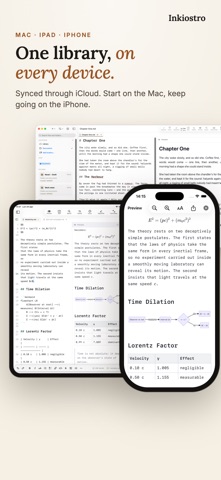
• iCloud Drive sync between iPhone, iPad and Mac, with no setup.
• External folders: work directly inside any folder on your device or in iCloud Drive. (Pro)
INKIOSTRO PRO — ONE PURCHASE, EVERY DEVICE
One purchase unlocks Pro on iPhone, iPad and Mac, forever. Try it free for 7 days.
• The visual editor
• Version history with search, comparison and a year of versions
• Backups of your library
• Professional ePub, HTML, and books made of many files
• PDF page setup
• Focus and Typewriter modes
• External folders
• 24 app themes, the Pro preview styles and any font installed on your device
MADE FOR
• Writers: novels and essays in plain text, out as a real ebook
• Students and researchers: notes and theses with proper formulas
• Developers: READMEs, documentation and technical notes with diagrams
• Anyone tired of paying every month for a text editor
• Anyone new to Markdown: the visual editor works like a word processor
PRIVACY
Your documents stay in your iCloud Drive or on your device. No servers of ours, ever. Inkiostro collects only anonymous, aggregated usage statistics — never personal data, never the content of your documents — and you can turn them off in Settings.