

InSight Countdown
InSight Countdown is made and published by Aliaksandr Harbavets. AppBrain is an independent app data site and isn't affiliated with Aliaksandr Harbavets. The app name, icon, screenshots and description belong to Aliaksandr Harbavets and are shown as published on the App Store.
AppBrain's verdict
- Last updated
- September 10, 2026
- Size
- 9.49 MB
User feedback
Ratings and reviews on the App StoreComments on InSight Countdown for iOS
We don't have enough comments to show example comments. Please check back later.
Store listing
By Aliaksandr Harbavets, from the App Store




Description by Aliaksandr Harbavets Written by the developer, not by AppBrain. Click to read.
InSight Countdown turns the wait for what matters into something you look forward to seeing.
Set a countdown to an exact date and time — your flight, an exam, a birthday, a deadline — not just a vague duration. A huge, glanceable countdown fills your screen, ticking down the days, hours, minutes, and seconds to the precise moment.
FEATURES
• Count down to an exact date & time
Pick the exact calendar date and time of your event — or a simple duration when that's all you need. The closest event is always front and center. Add a note — flight number, gate, address — shown in small type under the name.
• Synced across your devices
Your countdowns stay in sync between iPhone, iPad, and Mac through your private iCloud — the same events, each keeping its own visualization, follow you everywhere. Your countdowns are yours — their content is never sent to us.
• Choose how time looks
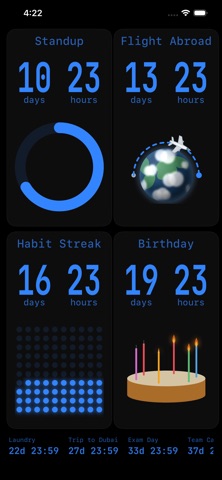
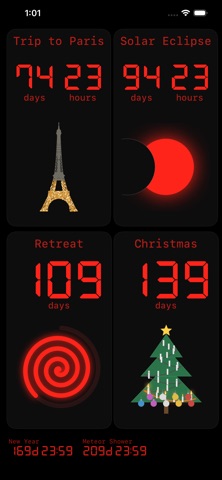
Watch time melt away in a draining hourglass, a progress ring, a rounded bar, a Time-Timer-style shrinking disc, a dot grid, a dot dial, a solar eclipse, an unwinding spiral, or a sun along its day arc — plus themed styles: a Christmas tree lighting up branch by branch, a birthday cake whose candles flicker on, a beach parasol opening as the sun rises, a juice glass that fills, a dumbbell loading up plate by plate, a car climbing a mountain road, a plane arcing around a globe, and lit-up landmarks (the Eiffel Tower, Burj Khalifa). Pick a look that fits the occasion — a parasol for a trip, a cake for a birthday — so a glance tells you what's coming. Swipe to switch right on the countdown; each remembers its own. Landscape keeps a linear bar.
• Make it yours
Pick a digit font — from a clean system face to a retro seven-segment LCD — and tint the whole app with a preset accent color or any color you choose.
• Many countdowns, one glance
The nearest event takes the main screen; the rest sit in a quick-access bottom bar. Choose per countdown when it takes the main screen — always, only when it's near, only on its day, or never — so a far-off event doesn't crowd out nearer ones. Or watch several at once on any device: Duo fits two to your screen, and a large grid shows four. iPad and Mac add a denser small grid and a zoomed layout that enlarges the nearest event. Called off? Archive it instead of deleting — it waits until you set a new date.
• Daily & weekly repeats
Set a countdown to repeat every day, or on the weekdays you choose (say Mon/Wed/Fri), and it rolls forward automatically after it finishes — great for routines, classes, standups, and recurring reminders.
• Beat procrastination — and have fun doing it
A deadline you can see is harder to ignore. Keep the countdown in front of you — full screen or on the Lock Screen — and watch the remaining time melt away. Better yet, the task you kept putting off becomes a screen you want to watch.
• Lock Screen & Dynamic Island
Show your countdowns as Live Activities on the Lock Screen and in the Dynamic Island. Choose per countdown when it appears.
• Doubles as an alarm across your devices
The instant a countdown hits zero, an alert breaks through silent mode and Focus — and on iOS 26 it rings until you dismiss it — or snooze it for five more minutes — so any countdown works as a full alarm. Add an early reminder (from 10 seconds to a day before), or ring the alarm up to 3 minutes ahead. Because your countdowns sync through iCloud, the same alarm can ring on whichever device is with you.
• iPhone, iPad & Mac
The full-screen countdown adapts to any size and rotation — a phone in your pocket, an iPad propped up as an always-on display, or a resizable Mac window. The controls fade away when you're not touching the screen, leaving just the countdown.
• Stays awake when you want
Optional screen-lock control keeps the display on — always or only while charging — so your countdown stays in sight.
Free. No account needed. Your countdowns are yours.
Safety and technology
Found in the app by AppBrain- Price
- Free
- App size
- 9.49 MB
- Content rating
- Everyone
Technologies used by InSight Countdown
Releases
Updates seen on the App Store- Version
- 1.2
- Launched
- July 2026
No changelog data
Alternatives
Similar apps and more from Aliaksandr HarbavetsAlternatives to InSight Countdown


Rankings
App Store top chartsApp Store Rankings for InSight Countdown
About the app and developer
About InSight Countdown
InSight Countdown is a productivity app developed by Aliaksandr Harbavets.
User Ratings
The app has no ratings yet.
App Information
InSight Countdown is freely available from the App Store. The app size is 9.49 MB. The latest version available is 1.2. The last update was on September 10, 2026.
Technical Requirements
The app has a content rating of Everyone. The app has been available on the App Store since July 2026.
Developer information for Aliaksandr Harbavets
Address:
Frequently asked questions about InSight Countdown
Is InSight Countdown free?
Yes. InSight Countdown is free on the App Store.
Is InSight Countdown still available?
Yes. InSight Countdown is on the App Store, and the last update we saw was on September 10, 2026.
How large is InSight Countdown?
InSight Countdown is 9.49 MB.
Is InSight Countdown suitable for children?
App Store rates the content of InSight Countdown as suitable for everyone.
Who made InSight Countdown?
InSight Countdown was developed by Aliaksandr Harbavets. It is listed in the productivity category on the App Store.
What are the best alternatives to InSight Countdown?
People looking at InSight Countdown also look at these productivity apps: Date Countdown Lite, Due Pal: ADHD Visual Timer, Mellowake: Alarm & Clock, Countdown Flow, Obsession: Goal Accountability.