AppBrain
AppBrain
  • Apps
  • Apps being viewed right now Trending apps today Most popular apps All-time most installed apps Top rated apps iPhone and iPad apps
  • Intelligence ▾
    Intelligence overview → Track any Android app or your whole market
    Track & analyze
    Keyword Tracker & OptimizerTrack & improve Play rankings App Performance ReportOne-off PDF for any app StatisticsFree Android & Play market stats
    Promote your app
    Featured Apps App Links
  • Intelligence
  • Pricing
  • Dashboard
  • Sign up
  • Log in
App Store Apps > Photo & Video > InstaCapture: Record & Edit
InstaCapture: Record & Edit icon

InstaCapture: Record & Edit

by Shreedhar Amin · Photo & Video · Free
On the App Store since February 2025 · Data updated 2026-11-02

InstaCapture: Record & Edit is made and published by Shreedhar Amin. AppBrain is an independent app data site and isn't affiliated with Shreedhar Amin. The app name, icon, screenshots and description belong to Shreedhar Amin and are shown as published on the App Store.

AppBrain's verdict

Rating on App Store
5.00
6 ratings
Last updated
September 1, 2026
Size
48.1 MB

It doesn't have enough ratings yet to judge what users think.

Official page on the App Store

User feedback

Ratings and reviews on the App Store

Comments on InstaCapture: Record & Edit for iOS

We don't have enough comments to show example comments. Please check back later.

Store listing

By Shreedhar Amin, from the App Store
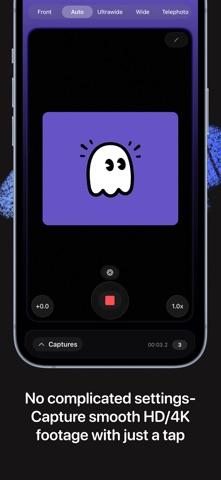
InstaCapture: Record & Edit Screenshot 1 of 6
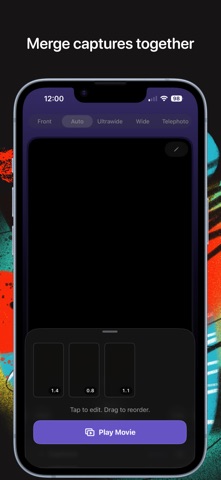
InstaCapture: Record & Edit Screenshot 2 of 6
InstaCapture: Record & Edit Screenshot 3 of 6
InstaCapture: Record & Edit Screenshot 4 of 6
InstaCapture: Record & Edit Screenshot 5 of 6
InstaCapture: Record & Edit Screenshot 6 of 6
Screenshots by Shreedhar Amin, from the the App Store listing
Description by Shreedhar Amin Written by the developer, not by AppBrain. Click to read.
The fastest way to vlog!

Most videos never get made. Not because editing is hard, but because capturing the right footage is.

InstaCapture solves that! InstaCapture allows you to build your vlog while you capture it. Not sure what to capture, real-time on-screen prompts help you film. Follow the visual cues, hit record, and your clips are automatically organized and ready to edit the moment you stop shooting.

From idea to finished video. On your iPhone. In minutes.

[HOW IT WORKS]

(1)CAPTURE WITH CUES
On-screen tips, simple framing guides and curated scripts help you capture and narrate the perfect shot as you record, keeping your footage clean and intentional.

(2)ESSENTIAL EDITING
Edit each clip individually. Trim frames, color grade, add automated captions, and adjust playback speed. Then merge them all into one finished video.

(3)EASY EXPORT
Choose your resolution and share straight to Instagram, TikTok, or your camera roll.

Terms of Use: https://www.instacaptureapp.com/terms-of-service
Privacy Policy: https://www.instacaptureapp.com/privacy-policy
Official page on the App Store

Safety and technology

Found in the app by AppBrain
Price
Free
App size
48.1 MB
Content rating
Everyone

Technologies used by InstaCapture: Record & Edit

Releases

Updates seen on the App Store
Version
3.7
Launched
February 2025

No changelog data

Alternatives

Similar apps and more from Shreedhar Amin

Alternatives to InstaCapture: Record & Edit

Video Pro - Movie Recorder icon Video Pro - Movie Recorder
Constellation Ltd
0.0
Free
UpTakes Sports Video Camera icon UpTakes Sports Video Camera
Uptakes Video LLC
4.9
Free
57 ratings
デタカメ icon デタカメ
Ryusei Fukumoto
5.0
Free
1 ratings
Video Resize & Scale - HD icon Video Resize & Scale - HD
Francis Bonnin
4.2
$1.99
12 ratings
AR Video Camera: Mixed Reality icon AR Video Camera: Mixed Reality
BYTE REBELS CLUB, MB
4.2
Free
5 ratings
CuttingRoom Reporter - Camera icon CuttingRoom Reporter - Camera
Cutting Room AS
5.0
Free
2 ratings
Tele Camera : 1000x Ultra Zoom icon Tele Camera : 1000x Ultra Zoom
Ilham Balaqis
3.5
Free
2 ratings
IMG.LY Design Editor icon IMG.LY Design Editor
IMG.LY GmbH
0.0
Free

Rankings

App Store top charts

App Store Rankings for InstaCapture: Record & Edit

This app is not ranked

About the app and developer

About InstaCapture: Record & Edit

InstaCapture: Record & Edit is a photo & video app developed by Shreedhar Amin.

User Ratings

InstaCapture: Record & Edit is rated 5.00 out of 5 stars. The rating is based on 6 ratings.

App Information

InstaCapture: Record & Edit is freely available from the App Store. The app size is 48.05 MB. The latest version available is 3.7. The last update was on September 1, 2026.

Technical Requirements

The app has a content rating of Everyone. The app has been available on the App Store since February 2025.

Developer information for Shreedhar Amin

Shreedhar Amin

Address:

Frequently asked questions about InstaCapture: Record & Edit

Is InstaCapture: Record & Edit free?

Yes. InstaCapture: Record & Edit is free on the App Store.

Is InstaCapture: Record & Edit still available?

Yes. InstaCapture: Record & Edit is on the App Store, and the last update we saw was on September 1, 2026.

How large is InstaCapture: Record & Edit?

InstaCapture: Record & Edit is 48.05 MB.

Is InstaCapture: Record & Edit suitable for children?

App Store rates the content of InstaCapture: Record & Edit as suitable for everyone.

How do people rate InstaCapture: Record & Edit?

InstaCapture: Record & Edit scores 5.00 out of 5 stars, from 6 ratings on the App Store.

Who made InstaCapture: Record & Edit?

InstaCapture: Record & Edit was developed by Shreedhar Amin. It is listed in the photo & video category on the App Store.

What are the best alternatives to InstaCapture: Record & Edit?

People looking at InstaCapture: Record & Edit also look at these photo & video apps: Video Pro - Movie Recorder, UpTakes Sports Video Camera, デタカメ, Video Resize & Scale - HD, AR Video Camera: Mixed Reality.

Share InstaCapture: Record & Edit

Price drops on Google Play Apps other people are watching Today's trending apps Popular Photo & Video Apps Top new apps
Video Pro - Movie Recorder icon Video Pro - Movie Recorder
UpTakes Sports Video Camera icon UpTakes Sports Video Camera
デタカメ icon デタカメ
Video Resize & Scale - HD icon Video Resize & Scale - HD
AR Video Camera: Mixed Reality icon AR Video Camera: Mixed Reality
CuttingRoom Reporter - Camera icon CuttingRoom Reporter - Camera
Tele Camera : 1000x Ultra Zoom icon Tele Camera : 1000x Ultra Zoom
IMG.LY Design Editor icon IMG.LY Design Editor
Overview Alternatives Reviews Rankings Technology
AppBrain Intelligence premium content

Subscribe now to get full and unlimited access to AppBrain Intelligence. You'll have access to:

  • App Intelligence dashboard (performance timeline, competitor comparison, country rankings, insight cards)
  • Detailed ranking data per app
  • Full timeline per developer
  • Device market shares data per country
  • Unlimited keyword tracking
1 Month

$75/mo
(billed every month)

SAVE 0%
Subscribe
3 Months

$65/mo
($195 billed every 3 months)

SAVE 13%
Subscribe
1 Year

$57.50/mo
($690 billed every year)

SAVE 23%
Subscribe
Each subscription will automatically renew 3 days before the expiration date for the same time period. Subscriptions can be cancelled at any time before the renewal.

AppBrain is an app data site, we track rankings, ratings, installs for all apps and games on Google Play and the App Store. AppBrain doesn't host app files or APKs, all install links go directly to the official store. All trademarks are owned by their respective owners.

More apps

  • Top Android apps being viewed
  • Horse Racing Rider Horse Games
  • Victory Blast Casino
  • FlipaClip: Draw 2D Animation

App statistics

  • Android statistics
  • Google Play Developer stats
  • Trending Android Apps
  • Trending iOS apps
  • Top popular Apps
  • Buy the best Android phone
  • Buy & sell app businesses

About AppBrain

  • Contact
  • Privacy
  • Documentation
  • DMCA takedowns
  • Blog
  • Android app Install tracking and attribution options for the AppBrain ad network
© 2010-2026 - AppBrain