

InstaChord-i
InstaChord-i is made and published by Loop-Sessions.LLC. AppBrain is an independent app data site and isn't affiliated with Loop-Sessions.LLC. The app name, icon, screenshots and description belong to Loop-Sessions.LLC. and are shown as published on the App Store.
AppBrain's verdict
Established- Rating on App Store
- 4.94
- 16 ratings
- Last updated
- August 4, 2026
It doesn't have enough ratings yet to judge what users think.
Rankings
App Store top chartsApp Store Rankings for InstaChord-i
Competitors
Similar apps and more from Loop-Sessions.LLC.Alternatives to InstaChord-i


More from Loop-Sessions.LLC.


Releases
Updates seen on the App Store- Version
- 1.4.8
- Launched
- December 2020
No changelog data
User feedback
Ratings and reviews on the App StoreComments on InstaChord-i for iOS
We don't have enough comments to show example comments. Please check back later.
Technology
Found in the app by AppBrain- Price
- Free
- App size
- 7.28 MB
- Content rating
- Everyone
Technologies used by InstaChord-i
About the app and developer
About InstaChord-i
InstaChord-i is a music app developed by Loop-Sessions.LLC.
What is the rating of InstaChord-i?
InstaChord-i is rated 4.94 out of 5 stars, based on 16 ratings.
Is InstaChord-i free?
InstaChord-i is free. The app size is 7.28 MB. The latest version available is 1.4.8. The last update was on August 4, 2026.
What are the requirements for InstaChord-i?
The app has a content rating of Everyone. The app has been available on the App Store since December 2020.
Developer information for Loop-Sessions.LLC.
Address:
Store listing
By Loop-Sessions.LLC., from the App Store



Description by Loop-Sessions.LLC. Written by the developer, not by AppBrain. Click to read.
You can experience an innovative electronic musical instrument "InstaChord", which has raised about $770,000 by crowdfunding with this app.
https://instachord.com
(This app was developed under the supervision of Mr. Yuichi Nagata, the developer of "InstaChord".)
■ Features
◆ Can perform music instantly
You can enjoy playing like a guitar or piano by tapping and swiping the pads while holding down the buttons with the chord symbols (C, Dm, etc.).
There are fundamental chords based on music theory on the screen, so you can make a song just by choosing buttons loosely.
◆ Guitar or Piano
You can choose from two types of interfaces, "guitar strings" and "piano keyboards".
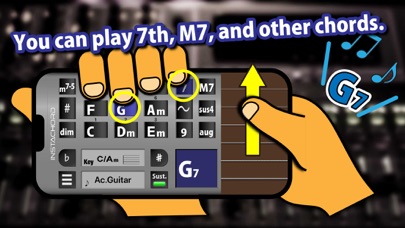
◆ Play various chords
If you press "~" (swap button) at the same time, the major and minor of the chord will be switched.
(Ex: "F" + "~" → "Fm", "Em" + "~" → "E")
You can also play various chords by pressing the chord buttons (7, M7, sus4, etc.) at the same time.
* Some functions are paid options
◆ You can play any song
When you set the Key setting to the key of a song, the fundamental chords (diatonic chords) used for that song are assigned to the buttons on the screen, so you can easily play songs with any key.
Since numerals (scale degree) is written on the screen, it is ideal for learning chord progressions.
◆ MIDI Connection
- Virtual MIDI: Control ohter Virtual MIDI compatible synth app on your device.
* GarageBand doesn't support Virtual MIDI input.
- Wi-Fi: Send MIDI notes to PC or Mac via Wi-Fi.
* Windows PC requires connection software such as rtpMIDI.
- BLE MIDI: Send MIDI notes to Mac or other iOS device via Bluetooth.
■ Playable chords
major, minor, 7, M7, m7, mM7, add9, m9, sus4, dim, aug, m7-5
* Some chords are paid options
■ Built-in 28 Sounds
* It is different from the built-in sound of the hardware version of InstaChord.
* Some sound sources are paid options
Ac.Guitar
E-Gt.Jazz
E-Gt.Clean
E-Gt.Dist
Sitar
Koto
Ac.Piano
E.Piano
Vibraphone
Marimba
Agogo
Lead Synth
Polysynth
Brightness
Rock Organ
Church Organ
Accordion
Strings
Synth Strings
Voice Oohs
Trumpet
Synth Brass
Flute
Whistle
Warm Pad
Bowed Grass
Metal Pad
Rain FX
■ InstaChord-i website
https://instachord.com/app