

instax SHARE
instax SHARE is made and published by FUJIFILM Corporation. AppBrain is an independent app data site and isn't affiliated with FUJIFILM Corporation. The app name, icon, screenshots and description belong to FUJIFILM Corporation and are shown as published on the App Store.
AppBrain's verdict
EstablishedPoorly rated- Rating on App Store
- 2.07
- 1,037 ratings
- Last updated
- June 24, 2024
- Size
- 60.1 MB
Users are critical: 2.1 stars from 1,037 ratings.
User feedback
Ratings and reviews on the App StoreComments on instax SHARE for iOS
We don't have enough comments to show example comments. Please check back later.
Store listing
By FUJIFILM Corporation, from the App Store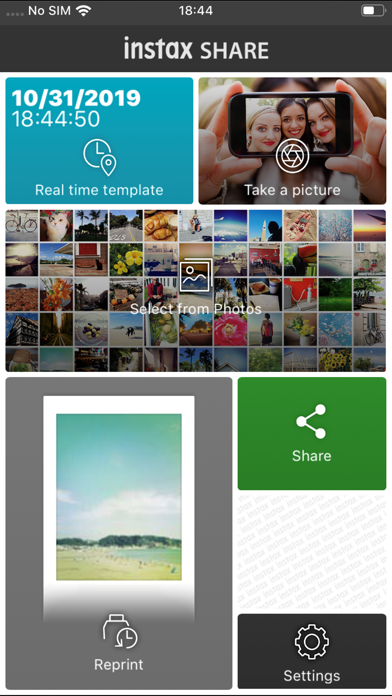

Description by FUJIFILM Corporation Written by the developer, not by AppBrain. Click to read.
[Select Your Best Shot!]
"instax SHARE" is an app to print images from your smartphone with the smartphone printer instax SHARE SP-1/SP-2/SP-3(FUJIFILM). You can enjoy beautiful instax print by simply selecting best shots in your smartphone or tablet within less than a minute.
[Supported Printer]
FUJIFILM instax SHARE Smartphone Printer SP-1/SP-2/SP-3
* Not support to old model printers.
[Caution]
(1)iCloud
If you want to print a picture stored in iCloud, save it to your device first and then print it.
(2) Permissions setting of "instax SHARE" application.
Some or all of the functions can not be used unless you enable the following permissions of "instax SHARE" application.
Please enable the authority by referring to the following procedure.
After installation, you will be asked for permission when using the following functions for the first time, please enable it.
The "Take a picture" function need the "Camera" permission.
The "Real time template" function need the "Camera" permission and the "Location" permission.
"Selection from Photos" function need the "Photos" permission.
If the authority is set to invalid, please enable it with the following operation.
--Example of operation on iPhone 6s (iOS 10.3.3)--
1.Tap "Settings"
2.Tap "instax SHARE"
3."ALLOW INSTAX SHARE TO ACCESS"
Please enable all of "Camera" "Photo" "Location".
Note: If you have not used the following functions ,these permission settings wil not be displayed.
The "Camera" permission has required by the "Take a picture" function and the "Real time template" function.
"Location" permission has required by the "Real time template" function.
The "Photos" permission has required by the "Selection from Photos" function.
[How to print]
Print photos taken with smartphones.
1. Turn on the printer.
2. **Important** By "Settings" app on your smartphone device, Choose "Wi-Fi", turn on the Wi-Fi, and choose and connect the printer SSID (INSTAX-xxxxxxxx, wrote at printer bottom) from the "CHOOSE A NETWORK..." list. (Excute once, will be connected automatically from the next time.)
3. Launch the instax SHARE app.
4. Select image from Photos or SNS, or take photo with a smartphone camera.
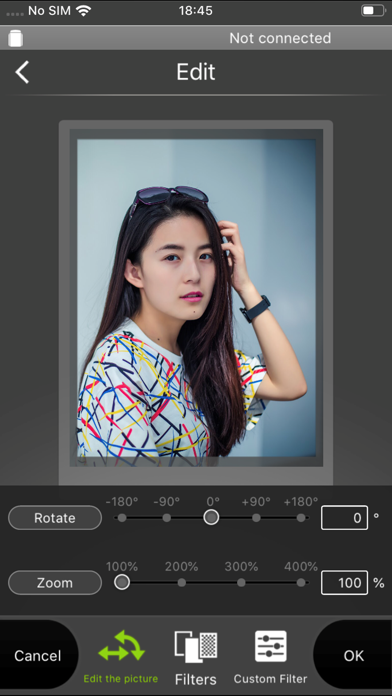
5. Once image is selected, press Edit and edit the image (scaling, rotate, filter and template).
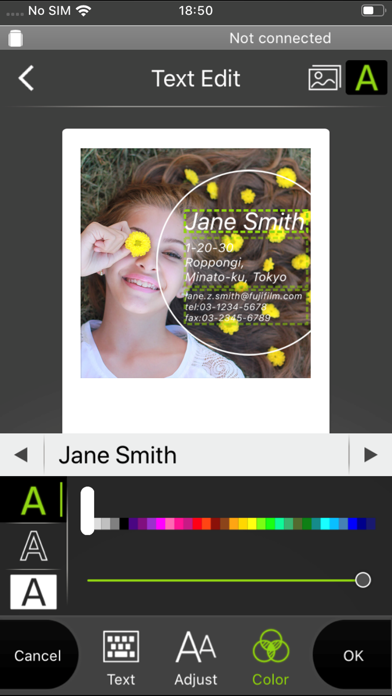
6. Post message on a template if template which accepts text is selected.
7. Press "Connect and print." when editting is completed.
8. When you print for the first time, will be asked password for the printer, please enter initial password that is wrote in User's Guide of the printer.
[When you can not update in AppStore]
Phenomenon:
On the AppStore update screen, the instaxSHARE application is displayed in "Available Updates"
However ,Sometimes "Update button" has been changed to "open button",and con not be updated.
Workaround:
Please uninstall the instaxSHARE application and reinstall it.
(When reinstalling, "Reprint image" saved in the application will be cleared.)
Safety and technology
Found in the app by AppBrain- Price
- Free
- App size
- 60.1 MB
- Content rating
- Everyone
Technologies used by instax SHARE
Releases
Updates seen on the App Store- Version
- 3.4.6
- Launched
- January 2014
No changelog data
Alternatives
Similar apps and more from FUJIFILM CorporationAlternatives to instax SHARE


More from FUJIFILM Corporation


Rankings
App Store top chartsApp Store Rankings for instax SHARE
About the app and developer
About instax SHARE
instax SHARE is a photo & video app developed by FUJIFILM Corporation.
What is the rating of instax SHARE?
instax SHARE is rated 2.07 out of 5 stars, based on 1 thousand ratings.
Is instax SHARE free?
instax SHARE is free. The app size is 60.10 MB. The latest version available is 3.4.6. The last update was on June 24, 2024.
What are the requirements for instax SHARE?
The app has a content rating of Everyone. The app has been available on the App Store since January 2014.
Developer information for FUJIFILM Corporation
Address: