

IntelliCalm brainwave music
IntelliCalm brainwave music is made and published by Stefan Brandmeier. AppBrain is an independent app data site and isn't affiliated with Stefan Brandmeier. The app name, icon, screenshots and description belong to Stefan Brandmeier and are shown as published on the App Store.
AppBrain's verdict
- Last updated
- June 30, 2022
- Size
- 286.3 MB
User feedback
Ratings and reviews on the App StoreComments on IntelliCalm brainwave music for iOS
We don't have enough comments to show example comments. Please check back later.
Store listing
By Stefan Brandmeier, from the App Store
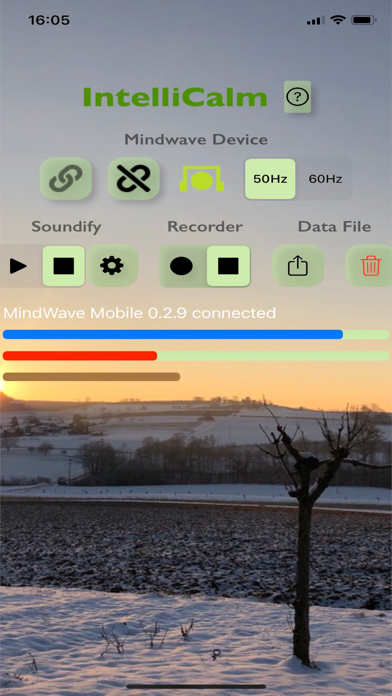


Description by Stefan Brandmeier Written by the developer, not by AppBrain. Click to read.
- Show visuals of your brainwaves as they indicate either meditative states, attention or eye blinks
- Attach musical voices/instruments and pitch levels to each frequency band of your brainwaves (Theta, Low Alpha, High Alpha, Low Beta, High Beta etc.)
- Increase / Decrease the volume of each instrument to achieve different patterns of biofeedback
- Automatically save and load the sound profile
- Record and export raw data of your brainwaves
Requires MindWave Mobile 2 EEG headset of NeuroSky. On popular demand we will support other headsets as well.
Usage:
1. Turn on bluetooth on your iPad or iPhone
2. Start IntelliCalm
3. Turn on your MindWave Mobile 2 Headset, make sure the battery is charged
4. Click on the link button to search and connect your Mindwave Mobile 2 headset
4a. Make sure to select 50/60Hz depending on the frequency of the electrical power in your country.
5. Wait for the headset symbol turns green for a good connection. If it stays yellow, try pressing the
electrode on your forehead with one hand and pinch the ear-electrode tight with your other hand.
6. Check out the blue, red and brown bars. The blue grows as you calm down. The red grows as you focus or concentrate. The brown indicates eye-blink.
7. If you want, click on the gear symbol to change the sound profile:
Harmonious: if turned on it will not play disharmony pitches i.e. the sounds will be more harmonious
Accuracy: this defines how precise the frequency of your brainwaves will be soundified. Lower Values increase precision.
Duration: this defines how long the midi sound will play that is triggered by your brainwaves. Play with it to get most out of the different midi instruments.
Sensitivity: this defines how sensitive the reading of your brainwaves is. Higher values will play the selected sounds louder, i.e. lower brainwave levels can be picked up.
Brain Wave Band: the different frequency bands of normal human brainwaves. Lower frequencies generally mean calmer states of mind. Theta is hard to produce unless you sleep. The Alpha Bands can indicate meditative & calm brain states. Beta Bands indicate focussed, concentrated states of mind.
Voice: the available midi voices to select for each brain wave band.
Base Pitch: the pitch assigned to the lower end of the respective brain wave frequency band. E.g. if you select C1 for low alpha, IntelliCalm will play C1 when it detects a wave of roughly 8Hz. The detection algorithm searches you brainwaves for the frequencies of the midi pitches that lay within each brain wave band. In this example it will search for all frequencies of the midi pitches that lay within 8-9Hz (7.71,8.17,8.66,9.17,9.72,10.30). It then transposes based on the Base Pitch you select. If you align the base pitches of all voices with the number of midi pitches (frequencies) that lay within the respective brain wave band then you can create a seamless range of notes played. If you select "natural" then no transposing will be done.
Volume: select arrow up if you want the volume of the voices to grow as the respective brainwave gets stronger. Select arrow down if you want the volume to go down with growing brainwaves. NOTE: To achieve wonderful biofeedback during meditation, use arrow down for the Alpha Waves in order to calm the music with meditation.
Have fun with IntelliCalm. Don't hesitate to provide feedback using App Store review or via our website (click on the question mark next to the title of the app)
Safety and technology
Found in the app by AppBrain- Price
- Free
- App size
- 286.3 MB
- Content rating
- Everyone
Technologies used by IntelliCalm brainwave music
Releases
Updates seen on the App Store- Version
- 1.7
- Launched
- December 2021
No changelog data
Alternatives
Similar apps and more from Stefan BrandmeierAlternatives to IntelliCalm brainwave music







Rankings
App Store top chartsApp Store Rankings for IntelliCalm brainwave music
About the app and developer
About IntelliCalm brainwave music
IntelliCalm brainwave music is a health & fitness app developed by Stefan Brandmeier.
User Ratings
The app has no ratings yet.
App Information
IntelliCalm brainwave music is freely available from the App Store. The app size is 286.31 MB. The latest version available is 1.7. The last update was on June 30, 2022.
Technical Requirements
The app has a content rating of Everyone. The app has been available on the App Store since December 2021.
Developer information for Stefan Brandmeier
Address:
Frequently asked questions about IntelliCalm brainwave music
Is IntelliCalm brainwave music free?
Yes. IntelliCalm brainwave music is free on the App Store.
Is IntelliCalm brainwave music still available?
Yes. IntelliCalm brainwave music is on the App Store, and the last update we saw was on June 30, 2022.
How large is IntelliCalm brainwave music?
IntelliCalm brainwave music is 286.31 MB.
Is IntelliCalm brainwave music suitable for children?
App Store rates the content of IntelliCalm brainwave music as suitable for everyone.
Who made IntelliCalm brainwave music?
IntelliCalm brainwave music was developed by Stefan Brandmeier. It is listed in the health & fitness category on the App Store.
What are the best alternatives to IntelliCalm brainwave music?
People looking at IntelliCalm brainwave music also look at these health & fitness apps: FumAR, Anxiety Relief Sessions, Mistikist: Mind Programmer, Pero:Calm, Relax, Focus Sounds, Binaural Beats: Sleep Focus.