

Interval Timer Tabata and HIIT
Interval Timer Tabata and HIIT is made and published by Sergei Melchugov. AppBrain is an independent app data site and isn't affiliated with Sergei Melchugov. The app name, icon, screenshots and description belong to Sergei Melchugov and are shown as published on the App Store.
AppBrain's verdict
- Rating on App Store
- 5.00
- 2 ratings
- Last updated
- June 26, 2026
It doesn't have enough ratings yet to judge what users think.
Rankings
App Store top chartsApp Store Rankings for Interval Timer Tabata and HIIT
Competitors
Similar apps and more from Sergei MelchugovAlternatives to Interval Timer Tabata and HIIT


Releases
Updates seen on the App Store- Version
- 1.0.2
- Launched
- June 2026
No changelog data
User feedback
Ratings and reviews on the App StoreComments on Interval Timer Tabata and HIIT for iOS
We don't have enough comments to show example comments. Please check back later.
Technology
Found in the app by AppBrain- Price
- Free
- App size
- 49.0 MB
- Content rating
- Everyone
Technologies used by Interval Timer Tabata and HIIT
About the app and developer
About Interval Timer Tabata and HIIT
Interval Timer Tabata and HIIT is a health & fitness app developed by Sergei Melchugov.
User Ratings
Interval Timer Tabata and HIIT is rated 5.00 out of 5 stars. The rating is based on 2 ratings.
App Information
Interval Timer Tabata and HIIT is freely available from the App Store. The app size is 49.01 MB. The latest version available is 1.0.2. The last update was on June 26, 2026.
Technical Requirements
The app has a content rating of Everyone. The app has been available on the App Store since June 2026.
Developer information for Sergei Melchugov
Address:
Frequently asked questions about Interval Timer Tabata and HIIT
Is Interval Timer Tabata and HIIT free?
Yes. Interval Timer Tabata and HIIT is free on the App Store.
Is Interval Timer Tabata and HIIT still available?
Yes. Interval Timer Tabata and HIIT is on the App Store, and the last update we saw was on June 26, 2026.
How large is Interval Timer Tabata and HIIT?
Interval Timer Tabata and HIIT is 49.01 MB.
Is Interval Timer Tabata and HIIT suitable for children?
App Store rates the content of Interval Timer Tabata and HIIT as suitable for everyone.
How do people rate Interval Timer Tabata and HIIT?
Interval Timer Tabata and HIIT scores 5.00 out of 5 stars, from 2 ratings on the App Store.
Who made Interval Timer Tabata and HIIT?
Interval Timer Tabata and HIIT was developed by Sergei Melchugov. It is listed in the health & fitness category on the App Store.
What are the best alternatives to Interval Timer Tabata and HIIT?
People looking at Interval Timer Tabata and HIIT also look at these health & fitness apps: Location Tracker - Find Phone, APX: Gym Workout Planner AI, Crystal Healing by Gemiway, SleepMaxxing: AI Sleep Coach, Ozzy - Ozempic & GLP1 Tracker.
Store listing
By Sergei Melchugov, from the App Store


Description by Sergei Melchugov Written by the developer, not by AppBrain. Click to read.
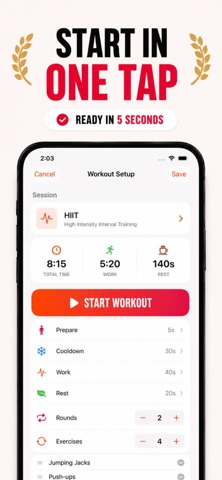
Meet the best interval timer app for Tabata, HIIT, circuits, boxing rounds, running intervals, and custom workouts.
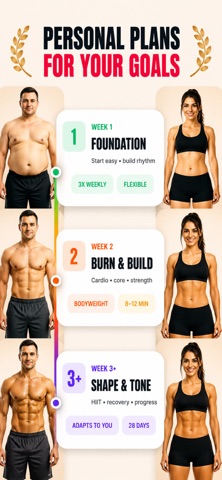
Start with a ready-made workout, follow a personal 28-day plan built around your goals, or build your own custom timer in seconds.
Apple Watch heart rate zones, voice cues, and built-in progress tracking keep you on pace and show your results.
No equipment needed. Train at home, outdoors, or in the gym.
See your progress after every workout with detailed analytics, achievements, streaks, reminders, and Apple Health sync.
Between sessions, keep momentum with daily step tracking, water tracking, and activity trends.
1. START WITH A REAL WORKOUT, NOT AN EMPTY TIMER
Open the app and start classic 20/10 Tabata, full-body HIIT, boxing rounds, running intervals, WOD, EMOM, and conditioning sessions. Selected workouts include video guidance, so you can move with better form.
2. BUILD THE EXACT TIMER YOU NEED
Create your own workout structure: work, rest, rounds, warm-up, recovery, cooldown, exercise names, and repeat sets. Save timers for strength circuits, heavy bag work, sprint training, mobility, rowing, cycling, jump rope, and more.
3. TRAIN BY HEART RATE ZONES
Pair your Apple Watch to see your pulse and effort in real time. Zone guidance helps you stop guessing: push during work intervals, hold a steady pace during longer sets, and recover before the next round.
4. KEEP MOVING WITHOUT WATCHING THE SCREEN
Voice cues announce interval names, round changes, work, rest, and finish. Large, readable timer phases help when your phone is on the floor, across the room, or mounted near your bike, treadmill, rower, or heavy bag. Music keeps playing while timer cues keep you on pace.
5. FOLLOW A PLAN THAT FITS YOUR GOAL
Get a personal 28-day plan based on your goals, fitness level, available days, and session length. See what to do next, spend less time setting up, and build consistency as you go.
Track everything, stay consistent:
- Detailed workout analytics and history
- Progress charts, streaks, and achievements
- Heart rate zones with real-time pulse tracking
- Daily step tracking, water tracking, and activity trends
- Apple Health sync for activity and health data
- Training reminders
What makes it smarter than a basic timer:
- Ready workouts when you want zero setup
- Custom timers when you need a specific structure
- Voice cues for hands-free training
- Music-friendly intervals
- Apple Watch support
- Large, readable timer for every phase
Good for:
- Tabata and HIIT timer sessions
- Boxing rounds, MMA rounds, and heavy bag work
- Running intervals, sprint training, cycling, rowing, and jump rope
- Strength circuits, bodyweight training, mobility, WOD, EMOM, AMRAP, conditioning, home workouts, and gym workouts
Simple when you press start. Smart while you train.
Try it free for 7 days — see the difference from your first workout.
SUBSCRIPTION INFORMATION
This app offers optional auto-renewable subscriptions for Premium features. Payment will be charged to your Apple Account at confirmation of purchase. Subscription renews automatically unless auto-renew is turned off at least 24 hours before the end of the current period. Your account will be charged for renewal within 24 hours before the end of the current period. You can manage or cancel your subscription in Apple Account Settings after purchase. Any unused portion of a free trial, if offered, will be forfeited when you purchase a subscription.
HEALTH NOTE
This app is for fitness and informational purposes only and is not medical advice. Consult a doctor before starting a new fitness program, especially if you have a medical condition or injury.
Privacy Policy: https://easyfit.support/privacy
Terms of Use: https://easyfit.support/terms