


AppBrain's verdict
- Last updated
- November 8, 2026
- Size
- 51.2 MB
User feedback
Ratings and reviews on the App StoreComments on Intervals - Auto Camera Timer for iOS
We don't have enough comments to show example comments. Please check back later.
Store listing
By Naveen Kumar, from the App StoreDescription by Naveen Kumar Written by the developer, not by AppBrain. Click to read.
Most filter apps make you take the photo first and guess. Intervals runs every look live on your camera at full quality, so the viewfinder shows what you will actually get. Swipe across the picture and a wipe follows your finger from one look to the next.
THE LOOKS
25 originals, built from how film really behaves: colour that deepens instead of glowing, soft highlights, grain that sits in the image, and skin that stays skin.
- Daylight: Natural, Sunday, Linen, Mint, Honey, Mist, Press, Archive, Slide
- Night: Tungsten, whose lights glow red like movie stock, plus Kowloon and Blue Hour
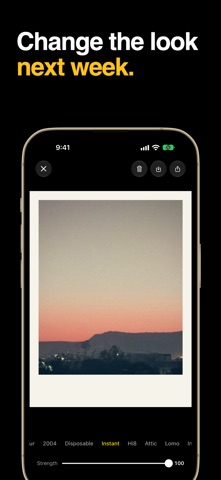
- Throwback: 2004, Disposable, Instant, Hi8, Attic, Lomo
- Mono: Ink, Pearl, Noir, Silver
- Wild: Aero, which turns trees hot pink, plus Heat and Riso
INTERVALS
Set how often and how many, press start, and walk away. Every frame comes out in your look: a sunset, a street, a party on the table. Choose one second to ten minutes between shots, up to 500 shots, or let it run until you stop it.
THE LOOK WALL
One tap shows a whole collection live at once, like a wall of tiny cameras all pointing at the same thing. Tap the one you want.
CHANGE YOUR MIND LATER
Your original stays safe in your Roll. Pick a different look next week, turn the strength down, or hold the picture to compare it with the original. Open photos you already have, too.
MADE TO BE SHARED
- Which one?: one photo in nine looks on a single sheet, ready for your friends to argue about
- Look reel: a short vertical video that wipes through nine looks
- Optional date stamp and instant print border
A REAL CAMERA
- Full-quality capture through the same system camera pipeline your iPhone uses
- Wide colour, saved as HEIC
- Lens switching, pinch to zoom, tap to focus, drag to set exposure
- Volume buttons fire the shutter
- 3, 5 and 10 second timers, for single photos and sequences
PAY ONCE
One price, everything included: every look, Intervals, the look wall and the share sheets. No subscription, no ads, no account, no tracking. Your photos stay on your phone until you share them.
Safety and technology
Found in the app by AppBrain- Price
- Free
- App size
- 51.2 MB
- Content rating
- Everyone
Technologies used by Intervals - Auto Camera Timer
Releases
Updates seen on the App Store- Version
- 1.0.0
- Launched
- November 2026
No changelog data
Alternatives
Similar apps and more from Naveen KumarAlternatives to Intervals - Auto Camera Timer


Also available on Google Play

Rankings
App Store top chartsApp Store Rankings for Intervals - Auto Camera Timer
About the app and developer
About Intervals - Auto Camera Timer
Intervals - Auto Camera Timer is an utilities app developed by Naveen Kumar.
What is the rating of Intervals - Auto Camera Timer?
Intervals - Auto Camera Timer has no ratings yet.
Is Intervals - Auto Camera Timer free?
Intervals - Auto Camera Timer is free. The app size is 51.17 MB. The latest version available is 1.0.0. The last update was on November 8, 2026.
What are the requirements for Intervals - Auto Camera Timer?
The app has a content rating of Everyone. The app has been available on the App Store since November 2026.
Intervals - Auto Camera Timer is made and published by Naveen Kumar. AppBrain is an independent app data site and isn't affiliated with Naveen Kumar. The app name, icon, screenshots and description belong to Naveen Kumar and are shown as published on the App Store.
Developer information for Naveen Kumar
Address: