

IntervalTimer Duo
IntervalTimer Duo is made and published by kosuke konuma. AppBrain is an independent app data site and isn't affiliated with kosuke konuma. The app name, icon, screenshots and description belong to kosuke konuma and are shown as published on the App Store.
AppBrain's verdict
- Last updated
- October 3, 2026
- Size
- 10.3 MB
User feedback
Ratings and reviews on the App StoreComments on IntervalTimer Duo for iOS
We don't have enough comments to show example comments. Please check back later.
Store listing
By kosuke konuma, from the App Store




Description by kosuke konuma Written by the developer, not by AppBrain. Click to read.
【Key Uses】
• HIIT (High-Intensity Interval Training)
• Pomodoro Technique (work and break cycles)
• Cooking timing management
• Stretching and yoga routines
• Study and rest cycle management
【Features】
• Run your timers back to back, automatically
• Build workouts with up to 10 timers — warm up, work, rest, cool down (Premium from the third timer)
• Each timer adjustable from 1 second to 60 minutes
• Preset feature to save and instantly recall favorite settings (1 preset free; unlimited presets: Premium)
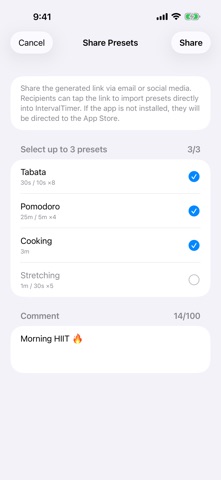
• Share presets via link — let friends import your timer setup in one tap
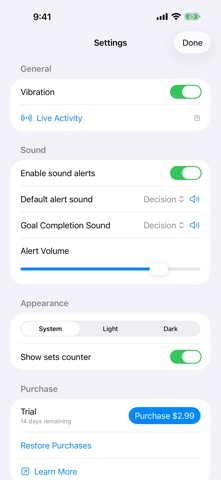
• Set counter to track progress toward your target sets (Premium)
• Audio notifications and vibration when timers end
• Live Activity shows remaining time on Lock Screen and Dynamic Island (Premium)
• Customizable alert sounds (extra sounds: Premium)
• Simple and intuitive interface
【Preset Sharing】
• Share your favorite timer configurations via link
• Recipients can import presets with a single tap
• Sync routines with your team or workout partners
【Ease of Use】
• One-tap start, pause, and reset
• Quick time setting with preset buttons
• Visual circular progress bars show remaining time
• Second timer can be enabled/disabled as needed
• Set counter tracks completed sets toward your goal
【Free & Premium】
The app is free to download and use. After installing, all premium features are unlocked for a 14-day free trial. When the trial ends, premium features require a one-time purchase (pay once, use forever) — a Universal Purchase shared between iOS and macOS.
Free forever:
• Two timers running alternately (1 second to 60 minutes each)
• One saved preset
• Basic alert sounds
• Audio and vibration notifications when timers end
• Circular progress bar
• Preset sharing via link (sending and receiving are both free)
Premium (one-time purchase, or during the free trial):
• A third timer and beyond (up to 10, each with its own name and sound)
• Unlimited presets
• Set counter
• Additional premium alert sounds
• Live Activity on Lock Screen and Dynamic Island
【Compatibility】
• iPhone and iPad
• Available in English, Japanese, French, German, and Spanish
【Universal Purchase】
If you own the macOS version, you can use the iOS version at no additional cost.
A simple yet fully-featured interval timer app that's perfect for any timing needs.
Privacy Policy: https://techback.info/interval-timer/ios/privacy-policy.html
Terms of Use (EULA): https://techback.info/interval-timer/ios/terms-of-use.html
Safety and technology
Found in the app by AppBrain- Price
- Free
- App size
- 10.3 MB
- Content rating
- Everyone
Technologies used by IntervalTimer Duo
Releases
Updates seen on the App Store- Version
- 1.3.0
- Launched
- October 2025
No changelog data
Alternatives
Similar apps and more from kosuke konumaAlternatives to IntervalTimer Duo


More from kosuke konuma


Rankings
App Store top chartsApp Store Rankings for IntervalTimer Duo
About the app and developer
About IntervalTimer Duo
IntervalTimer Duo is a health & fitness app developed by kosuke konuma.
User Ratings
The app has no ratings yet.
App Information
IntervalTimer Duo is freely available from the App Store. The app size is 10.33 MB. The latest version available is 1.3.0. The last update was on October 3, 2026.
Technical Requirements
The app has a content rating of Everyone. The app has been available on the App Store since October 2025.
Developer information for kosuke konuma
Address:
Frequently asked questions about IntervalTimer Duo
Is IntervalTimer Duo free?
Yes. IntervalTimer Duo is free on the App Store.
Is IntervalTimer Duo still available?
Yes. IntervalTimer Duo is on the App Store, and the last update we saw was on October 3, 2026.
How large is IntervalTimer Duo?
IntervalTimer Duo is 10.33 MB.
Is IntervalTimer Duo suitable for children?
App Store rates the content of IntervalTimer Duo as suitable for everyone.
Who made IntervalTimer Duo?
IntervalTimer Duo was developed by kosuke konuma. It is listed in the health & fitness category on the App Store.
What are the best alternatives to IntervalTimer Duo?
People looking at IntervalTimer Duo also look at these health & fitness apps: Round: HIIT Workout Timer, Constant Scale, HomeBase Fit for Life, 日記と体重 - ダイエット体重管理、BMI計算もできる, Tai Chi Workout:Senior Balance.