

Intuitive Password®
Intuitive Password® is made and published by Intuitive Security Systems Pty. Ltd. AppBrain is an independent app data site and isn't affiliated with Intuitive Security Systems Pty. Ltd. The app name, icon, screenshots and description belong to Intuitive Security Systems Pty. Ltd. and are shown as published on the App Store.
AppBrain's verdict
- Last updated
- June 2, 2026
- Size
- 64.9 MB
User feedback
Ratings and reviews on the App StoreComments on Intuitive Password® for iOS
We don't have enough comments to show example comments. Please check back later.
Store listing
By Intuitive Security Systems Pty. Ltd., from the App Store


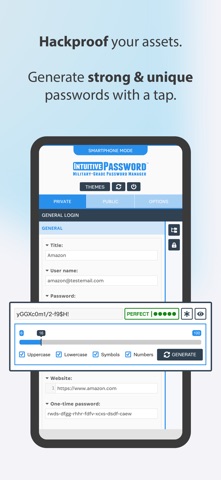
Description by Intuitive Security Systems Pty. Ltd. Written by the developer, not by AppBrain. Click to read.
== Built for families and teams ==
Intuitive Password is built with flexibility and security in mind, making it perfect for personal use, family sharing, and business environments. Whether you're an individual seeking better password management or a company looking for secure team access, Intuitive Password meets your needs.
◆ Add all your online accounts and select the vaults you wish to view
◆ Easily move password items between vaults
◆ Use shared vaults to securely share sensitive information with family or team members
== Security design ==
Intuitive Password is built with a robust, multi-layered security design to ensure your data remains protected at all times. Utilizing military-grade encryption, it safeguards your passwords and sensitive information both at rest and in transit. Advanced features like two-factor authentication (2FA), single-use codes, and anti-phishing protection add extra layers of defense, making unauthorized access nearly impossible. The Security Dashboard provides real-time monitoring of your password health, highlighting weak or reused passwords for immediate action. With options like country-based restrictions, offline access, and secure account inheritance, Intuitive Password gives you complete control over who accesses your data. Additionally, automatic logout and email/SMS notifications provide continuous security, ensuring you're always informed of any potential threats.
Learn more about our security design at www.intuitivepassword.com/Resources/Security.
== Key features ==
◆ Unlimited access to passwords: Access your passwords securely from any device, including smartphones, tablets, and desktops, with no limits. Your data is always available, whether you’re on the go or at home.
◆ Single-use codes: Intuitive Password offers single-use codes as an added layer of security. These one-time codes can replace your password during login, particularly useful when logging in on public or shared computers. Each code expires after use, ensuring your account remains secure.
◆ Security dashboard: Monitor the health of your passwords with the Security Dashboard. It highlights weak, reused, or compromised passwords, allowing you to make necessary changes to maintain strong security across all your accounts.
◆ Advanced search: Quickly locate passwords or sensitive notes using the built-in search function. You can search by keywords or tags, making it easy to find exactly what you need in seconds.
◆ Geo-location restriction: Intuitive Password gives you the ability to restrict login access based on geographic location. You can block login attempts from specific countries, enhancing your security by preventing unauthorized access from unfamiliar regions.
◆ Offline mode: Access all your stored passwords without requiring an internet connection. This feature is available on all devices, including smartphones, tablets, laptops, and desktops, ensuring you can manage your passwords anytime, anywhere.
◆ Data importing and exporting: Easily import passwords from other password managers into Intuitive Password, and export your data when needed. Our simple process ensures smooth transitions and easy data management without compromising security.
== Get started for free ==
Intuitive Password's Basic edition is completely free, with no time limitations, and can be used on as many devices as you need, including apps for iOS.
◆ Privacy policy: www.intuitivepassword.com/Resources/PrivacyStatement
◆ Terms of Service: www.intuitivepassword.com/Resources/TermsOfService
Safety and technology
Found in the app by AppBrain- Price
- Free
- App size
- 64.9 MB
- Content rating
- Everyone
Technologies used by Intuitive Password®
Releases
Updates seen on the App Store- Version
- 5.2.0
- Launched
- October 2017
No changelog data
Alternatives
Similar apps and more from Intuitive Security Systems Pty. Ltd.Alternatives to Intuitive Password®





Rankings
App Store top chartsApp Store Rankings for Intuitive Password®
About the app and developer
About Intuitive Password®
Intuitive Password® is a productivity app developed by Intuitive Security Systems Pty. Ltd.
User Ratings
The app has no ratings yet.
App Information
Intuitive Password® is freely available from the App Store. The app size is 64.88 MB. The latest version available is 5.2.0. The last update was on June 2, 2026.
Technical Requirements
The app has a content rating of Everyone. The app has been available on the App Store since October 2017.
Developer information for Intuitive Security Systems Pty. Ltd.
Intuitive Security Systems Pty. Ltd.
Address: