

InViewer: Story Viewer
InViewer: Story Viewer is made and published by Alexander Kandalov. AppBrain is an independent app data site and isn't affiliated with Alexander Kandalov. The app name, icon, screenshots and description belong to Alexander Kandalov and are shown as published on the App Store.
AppBrain's verdict
- Rating on App Store
- 4.38
- 8 ratings
- Last updated
- October 7, 2026
It doesn't have enough ratings yet to judge what users think.
Rankings
App Store top chartsApp Store Rankings for InViewer: Story Viewer
Competitors
Similar apps and more from Alexander KandalovAlternatives to InViewer: Story Viewer





Releases
Updates seen on the App Store- Version
- 2.0.0
- Launched
- October 2022
No changelog data
User feedback
Ratings and reviews on the App StoreComments on InViewer: Story Viewer for iOS
We don't have enough comments to show example comments. Please check back later.
Technology
Found in the app by AppBrain- Price
- Free
- App size
- 42.4 MB
- Content rating
- Medium
Technologies used by InViewer: Story Viewer
About the app and developer
About InViewer: Story Viewer
InViewer: Story Viewer is a photo & video app developed by Alexander Kandalov.
What is the rating of InViewer: Story Viewer?
InViewer: Story Viewer is rated 4.38 out of 5 stars, based on 8 ratings.
Is InViewer: Story Viewer free?
InViewer: Story Viewer is free. The app size is 42.40 MB. The latest version available is 2.0.0. The last update was on October 7, 2026.
What are the requirements for InViewer: Story Viewer?
The app has a content rating of Medium Maturity. The app has been available on the App Store since October 2022.
Developer information for Alexander Kandalov
Address:
Store listing
By Alexander Kandalov, from the App Store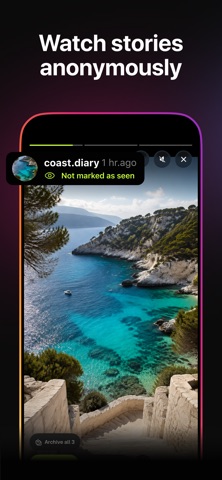
Description by Alexander Kandalov Written by the developer, not by AppBrain. Click to read.
GO STRAIGHT TO THE MEDIA
Paste a link into Search to open the story, post, Reel or highlight you found. Or send the link through Share → InViewer, then return to InViewer to open it. Posts and Reels require Pro.
SEE WHAT CHANGED
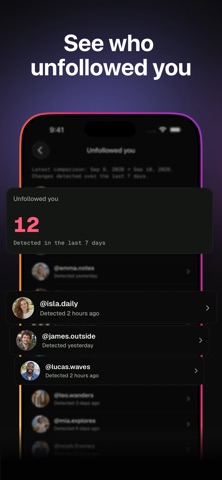
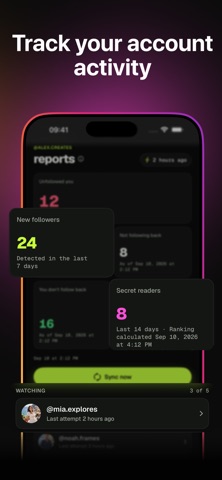
Select a public account for follower reports. The first complete check saves a starting point. Later complete checks show new followers, detected unfollows and accounts that do not follow back. Dates show when a change was detected, not the exact moment it happened.
PUBLIC PROFILES ONLY
Private accounts are not supported. An account must be public before it can be checked. Deleted, expired or otherwise unavailable media cannot be opened.
FREE AND PRO
Search public profiles for free and try stories and highlights within daily free allowances. Pro includes posts and Reels, full reports, public profile tracking, Home Screen widgets and periodic alerts. Daily service limits still apply. Background checks and alerts may be delayed.
Pro requires an active subscription. Available plans, prices and renewal terms are shown before purchase. Subscriptions renew automatically unless cancelled at least 24 hours before the current period ends. Manage or cancel subscriptions in your Apple Account settings.
Requires iOS 26 or later. The app interface is available in English, Russian, Spanish, Brazilian Portuguese and Turkish.
Support: https://inviewer.store/support
Privacy: https://inviewer.store/privacy
Terms: https://www.apple.com/legal/internet-services/itunes/dev/stdeula/
InViewer is an independent app, not affiliated with or endorsed by Instagram or Meta. Instagram is a trademark of Meta Platforms, Inc.