

iPlan: Planner & Habit Tracker
iPlan: Planner & Habit Tracker is made and published by 滴水 王. AppBrain is an independent app data site and isn't affiliated with 滴水 王. The app name, icon, screenshots and description belong to 滴水 王 and are shown as published on the App Store.
AppBrain's verdict
- Last updated
- November 2, 2026
- Size
- 73.0 MB
User feedback
Ratings and reviews on the App StoreComments on iPlan: Planner & Habit Tracker for iOS
We don't have enough comments to show example comments. Please check back later.
Store listing
By 滴水 王, from the App Store




Description by 滴水 王 Written by the developer, not by AppBrain. Click to read.
Use it to keep a record of your life: to-dos, notes, time tracking, habit check-ins, and anniversaries.
# Plan Each Day Like You Would in a Journal
Choose from multiple background colors and dotted paper styles to make planning feel less like filling in a cold spreadsheet. Highlighter-style plan bars and checkboxes turn your daily schedule into a clear, beautiful digital journal you'll want to keep using.
# Calendar Plans | See the Big Picture and Stay on Track
Stop piecing together dates from scattered to-dos. Swipe across the calendar to create a plan spanning multiple days, then see at a glance how much time an important goal takes and how far you've progressed.
Mix and match plan bar styles to make different schedules look like charming journal stickers. Even a busy calendar stays easy to scan instead of becoming a wall of clutter.
# Every Plan Is a Task List | Reach Your Goal Step by Step
Break each plan down into a concrete task list.
Tap a plan to see what needs to be done. Every task you check off moves the plan one step forward. Whether you're preparing for an exam, finishing a project, or organizing a trip, you can turn a vague goal into clear next actions.
# Four Quadrants | Do What Truly Matters First
Too much to do and not sure where to begin? Sort tasks by importance and urgency with the four quadrants. Spend less time deciding and more time on what truly matters.
If the default categories don't fit the way you think, rename all four quadrants and build a priority system that works for you.
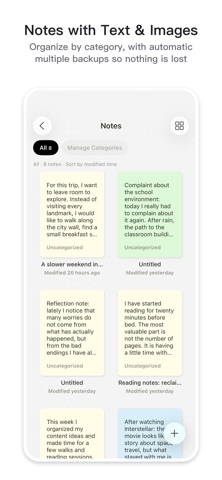
# Quick Notes | Capture Ideas Without Worrying About Losing Them
Save inspiration, journal entries, study notes, and extra planning details whenever they come to you.
Insert images and adjust bold text, paragraph spacing, line spacing, and more to keep everything clear and easy to read. Automatic multi-version backups preserve your edits, and you can restore an earlier version whenever you need it.
# Tracking | See How Every Effort Adds Up
Habits are more than simply “done” or “not done.”
For each goal, choose any combination of Check-ins, Timer, and Custom Metrics:
- Use check-ins to record whether you stayed consistent
- Use the timer to see how much time you invested
- Use custom metrics to track changes in weight, measurements, height, workout reps, training weight, and more
Set a completion rule for every habit, such as once a day, twice a day, four times a week, or N times a month. Whatever your routine looks like, you can track it your way instead of forcing it into a fixed template.
# Reviews | Discover Your Rhythm Through Your Records
Review your progress by day, week, month, or year. See not only how much you accomplished, but also how your state changed, where your time went, and which habits are worth continuing.
For daily reviews, use cute animal stickers to capture how the day felt. Looking back makes each day's mood and experiences easy to see, while keeping reflection light and warm.
# Cloud Sync + Local Network Image Sync | The Best of Both
Your text data syncs through the cloud for a seamless experience across devices. Sign in to your account on any device to start syncing right away.
Images sync automatically between your devices when they are on the same local network. They are never uploaded to the server, protecting your privacy and giving you virtually unlimited image storage, limited only by the available space on your own devices.
iPlan will keep refining the journal-planner experience, combining the tactile charm of paper with the efficiency of digital planning to help you organize your time, manage tasks, and record your life more naturally.
Privacy Policy: https://mokkaiox.com/en/stepia/privacy/
Terms of Use: https://mokkaiox.com/en/stepia/terms/
Safety and technology
Found in the app by AppBrain- Price
- Free
- App size
- 73.0 MB
- Content rating
- Everyone
Technologies used by iPlan: Planner & Habit Tracker
Releases
Updates seen on the App Store- Version
- 5.2
- Launched
- May 2026
No changelog data
Alternatives
Similar apps and more from 滴水 王Alternatives to iPlan: Planner & Habit Tracker


More from 滴水 王

Rankings
App Store top chartsApp Store Rankings for iPlan: Planner & Habit Tracker
About the app and developer
About iPlan: Planner & Habit Tracker
iPlan: Planner & Habit Tracker is a productivity app developed by 滴水 王.
User Ratings
The app has no ratings yet.
App Information
iPlan: Planner & Habit Tracker is freely available from the App Store. The app size is 72.96 MB. The latest version available is 5.2. The last update was on November 2, 2026.
Technical Requirements
The app has a content rating of Everyone. The app has been available on the App Store since May 2026.
Developer information for 滴水 王
Address: