

iRefFoos is made and published by Eric Dunn. AppBrain is an independent app data site and isn't affiliated with Eric Dunn. The app name, icon, screenshots and description belong to Eric Dunn and are shown as published on the App Store.
AppBrain's verdict
Established- Rating on App Store
- 5.00
- 2 ratings
- Last updated
- May 15, 2026
- Size
- 53.1 MB
It doesn't have enough ratings yet to judge what users think.
User feedback
Ratings and reviews on the App StoreComments on iRefFoos for iOS
We don't have enough comments to show example comments. Please check back later.
Store listing
By Eric Dunn, from the App Store


Description by Eric Dunn Written by the developer, not by AppBrain. Click to read.
Foosball players are constantly searching for tells — the small habits and patterns that reveal how an opponent plays. Until now, discovering those tells relied on instinct and years of experience.
iRefFoos changes that.
Built by Pro-Master player Eric Dunn, iRefFoos analyzes matches, reveals possession patterns, and lets players instantly review key moments so they can understand what’s really happening on the table.
FIND THE TELLS
Detailed possession timelines and visual bar charts reveal patterns that are difficult to see during live play. Spot tendencies, passing patterns, and defensive habits players rely on to gain an edge.
REVIEW THE MOMENT
Record your match and instantly jump to the possessions you want to study — even while the match is still being played. Get the information you need when it matters most.
ANALYZE ANY GAME
Import match footage and process it with Auto-Timer to generate full possession timelines and statistics — just like a live game.
TRAIN THE RIGHT HABITS
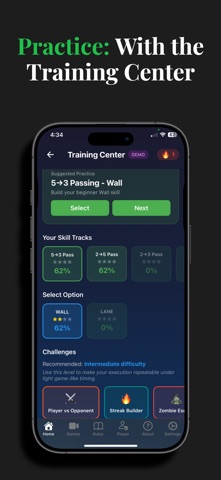
The Training Center uses structured challenges designed to build consistency, timing, and the habits the best players use to reach the highest levels.
Whether you're competing in weekly events, studying tournament footage, or practicing for the next level, iRefFoos helps you see the game differently.
Each session begins by choosing how you want to foos: Referee, Practice, Compete, Stream/Share, or Fun Mode — and the app configures itself instantly.
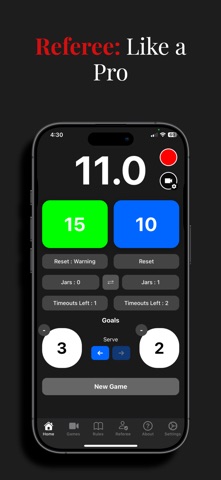
REFEREE
Run matches confidently without taking your eyes off the table.
• ITSF shot clocks with tenth-second precision
• Reset → Warning → Technical progression
• Score tracking, timeouts, and serve indicator
• Hands-free controls using volume buttons
• Customizable layout and automatic game recovery
• Track jars across an entire match.
VAR Recording lets you review key moments if a call is questioned.
Remote Viewing shares scores and timers via QR code so spectators can follow along.
PRACTICE
Train smarter.
Auto-Timer detects the ball with your camera and automatically starts the correct shot clock.
Practice mode includes zone highlighting, audio cues, and countdown alerts to help players master tournament timing.
Training Center (Premium) provides structured challenges that track every attempt so you can see real progress over time. Modeled specially after the practice games and techniques pro-master players use to reach the highest level.
COMPETE
Turn your phone into a personal foosball coach.
Auto-Timer records games and generates detailed statistics including possession charts and zone success rates. Between games or timeouts you can quickly review video clips, analyze defenses, and identify patterns that help you mid-game.
HIGHLIGHTS & MATCH REVIEW
Create highlight reels automatically from goals and passes, or mark moments manually while reviewing recordings.
Import existing match videos to generate full timelines and possession statistics.
STREAM & SHARE
Share live match statistics with spectators using a QR code.
Display stats on a TV via AirPlay/HDMI or stream with your favorite broadcasting app.
Remote Control allows a second device to manage scores, matches, and highlights from a phone or web browser.
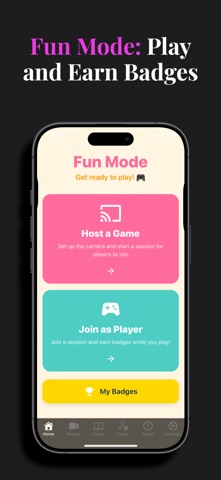
FUN MODE
Perfect for clubs and youth groups.
Players connect on their own device and earn badges for passes, shots, blocks, streaks, and milestones — no accounts required.
FREE vs PREMIUM
Free
• Referee timing tools
• VAR recording and sharing
• Auto-Timer practice mode
• Highlight reel creation
• Game playback and camera roll saves
• Training Center demo
• Fun Mode
Premium
• Training Center challenges
• Quick Jump match review filters
• Video analysis statistics
• Automatic highlight reels for streams
Whether you're learning the game, refereeing, or competing at the highest level, iRefFoos helps you see foosball like never before.
Terms of Use: https://www.apple.com/legal/internet-services/itunes/dev/stdeula/
Safety and technology
Found in the app by AppBrain- Price
- Free
- App size
- 53.1 MB
- Content rating
- Everyone
Technologies used by iRefFoos
Releases
Updates seen on the App Store- Version
- 2.8.1
- Launched
- before 2010
No changelog data
Alternatives
Similar apps and more from Eric DunnMore from Eric Dunn


Also available on Google Play

Rankings
App Store top chartsApp Store Rankings for iRefFoos
About the app and developer
About iRefFoos
iRefFoos is a sports app developed by Eric Dunn.
User Ratings
iRefFoos is rated 5.00 out of 5 stars. The rating is based on 2 ratings.
App Information
iRefFoos is freely available from the App Store. The app size is 53.10 MB. The latest version available is 2.8.1. The last update was on May 15, 2026.
Technical Requirements
The app has a content rating of Everyone. The app has been available on the App Store since before 2010.
Developer information for Eric Dunn
Address:
Frequently asked questions about iRefFoos
Is iRefFoos free?
Yes. iRefFoos is free on the App Store.
Is iRefFoos still available?
Yes. iRefFoos is on the App Store, and the last update we saw was on May 15, 2026.
How large is iRefFoos?
iRefFoos is 53.10 MB.
Is iRefFoos suitable for children?
App Store rates the content of iRefFoos as suitable for everyone.
How do people rate iRefFoos?
iRefFoos scores 5.00 out of 5 stars, from 2 ratings on the App Store.
Who made iRefFoos?
iRefFoos was developed by Eric Dunn. It is listed in the sports category on the App Store.