

iSub Player
iSub Player is made and published by Shandong HOPE Machine Co., Ltd. AppBrain is an independent app data site and isn't affiliated with Shandong HOPE Machine Co., Ltd. The app name, icon, screenshots and description belong to Shandong HOPE Machine Co., Ltd. and are shown as published on the App Store.
AppBrain's verdict
- Last updated
- October 18, 2026
Rankings
App Store top chartsApp Store Rankings for iSub Player
Competitors
Similar apps and more from Shandong HOPE Machine Co., Ltd.Alternatives to iSub Player


Releases
Updates seen on the App Store- Version
- 1.1.5
- Launched
- July 2026
No changelog data
User feedback
Ratings and reviews on the App StoreComments on iSub Player for iOS
We don't have enough comments to show example comments. Please check back later.
Technology
Found in the app by AppBrain- Price
- Free
- App size
- 128.1 MB
- Content rating
- Everyone
Technologies used by iSub Player
About the app and developer
About iSub Player
iSub Player is an utilities app developed by Shandong HOPE Machine Co., Ltd.
User Ratings
The app has no ratings yet.
App Information
iSub Player is freely available from the App Store. The app size is 128.07 MB. The latest version available is 1.1.5. The last update was on October 18, 2026.
Technical Requirements
The app has a content rating of Everyone. The app has been available on the App Store since July 2026.
Developer information for Shandong HOPE Machine Co., Ltd.
Shandong HOPE Machine Co., Ltd.
Address:
Frequently asked questions about iSub Player
Is iSub Player free?
Yes. iSub Player is free on the App Store.
Is iSub Player still available?
Yes. iSub Player is on the App Store, and the last update we saw was on October 18, 2026.
How large is iSub Player?
iSub Player is 128.07 MB.
Is iSub Player suitable for children?
App Store rates the content of iSub Player as suitable for everyone.
Who made iSub Player?
iSub Player was developed by Shandong HOPE Machine Co., Ltd. It is listed in the utilities category on the App Store.
What are the best alternatives to iSub Player?
People looking at iSub Player also look at these utilities apps: 电子飞行手册, 随时看 - 本地MP4视频播放器, NFC無源掛鎖, 喵播放器, VelaPlay.
Store listing
By Shandong HOPE Machine Co., Ltd., from the App Store
Description by Shandong HOPE Machine Co., Ltd. Written by the developer, not by AppBrain. Click to read.
Whether you are learning English, Japanese, Korean, French, Spanish, or other languages, iSub Player provides a more efficient viewing and learning experience.
【Efficient Subtitle Learning】
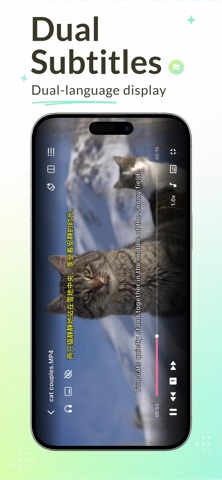
• Display dual subtitles for side-by-side learning
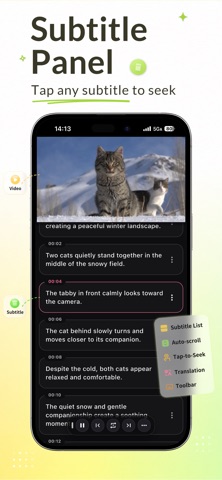
• Independent subtitle panel with free scrolling
• Tap subtitles to jump to the exact position
• Repeat individual sentences for practice
• Shadowing, Record & Compare to Original
• Save subtitles, screenshots, and audio clips with one tap
• Quickly open AI websites to analyze subtitles and words
• Subtitle Masking for a Pure Listening Environment
【Professional Local Media Player】
• Supports popular video formats including MP4, MKV, MOV, AVI, WEBM, FLV and More
• Supports popular audio formats including MP3, AAC, FLAC, M4A, WAV, WMA and More
• Supports multiple audio track switching and audio Delay
• Supports embedded subtitles and external SRT, ASS subtitles, and LRC lyrics
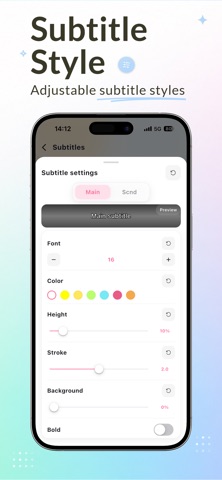
• Customizable subtitle delay, font size, and subtitle styles
【Powerful Media Library】
• Import local video and audio files
• Automatically scan folders to create playlists
• Browse with list and grid views
• Multiple sorting options
• Automatically save playback history
• Quickly search media files
• Convenient long-press action menu
• Support batch selection and batch operations
• Private folders with password protection
【Favorites & Learning Management】
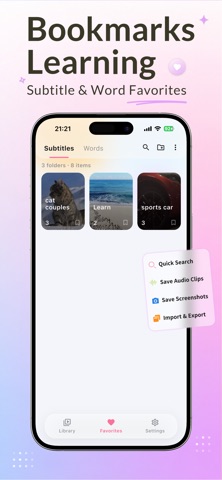
• Save subtitle sentences, words, screenshots, and audio clips
• Categorize learning materials
• Quickly search saved content
• Export and import favorites data without quality loss
【Professional Playback Experience】
• High-precision timeline seeking
• Playback speed adjustment while maintaining audio pitch
• Automatically remember playback progress
• Gesture controls for brightness, volume, and playback position
• Double-tap to fast forward or rewind
• Pinch-to-zoom video display
• Support playlist loop, single-item loop, and single playback modes
【Background Playback】
• Continue audio playback in the background
• Lock screen media controls
• System notification playback controls
【Rich Personalization Options】
• Multi-language interface
• Customizable subtitle styles (font size, color, position, outline, background, bold, etc.)
• Playback preferences
• Translation settings
• Light mode, dark mode, and system theme support
• Customizable external keyboard shortcuts
iSub Player focuses on local media playback and language learning. It does not provide any online video content. All media files come from the user's device or are imported by the user.
Whether you are watching movies, TV shows, anime, or documentaries, or practicing listening, subtitle-based learning, speaking shadowing, and language skills, iSub Player is your ideal companion for turning local videos into effective learning resources.