

0.00
0 reviews
Free

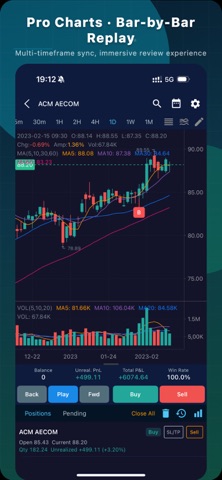
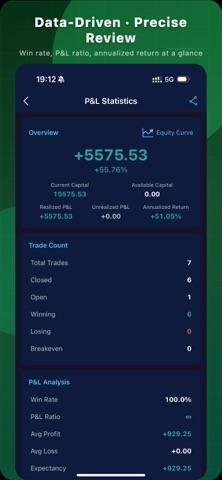

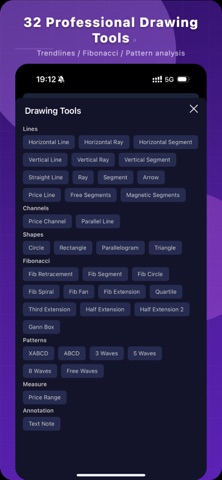

Screenshots by 大临 詹, from the the App Store listing
AppBrain's verdict
- Last updated
- November 23, 2026
- Size
- 11.5 MB
User feedback
Ratings and reviews on the App StoreComments on iTradeTrainer for iOS
We don't have enough comments to show example comments. Please check back later.
Store listing
By 大临 詹, from the App StoreDescription by 大临 詹 Written by the developer, not by AppBrain. Click to read.
iTradeTrainer is a professional K-line (candlestick) replay and trading simulation tool.
Practice your strategies with nearly 20 years of real historical market data. Build market intuition and discipline without risking real money. Available history varies by instrument.
One account works across the web, desktop and mobile versions. In the desktop app, analyze multiple charts side by side and place simulated orders with keyboard shortcuts. On iPhone or iPad, fit a practice session into a spare moment. Enable cloud sync on both devices to review those same trades on your computer.
AI Trade Review on Desktop
The desktop app lets you review your trades through conversation. Set up your AI model, filter your order history or open a saved session, then select AI Review. Check the attached trades, add context and send your question.
Ask “Which trades accounted for most of my losses?” Then follow up with “How did my position sizes compare on winning and losing trades?” The assistant uses your entries, exits, trade direction and profit or loss to help you spot recurring habits and choose one change to test in your next session.
Key Features
Bar-by-Bar Replay
Choose from 13 chart views, including an intraday chart and candlesticks from one minute to one month. Adjust playback speed or step forward and back one bar at a time. Make your decision before the next candle appears.
Multi-Timeframe Synchronized Analysis
On desktop, view up to four synchronized charts in a 2×2 grid or a horizontal or vertical split. Use a higher timeframe to identify the trend and a lower timeframe to look for entries.
Simulated Trading
Market orders fill at the replay price. Limit orders trigger when price conditions are met. Practice with stop-loss and take-profit orders, partial closes and forced liquidation. Size positions using all available funds, a percentage, a fixed amount or a fixed quantity.
Draw-to-Order
On desktop, drag a line on the chart to set a limit order price. Drag the line again to adjust a pending order.
Double-Blind Training Mode
Hide the symbol and date, then replay a random instrument from a random starting point. Test your rules on price action alone.
Extensive Market Coverage
Explore over 23,000 instruments, including Shanghai and Shenzhen A-shares, Beijing Stock Exchange listings, U.S. stocks, ETFs, LOFs, convertible bonds, indices, futures and forex. Historical data loads online when you select an instrument.
Professional Charting Tools
Use 30+ technical indicators, including MA, MACD, KDJ, RSI and Bollinger Bands, and 30+ drawing tools, including trendlines, Fibonacci retracements, Gann boxes and Elliott waves. Drawings support magnet snapping and sync across timeframes.
TDX Formula Support
Write or import custom indicators using Tongdaxin (TDX) formula syntax. On desktop, describe an idea in plain language and ask the AI indicator assistant to write, explain or revise the formula.
Performance Statistics
Track win rate, profit/loss ratio, cumulative return and maximum drawdown. Use the equity curve, trades and notes to see what drove your results.
Intraday Chart with Average Price Line
The built-in DAVP indicator resets each trading day so you can compare intraday prices with that session’s average.
Who Is It For?
Trading learners who want systematic practice without risking real money
Technical analysis enthusiasts who want to backtest strategies manually
Beginner and intermediate traders building market intuition and discipline
Securities and futures professionals looking for a supplementary training tool
Membership
New accounts receive a free trial. A range of membership plans is available.
Disclaimer
For learning and simulation only. iTradeTrainer does not execute real trades or provide investment advice. Historical data and simulated results do not predict future performance.
Official website
https://itradetrainer.raoyunsoft.com/
Safety and technology
Found in the app by AppBrain- Price
- Free
- App size
- 11.5 MB
- Content rating
- Everyone
Technologies used by iTradeTrainer
Releases
Updates seen on the App Store- Version
- 1.6.4
- Launched
- June 2026
No changelog data
Alternatives
Similar apps and more from 大临 詹Alternatives to iTradeTrainer


Rankings
App Store top chartsApp Store Rankings for iTradeTrainer
This app is not ranked
About the app and developer
About iTradeTrainer
iTradeTrainer is a finance app developed by 大临 詹.
User Ratings
The app has no ratings yet.
App Information
iTradeTrainer is freely available from the App Store. The app size is 11.48 MB. The latest version available is 1.6.4. The last update was on November 23, 2026.
Technical Requirements
The app has a content rating of Everyone. The app has been available on the App Store since June 2026.
iTradeTrainer is made and published by 大临 詹. AppBrain is an independent app data site and isn't affiliated with 大临 詹. The app name, icon, screenshots and description belong to 大临 詹 and are shown as published on the App Store.
Developer information for 大临 詹
Address: