AppBrain
AppBrain
  • Apps
  • Apps being viewed right now Trending apps today Most popular apps All-time most installed apps Top rated apps iPhone and iPad apps
  • Intelligence ▾
    Intelligence overview → Track any Android app or your whole market
    Track & analyze
    Keyword Tracker & OptimizerTrack & improve Play rankings App Performance ReportOne-off PDF for any app StatisticsFree Android & Play market stats
    Promote your app
    Featured Apps App Links
  • Intelligence
  • Pricing
  • Dashboard
  • Sign up
  • Log in
App Store Apps > Utilities > iVCam Webcam
iVCam Webcam icon

iVCam Webcam

7.3.2
Shanghai Yitu Information Technology Co., Ltd.
4.26
14,711 reviews
Free

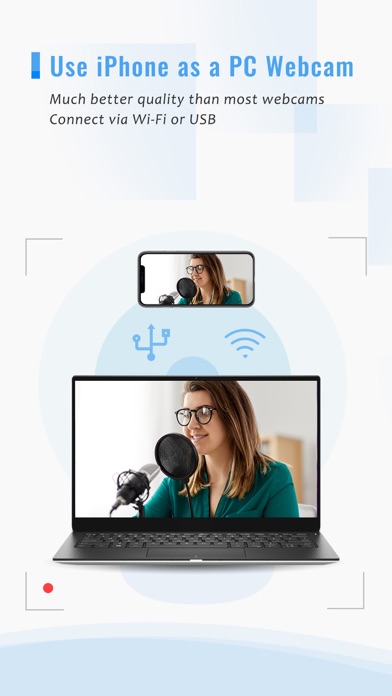
iVCam Webcam Screenshot 1 of 5
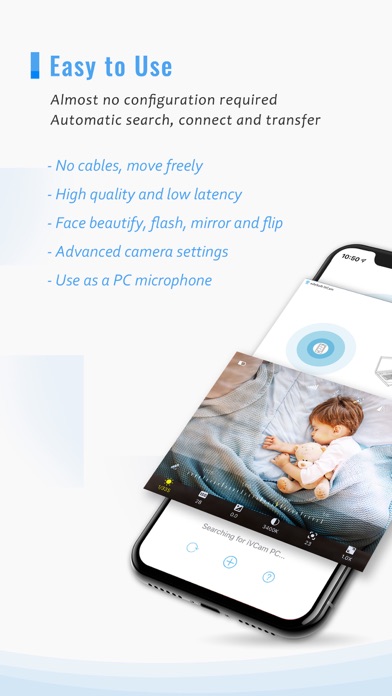
iVCam Webcam Screenshot 2 of 5
iVCam Webcam Screenshot 3 of 5
iVCam Webcam Screenshot 4 of 5
iVCam Webcam Screenshot 5 of 5
Screenshots by Shanghai Yitu Information Technology Co., Ltd., from the the App Store listing
View on the App Store

AppBrain's verdict

EstablishedWell rated
Rating on App Store
4.26
14,711 ratings
Last updated
November 12, 2025
Size
18.7 MB

Users rate it well: 4.3 stars from 14,711 ratings.

Official page on the App Store

User feedback

Ratings and reviews on the App Store

Comments on iVCam Webcam for iOS

We don't have enough comments to show example comments. Please check back later.

Store listing

By Shanghai Yitu Information Technology Co., Ltd., from the App Store
Description by Shanghai Yitu Information Technology Co., Ltd. Written by the developer, not by AppBrain. Click to read.
Why buy a webcam since you already have an iPhone/iPad?

iVCam turns your iPhone/iPad into an HD webcam for Windows PC. You can also replace your old USB webcam or integrated webcam with it which has a better quality. At the same time it's also a perfect baby monitor, spy-cam, security camera and pet-cam.

No enough space on your device? iVCam can record the video directly to your PC, works just like a remote video recorder!

Setting up iVCam is very simple - just download and install our client software on your PC and you're ready to go! The connection is fully automatic and requires no manual configuration.

Main Features:
- High-quality, real-time video with low latency and fast speed
- Automatic connection via Wi-Fi or USB and easy to use
- Connect multiple devices to one PC at the same time
- Support common video sizes such as 4K, 2K, 1080p, 720p, 480p, 360p, etc.
- Advanced camera settings - AE/AF, ISO, EC, WB and Zooming
- Configurable for video frame rate, quality and encoder
- Landscape and Portrait mode supported
- Support front/rear, wide angle/telephoto cameras and real-time switching
- Support for face beautify, flash, manual/auto focus and video flip/mirror
- Background replacement - Blur, Bokeh, Mosaic, Green Screen and more
- Audio supported, use your smartphone as a wireless microphone for PC
- Completely replaces USB webcam or integrated webcam, compatible with most applications using webcam
- Preview video, take pictures and record video files with our Windows client software

Install required Windows client software from https://www.e2esoft.com/ivcam.

Terms of Use:
https://www.e2esoft.com/ivcam/terms-of-use

Safety and technology

Found in the app by AppBrain
Price
Free
App size
18.7 MB
Content rating
Everyone

Technologies used by iVCam Webcam

Releases

Updates seen on the App Store
Version
7.3.2
Launched
November 2016

No changelog data

Alternatives

Similar apps and more from Shanghai Yitu Information Technology Co., Ltd.

Alternatives to iVCam Webcam

DroidCam Webcam & OBS Camera icon DroidCam Webcam & OBS Camera
DEV47APPS
4.6
Free
2.3K ratings
Remote Mouse icon Remote Mouse
耀 阮
4.6
Free
18.8K ratings
Screen Mirroring: LetsView icon Screen Mirroring: LetsView
Wangxu Technology Co., Ltd
2.7
Free
408 ratings
OBS Blade icon OBS Blade
Rene Schramowski
4.0
Free
75 ratings
Wolow - Wake on LAN icon Wolow - Wake on LAN
Jack Baker
4.3
Free
1.4K ratings
ApowerMirror- Screen Mirroring icon ApowerMirror- Screen Mirroring
Apowersoft Limited
2.8
Free
2.1K ratings
AMD Link icon AMD Link
AMD (Advanced Micro Devices, Inc.)
2.4
Free
52 ratings
Mixing Station icon Mixing Station
David Schumann
4.5
Free
624 ratings

More from Shanghai Yitu Information Technology Co., Ltd.

TV Assist icon TV Assist
Shanghai Yitu Information Technology Co., Ltd.
4.3
Free
10.1K ratings
iPlayTo - Media Cast icon iPlayTo - Media Cast
Shanghai Yitu Information Technology Co., Ltd.
4.5
$2.99
664 ratings

Rankings

App Store top charts

App Store Rankings for iVCam Webcam

This app is not ranked

About the app and developer

About iVCam Webcam

iVCam Webcam is an utilities app developed by Shanghai Yitu Information Technology Co., Ltd.

User Ratings

iVCam Webcam is rated 4.26 out of 5 stars. The rating is based on 15 thousand ratings.

App Information

iVCam Webcam is freely available from the App Store. The app size is 18.66 MB. The latest version available is 7.3.2. The last update was on November 12, 2025.

Technical Requirements

The app has a content rating of Everyone. The app has been available on the App Store since November 2016.

iVCam Webcam is made and published by Shanghai Yitu Information Technology Co., Ltd. AppBrain is an independent app data site and isn't affiliated with Shanghai Yitu Information Technology Co., Ltd. The app name, icon, screenshots and description belong to Shanghai Yitu Information Technology Co., Ltd. and are shown as published on the App Store.

Developer information for Shanghai Yitu Information Technology Co., Ltd.

Shanghai Yitu Information Technology Co., Ltd.

Address:

Share iVCam Webcam

Apps other people are watching Popular Utilities Apps Today's trending apps Top new apps Price drops on Google Play
DroidCam Webcam & OBS Camera icon DroidCam Webcam & OBS Camera
Remote Mouse icon Remote Mouse
Screen Mirroring: LetsView icon Screen Mirroring: LetsView
OBS Blade icon OBS Blade
Wolow - Wake on LAN icon Wolow - Wake on LAN
ApowerMirror- Screen Mirroring icon ApowerMirror- Screen Mirroring
AMD Link icon AMD Link
Mixing Station icon Mixing Station
Overview Alternatives Reviews Rankings Technology
AppBrain Intelligence premium content

Subscribe now to get full and unlimited access to AppBrain Intelligence. You'll have access to:

  • App Intelligence dashboard (performance timeline, competitor comparison, country rankings, insight cards)
  • Detailed ranking data per app
  • Full timeline per developer
  • Device market shares data per country
  • Unlimited keyword tracking
1 Month

$75/mo
(billed every month)

SAVE 0%
Subscribe
3 Months

$65/mo
($195 billed every 3 months)

SAVE 13%
Subscribe
1 Year

$57.50/mo
($690 billed every year)

SAVE 23%
Subscribe
Each subscription will automatically renew 3 days before the expiration date for the same time period. Subscriptions can be cancelled at any time before the renewal.

AppBrain is an app data site, we track rankings, ratings, installs for all apps and games on Google Play and the App Store. AppBrain doesn't host app files or APKs, all install links go directly to the official store. All trademarks are owned by their respective owners.

More apps

  • Top Android apps being viewed
  • KUKI Football
  • MY HERO ULTRA RUMBLE Mobile
  • Travel Map Animation - MapAnim

App statistics

  • Android statistics
  • Google Play Developer stats
  • Trending Android Apps
  • Trending iOS apps
  • Top popular Apps
  • Buy the best Android phone
  • Buy & sell app businesses

About AppBrain

  • Contact
  • Privacy
  • Documentation
  • DMCA takedowns
  • Blog
  • Monetization tips: Understanding your eCPM
© 2010-2026 - AppBrain