

Jam Maestro: create guitar tab
Jam Maestro: create guitar tab is made and published by David Blake. AppBrain is an independent app data site and isn't affiliated with David Blake. The app name, icon, screenshots and description belong to David Blake and are shown as published on the App Store.
AppBrain's verdict
EstablishedLoved by users- Rating on App Store
- 4.73
- 374 ratings
- Last updated
- November 7, 2022
Users love it: 4.7 stars from 374 ratings.
Rankings
App Store top chartsApp Store Rankings for Jam Maestro: create guitar tab
Competitors
Similar apps and more from David BlakeAlternatives to Jam Maestro: create guitar tab





More from David Blake





Releases
Updates seen on the App Store- Version
- 3.6.6
- Launched
- February 2013
No changelog data
User feedback
Ratings and reviews on the App StoreComments on Jam Maestro: create guitar tab for iOS
We don't have enough comments to show example comments. Please check back later.
Technology
Found in the app by AppBrain- Price
- $8.99
- App size
- 291.7 MB
- Content rating
- Everyone
Technologies used by Jam Maestro: create guitar tab
About the app and developer
About Jam Maestro: create guitar tab
Jam Maestro: create guitar tab is a music app developed by David Blake.
User Ratings
Jam Maestro: create guitar tab is rated 4.73 out of 5 stars. The rating is based on 370 ratings.
App Information
Jam Maestro: create guitar tab costs $8.99. The app size is 291.65 MB. The latest version available is 3.6.6. The last update was on November 7, 2022.
Technical Requirements
The app has a content rating of Everyone. The app has been available on the App Store since February 2013.
Developer information for David Blake
Address:
Frequently asked questions about Jam Maestro: create guitar tab
Is Jam Maestro: create guitar tab free?
No. Jam Maestro: create guitar tab costs $8.99 on the App Store.
Is Jam Maestro: create guitar tab still available?
Yes. Jam Maestro: create guitar tab is on the App Store, and the last update we saw was on November 7, 2022.
How large is Jam Maestro: create guitar tab?
Jam Maestro: create guitar tab is 291.65 MB.
Is Jam Maestro: create guitar tab suitable for children?
App Store rates the content of Jam Maestro: create guitar tab as suitable for everyone.
How do people rate Jam Maestro: create guitar tab?
Jam Maestro: create guitar tab scores 4.73 out of 5 stars, from 374 ratings on the App Store.
Who made Jam Maestro: create guitar tab?
Jam Maestro: create guitar tab was developed by David Blake. It is listed in the music category on the App Store.
What are the best alternatives to Jam Maestro: create guitar tab?
People looking at Jam Maestro: create guitar tab also look at these music apps: Reflow - Score Editor, Guitar Notation Pro, Quantiloop Pro - Live Looper, ChordPolyPad, BLEASS Filter.
Store listing
By David Blake, from the App Store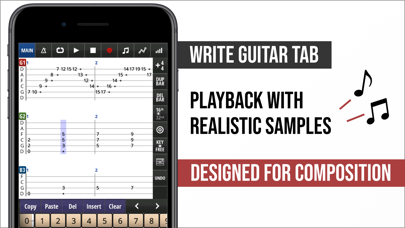



Description by David Blake Written by the developer, not by AppBrain. Click to read.
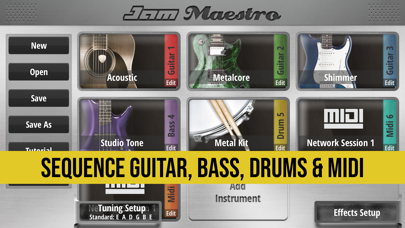
Sequence up to 16 instruments together, including Guitar, Bass and Drums, and compose songs in guitar/drum tab format.
Midi sequence and play background apps in your compositions using the Midi and Inter-App Audio instrument types.
Easily construct harmonies and see the relationship between notes thanks to a unique interface. Instantly share tab ideas with friends and bandmates via Dropbox. Playback with highly realistic samples. Export tabs to PDF/TXT and render tabs to wav/m4a format. Import Guitar Pro 3-5 files.
Features:
- 5 Instrument types: Guitar, Bass, Drums, Midi, Inter-App Audio.
- Inter-App Audio Host and Node support.
- Connect up to 4x Inter-App Audio Effects.
- Effects: Reverb, Delay, EQ, Chorus, Flanger, Vibrato, Tremolo.
- Full Midi In/Out compatibility
- Midi Sequencing
- Import Guitar Pro 3-5 files
- Export/Import Midi files
- Export tab to PDF/TXT file
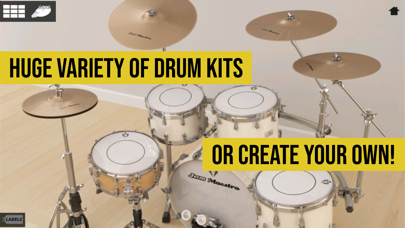
- Create your own Drum Kits.
- Audiobus 3.0 support, including State Saving that captures tab info (share your songs in Audiobus presets!)
- AudioCopy support.
- Ableton Link
Check out - www.jammaestro.com - for many videos of Jam Maestro in action!
“This app gives me the power to pro-produce music even places that I can’t physically play guitar. I’ve used this as my main song-writing tool for years now.”
-Chris Zell (She Pulled The Trigger)
INSTRUMENTS:
• Load up to 16 instruments, all midi in compatible.
• 5 Instrument Types: Guitar, Bass, Drums, Midi, Inter-App Audio
• Realistic sound, OVER 4000+ (painstakingly) recorded samples.
• Full guitar fretboard (24 frets).
• Palm muted equivalents for every guitar note for that heavy CHUG sound.
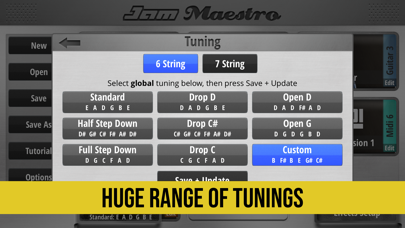
• Supports 6/7 string guitar, 4/5 string bass.
• Any custom guitar tuning in the range of Standard to Drop A possible (in most cases alternative tunings have been fully resampled for most realistic sound).
• One-touch Chords allow you to forget tricky finger position (+ define up to 25 of your own).
• Unique interface allows dynamic key changing as you play.
• Use guitar fretboard or drum pads as a midi controller to play background apps/midi devices.
• iPad version ‘Dual Mode’ allows you to play 2 instruments simultaneously, including 2 separate midi compatible apps/devices.
DRUM KIT CREATOR:
• Use own samples or background midi app sounds.
• Up to 20 pads, each which can be assigned with 2 sounds for cut off (eg. Open and Closed Hi-Hat).
• All custom kits fully compatible with internal sequencer
• Drum Kits using local samples are fully Midi In compatible.
• Create Interfaces for background midi drum apps and sequence using internal sequencer.
• Easily import and export your custom drum kits and share with others.
SOUNDPACKS
All Soundpacks now come unlocked in the Full Version.
• Guitar: Acoustic, Metalcore, Shimmer, Stoner Doom, Bright Clean, Epic lead.
• Bass: Studio Tone, Blacklisted, Hazzard.
• Drum: Metal Drums, Rock Drums. Metal Drums Pro, Rock Drums Pro, Power Drums, Punk Drums, Vintage Drums, Jazz Drums, Vinyl Drums, Bongos, Tabla, Drum Machine 808, Industrial, Atmosphere, Percussion Kit, Timpani
TAB:
• Guitar/Bass/Drum Tab Sequencer.
• Midi Sequencer
• Intuitive interface - program in notes just by touching them, rather than messing around with a numpad.
• Play in almost any time signature.
• Key analysis tools.
• Jam Mode means you can record all instruments to tab simultaneously as you jam over your backing instruments.
• Tempo/Repeat/Mixer/Panning Control.
EXPORT:
• Save tabs in .jam format - export via iTunes or straight to Dropbox to share with friends/bandmates instantly.
• Share tabs as PDF/TXT file.
• Export tabs as midi file.
• Render tabs as wav/m4a files.
• Audiobus 3.0 Support
• AudioCopy Support
www.jammaestro.com