

Jimakuru: Auto Captions
Jimakuru: Auto Captions is made and published by reiji onishi. AppBrain is an independent app data site and isn't affiliated with reiji onishi. The app name, icon, screenshots and description belong to reiji onishi and are shown as published on the App Store.
AppBrain's verdict
- Last updated
- October 6, 2026
- Size
- 6.23 MB
User feedback
Ratings and reviews on the App StoreComments on Jimakuru: Auto Captions for iOS
We don't have enough comments to show example comments. Please check back later.
Store listing
By reiji onishi, from the App Store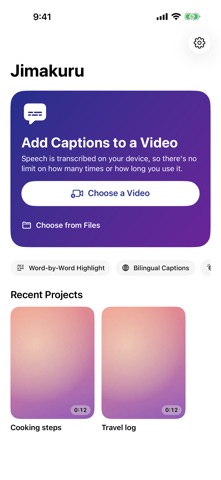




Description by reiji onishi Written by the developer, not by AppBrain. Click to read.
■ Transcribed on your device
Pick a video and the speech is turned into text on your iPhone, then split into easy-to-read captions. Nothing is uploaded, so there are no limits on how many videos or how long they are. Works with English, Spanish, French, German, Italian, Portuguese, Japanese, Chinese, Korean and many more languages.
■ Fix anything in place
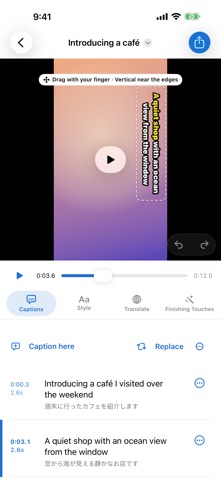
Tap a caption to edit it. Split, merge, nudge the timing, snap it to the current frame, or replace a misheard name everywhere at once. Undo and redo included.
■ 24 styles and 70+ fonts
Classic, karaoke and bold telop, plus cute captions like dreamy pastel, sticker, candy and neon, and eye-catching ones with gradients and offset shadows. Mix fonts, colors, gradients, double outlines, shadows, rounded boxes and letter spacing freely, and save your look as the default for new videos. Highlight each word as it is spoken and emphasize key words automatically.
■ Drag to move, push to the edge for vertical text
Drag captions on the video and pinch to resize. Push a caption against the right or left edge and it turns vertical. You can also change the position, direction, look and timing of a single caption.
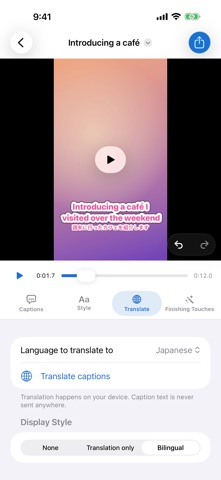
■ Bilingual captions
Translate captions on your device and show only the translation, or the translation in small text under the original.
■ Sound captions and face-aware placement
Applause, laughter and music become captions like [Applause]. Where a caption would cover a face, it moves out of the way automatically.
■ Trim and tighten
Keep as many parts of the video as you like. Remove silent gaps and filler words such as "um" and "uh" automatically for a snappier video. Captions move with the cuts.
■ Vertical, square or wide
Turn a landscape video into 9:16, 1:1, 4:5 or 16:9. Nothing is cropped: the whole frame stays visible and the empty space is filled with a blurred copy of the video or black.
■ Export
Video with captions burned in (HEVC / H.264, original quality), SRT caption file or text transcript. Unless you change the shape, vertical videos stay vertical.
■ Free, no watermark
All features are free. No watermark on your exports. To cover running costs, the app shows a small ad at the bottom of the screen, an ad while loading or exporting, and a full-screen ad at most once a day after an export. Audio and video are processed entirely on your device and never sent anywhere.
---
Requires iOS 26.0 or later (iPhone and iPad)
Support: rei12jii@gmail.com
Safety and technology
Found in the app by AppBrain- Price
- Free
- App size
- 6.23 MB
- Content rating
- Everyone
Technologies used by Jimakuru: Auto Captions
Releases
Updates seen on the App Store- Version
- 1.0.1
- Launched
- October 2026
No changelog data
Alternatives
Similar apps and more from reiji onishiAlternatives to Jimakuru: Auto Captions


More from reiji onishi


Rankings
App Store top chartsApp Store Rankings for Jimakuru: Auto Captions
About the app and developer
About Jimakuru: Auto Captions
Jimakuru: Auto Captions is a photo & video app developed by reiji onishi.
What is the rating of Jimakuru: Auto Captions?
Jimakuru: Auto Captions has no ratings yet.
Is Jimakuru: Auto Captions free?
Jimakuru: Auto Captions is free. The app size is 6.23 MB. The latest version available is 1.0.1. The last update was on October 6, 2026.
What are the requirements for Jimakuru: Auto Captions?
The app has a content rating of Everyone. The app has been available on the App Store since October 2026.
Developer information for reiji onishi
Address:
Frequently asked questions about Jimakuru: Auto Captions
Is Jimakuru: Auto Captions free?
Yes. Jimakuru: Auto Captions is free on the App Store.
Is Jimakuru: Auto Captions still available?
Yes. Jimakuru: Auto Captions is on the App Store, and the last update we saw was on October 6, 2026.
How large is Jimakuru: Auto Captions?
Jimakuru: Auto Captions is 6.23 MB.
Is Jimakuru: Auto Captions suitable for children?
App Store rates the content of Jimakuru: Auto Captions as suitable for everyone.
Who made Jimakuru: Auto Captions?
Jimakuru: Auto Captions was developed by reiji onishi. It is listed in the photo & video category on the App Store.
What are the best alternatives to Jimakuru: Auto Captions?
People looking at Jimakuru: Auto Captions also look at these photo & video apps: Video Translator, subtitles AI, Kapto: Captions for Videos, Malcut - Auto Captions, Lunevo - Offline Subtitles, KakuCut: Video Editor.