

Jointometer - Analyze Motion
Jointometer - Analyze Motion is made and published by Mohammed Eleffendi. AppBrain is an independent app data site and isn't affiliated with Mohammed Eleffendi. The app name, icon, screenshots and description belong to Mohammed Eleffendi and are shown as published on the App Store.
AppBrain's verdict
- Last updated
- December 10, 2025
Rankings
App Store top chartsApp Store Rankings for Jointometer - Analyze Motion
Competitors
Similar apps and more from Mohammed EleffendiAlternatives to Jointometer - Analyze Motion


Releases
Updates seen on the App Store- Version
- 1.0
- Launched
- December 2025
No changelog data
User feedback
Ratings and reviews on the App StoreComments on Jointometer - Analyze Motion for iOS
We don't have enough comments to show example comments. Please check back later.
Technology
Found in the app by AppBrain- Price
- Free
- App size
- 52.7 MB
- Content rating
- Everyone
Technologies used by Jointometer - Analyze Motion
About the app and developer
About Jointometer - Analyze Motion
Jointometer - Analyze Motion is a sports app developed by Mohammed Eleffendi.
User Ratings
The app has no ratings yet.
App Information
Jointometer - Analyze Motion is freely available from the App Store. The app size is 52.68 MB. The latest version available is 1.0. The last update was on December 10, 2025.
Technical Requirements
The app has a content rating of Everyone. The app has been available on the App Store since December 2025.
Developer information for Mohammed Eleffendi
Address:
Frequently asked questions about Jointometer - Analyze Motion
Is Jointometer - Analyze Motion free?
Yes. Jointometer - Analyze Motion is free on the App Store.
Is Jointometer - Analyze Motion still available?
Yes. Jointometer - Analyze Motion is on the App Store, and the last update we saw was on December 10, 2025.
How large is Jointometer - Analyze Motion?
Jointometer - Analyze Motion is 52.68 MB.
Is Jointometer - Analyze Motion suitable for children?
App Store rates the content of Jointometer - Analyze Motion as suitable for everyone.
Who made Jointometer - Analyze Motion?
Jointometer - Analyze Motion was developed by Mohammed Eleffendi. It is listed in the sports category on the App Store.
What are the best alternatives to Jointometer - Analyze Motion?
People looking at Jointometer - Analyze Motion also look at these sports apps: Sports Video Analysis: BitBody, CheckMotion, Pose & Angle, KineVision - Video Analysis, Pose & Tracking.
Store listing
By Mohammed Eleffendi, from the App Store



Description by Mohammed Eleffendi Written by the developer, not by AppBrain. Click to read.
Jointometer is your ultimate motion analysis tool for understanding how joints move in video. Whether you’re an athlete, coach, physical therapist, or researcher, Jointometer turns your device into a precise motion-tracker, all using your camera only and without any expensive sensors or lab equipment.
How It Works
1. Create a Project: Start by creating a new project to keep your videos and analyses organized.
2. Import a Video: Choose any video from your library.
3. Trim and Focus: Quickly trim your clip to the moment that matter most.
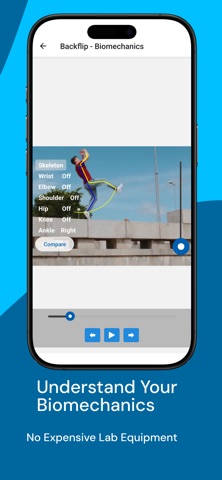
4. See the Motion: Watch as the app automatically detects and visualizes key joints, overlaying an animated skeleton that moves fluidly across your video.
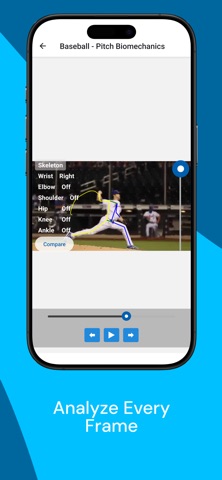
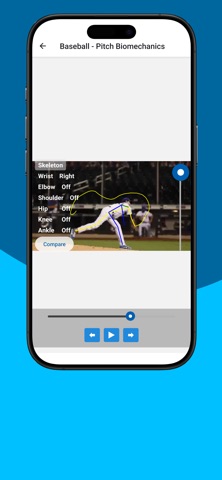
5. Track Joints in Motion: Select any joint—like a wrist, knee, or ankle—and view its trace path throughout the video. See exactly how it moves, accelerates, and stabilizes over time.
Compare and Learn
Jointometer doesn’t just show you your motion—it helps you understand it.
You can import a second video and directly compare joint traces side-by-side. Whether you’re perfecting your golf swing, optimizing your running stride, or studying rehabilitation progress, Jointometer makes it easy to compare your movement to a reference or ideal model.
Key Features
2D Pose Detection: Automatically detect and visualize human joints in any video.
Skeleton Overlay: See a clean, frame-by-frame skeleton drawn directly on your video.
Joint Tracing: Follow any joint’s trajectory through space and time.
Video Tools: Import, trim, and analyze with ease.
Frame Analysis: Examine specific frames for detailed motion insights.
Motion Comparison: Compare your performance against a reference video to pinpoint differences in technique.
Project Management: Save multiple projects and revisit past analyses anytime.
Perfect For
Athletes & Coaches: Analyze form, balance, and technique.
Rehabilitation & Physical Therapy: Track patient progress with measurable visual data.
Researchers & Students: Study biomechanics and motion patterns.
Content Creators & Developers: Integrate motion insights into creative or technical projects.
Why Jointometer?
Jointometer gives you data-driven insight into motion. By turning complex pose estimation technology into a simple, visual experience, it bridges the gap between science and everyday usability.
You’ll see how each joint moves through space, compare motion patterns across multiple videos, and gain a deeper understanding of performance—all without expensive lab equipment.
Unlock the Power of Motion
Every movement tells a story. Jointometer helps you capture, visualize, and understand that story in precise detail. Whether you’re analyzing your own motion or comparing it to a professional example, you’ll gain clarity that helps you move smarter, train better, and perform stronger.
Download Jointometer today and start turning your videos into visual motion insights.
See the motion. Understand the movement. Master the technique.