AppBrain
AppBrain
  • Apps
  • Apps being viewed right now Trending apps today Most popular apps All-time most installed apps Top rated apps iPhone and iPad apps
  • Intelligence ▾
    Intelligence overview → Track any Android app or your whole market
    Track & analyze
    Keyword Tracker & OptimizerTrack & improve Play rankings App Performance ReportOne-off PDF for any app StatisticsFree Android & Play market stats
    Promote your app
    Featured Apps App Links
  • Intelligence
  • Pricing
  • Dashboard
  • Sign up
  • Log in
App Store Apps > Productivity > Jolt: Screen Time Control
Jolt: Screen Time Control icon

Jolt: Screen Time Control

by ASAKIRA CONSULTANTS LLP · Productivity · Free
On the App Store since January 2025 · Data updated 2026-10-16
App Store

Jolt: Screen Time Control is made and published by ASAKIRA CONSULTANTS LLP. AppBrain is an independent app data site and isn't affiliated with ASAKIRA CONSULTANTS LLP. The app name, icon, screenshots and description belong to ASAKIRA CONSULTANTS LLP and are shown as published on the App Store.

AppBrain's verdict

Well rated
Rating on App Store
4.30
106 ratings
Last updated
September 29, 2026

Users rate it well: 4.3 stars from 106 ratings.

Rankings

App Store top charts

App Store Rankings for Jolt: Screen Time Control

This app is not ranked

Competitors

Similar apps and more from ASAKIRA CONSULTANTS LLP

Alternatives to Jolt: Screen Time Control

Lesscreen: Screen Time Limit icon Lesscreen: Screen Time Limit
Shenzhen Jirry Jirry Technology Co., Ltd.
0.0
Free
Focusspace: Limit Screen Time icon Focusspace: Limit Screen Time
Focusspace, LLC
4.7
Free
13 ratings
Breaktime: Focus App Blocker icon Breaktime: Focus App Blocker
Nathan Chan
4.6
Free
69 ratings
Achieve! Earn Your Screen Time icon Achieve! Earn Your Screen Time
Jonathan Goldson
4.5
Free
46 ratings
Pattrn - Discipline Tracker icon Pattrn - Discipline Tracker
Pedro Schott
4.8
Free
942 ratings
Zenze - App Time Limit icon Zenze - App Time Limit
Atmana Tech
4.2
Free
31 ratings
Fokus - Screen time icon Fokus - Screen time
Adrien Blanc
3.0
Free
2 ratings
Opal PRO, Social Media Blocker icon Opal PRO, Social Media Blocker
IT ForYou
4.6
Free
38 ratings

Releases

Updates seen on the App Store
Version
2.0.4
Launched
January 2025

No changelog data

User feedback

Ratings and reviews on the App Store

Comments on Jolt: Screen Time Control for iOS

We don't have enough comments to show example comments. Please check back later.

Technology

Found in the app by AppBrain
Price
Free
App size
176.9 MB
Content rating
Everyone

Technologies used by Jolt: Screen Time Control

About the app and developer

About Jolt: Screen Time Control

Jolt: Screen Time Control is a productivity app developed by ASAKIRA CONSULTANTS LLP.

User Ratings

Jolt: Screen Time Control is rated 4.30 out of 5 stars. The rating is based on 110 ratings.

App Information

Jolt: Screen Time Control is freely available from the App Store. The app size is 176.88 MB. The latest version available is 2.0.4. The last update was on September 29, 2026.

Technical Requirements

The app has a content rating of Everyone. The app has been available on the App Store since January 2025.

Developer information for ASAKIRA CONSULTANTS LLP

ASAKIRA CONSULTANTS LLP

Address:

Share Jolt: Screen Time Control

Store listing

By ASAKIRA CONSULTANTS LLP, from the App Store
Jolt: Screen Time Control Screenshot 1 of 10
Jolt: Screen Time Control Screenshot 2 of 10
Jolt: Screen Time Control Screenshot 3 of 10
Jolt: Screen Time Control Screenshot 4 of 10
Jolt: Screen Time Control Screenshot 5 of 10
Jolt: Screen Time Control Screenshot 6 of 10
Jolt: Screen Time Control Screenshot 7 of 10
Jolt: Screen Time Control Screenshot 8 of 10
Jolt: Screen Time Control Screenshot 9 of 10
Jolt: Screen Time Control Screenshot 10 of 10
Screenshots by ASAKIRA CONSULTANTS LLP, from the the App Store listing
Description by ASAKIRA CONSULTANTS LLP Written by the developer, not by AppBrain. Click to read.
You know exactly what you should be doing right now. So does your phone - and it's betting you'll check it anyway. Jolt is built for people who are done losing that bet.
——
KNOW IF YOU'RE ACTUALLY IMPROVING
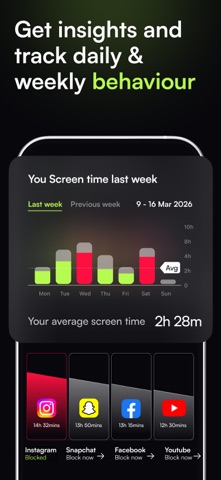
Attention Forecast - New Before your day starts, Jolt tells you how it's likely to go. One predictive score built from last night's sleep, your 28-day usage trend, your streak, and your blocking discipline.
Attention Score: One number. Every day. Your Focus, Sleep, and Discipline combined. It rises when all three do - it won't let one good habit carry the weight of two bad ones. Watch it over 7, 14, 30 days. The direction it moves is the most honest feedback you'll get.
Discipline Score: The gap between the limits you set and the limits you actually held. Not whether you blocked Instagram - whether you stayed blocked when it counted. Most people are surprised by this number. That's the point.
Focus Score: Most people think they're focused. The Focus Score measures whether they actually were - how much deep work you completed, how many sessions you finished without quitting, how little you touched your phone mid-session. The score doesn't round up.
Sleep Score: Your last pickup before bed. Your first reach in the morning. How many times you interrupted your own sleep. Tracked, scored, shown back to you every day.
——
SET LIMITS THAT ACTUALLY HOLD
Duration Limit: Daily time cap on any app - 30 minutes on Instagram, 20 on YouTube. When it hits, it locks. No snooze, no exceptions.
Open Limit: Cap how many times you open an app each day. Three opens on Twitter. Five on Reddit. Once you've hit the number, it's done.
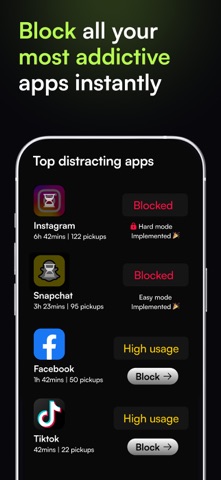
Blocking Modes: Easy: a breathing pause before the app opens. Medium: rapid taps or a timed challenge - your brain earns the unlock. Hard: nothing gets through.
Hard Mode: Set it once. Can't edit, delete, or override it until the next day. Your morning self makes the rules. Your evening self lives with them.
——
FOCUS SESSIONS
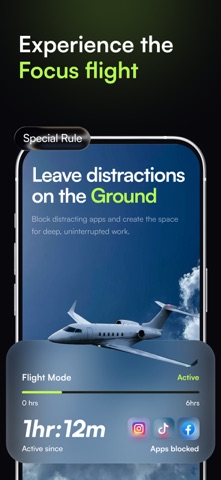
Focus Flights - New: You don't start a timer anymore. You book a flight.
Pick a destination reachable in your focus window. Choose your seat: First Class seals the cabin - no early exit. Business puts a challenge between you and the door. Economy lets you tap out.
Board, take off, block your apps. Land and it logs as a completed flight. Quit early and it goes down as a crash - distance credited for how far you got. Every flight lives in your Flight Wallet.
Focus Sessions Block every distracting app for a set window - deep work, exam session, meeting hour. 20+ templates or build your own. Everything else disappears until you're done.
Quick Sessions: One tap. Immediate block. Zero setup. Focus right now, not after configuring anything.
——
CLOSE EVERY LOOPHOLE
Sleep Schedule: Set your bedtime and wake-up time. Every distracting app locks automatically. You choose which essentials stay on - everything else is off until morning, with full tracking of every pickup.
Accountability Partner: A real person who sees your screen time and must approve every override. Not an algorithm. A human who will actually push back.
GPS Blocking: Set your office, library, or gym. The moment you arrive, Jolt activates. The environment does what willpower can't.
Good Apps First: Use your journal, reading app, or workout tracker first. Once you do, the distracting apps unlock. Focus becomes the price of entry.
Block 18+ One toggle. Every adult site and app - off.
Shield Customisation - New: The screen that blocks you now looks how you want it. Choose a persona or build your own: custom text, colors, and icon. Turn on Randomized Experience, and it changes every time a block fires.
——
PRIVACY FIRST: All blocking runs locally via Apple's Screen Time API. No personal data leaves your device.
Download free. Block your first app in 30 seconds.
Support: hello@thejoltapp.com
Terms: thejoltapp.com/terms & https://www.apple.com/legal/internet-services/itunes/dev/stdeula/
Privacy: thejoltapp.com/privacy
Official page on the App Store
Today's trending apps Apps other people are watching Price drops on Google Play Top new apps Popular Productivity Apps
Lesscreen: Screen Time Limit icon Lesscreen: Screen Time Limit
Focusspace: Limit Screen Time icon Focusspace: Limit Screen Time
Breaktime: Focus App Blocker icon Breaktime: Focus App Blocker
Achieve! Earn Your Screen Time icon Achieve! Earn Your Screen Time
Pattrn - Discipline Tracker icon Pattrn - Discipline Tracker
Zenze - App Time Limit icon Zenze - App Time Limit
Fokus - Screen time icon Fokus - Screen time
Opal PRO, Social Media Blocker icon Opal PRO, Social Media Blocker
Overview Alternatives Reviews Rankings Technology
AppBrain Intelligence premium content

Subscribe now to get full and unlimited access to AppBrain Intelligence. You'll have access to:

  • App Intelligence dashboard (performance timeline, competitor comparison, country rankings, insight cards)
  • Detailed ranking data per app
  • Full timeline per developer
  • Device market shares data per country
  • Unlimited keyword tracking
1 Month

$75/mo
(billed every month)

SAVE 0%
Subscribe
3 Months

$65/mo
($195 billed every 3 months)

SAVE 13%
Subscribe
1 Year

$57.50/mo
($690 billed every year)

SAVE 23%
Subscribe
Each subscription will automatically renew 3 days before the expiration date for the same time period. Subscriptions can be cancelled at any time before the renewal.

AppBrain is an app data site, we track rankings, ratings, installs for all apps and games on Google Play and the App Store. AppBrain doesn't host app files or APKs, all install links go directly to the official store. All trademarks are owned by their respective owners.

More apps

  • Top Android apps being viewed
  • Slots Prosperity - Casino Slot
  • NRL Fantasy
  • Captcha Entry: Typing Job work

App statistics

  • Android statistics
  • Google Play Developer stats
  • Trending Android Apps
  • Trending iOS apps
  • Top popular Apps
  • Buy the best Android phone
  • Buy & sell app businesses

About AppBrain

  • Contact
  • Privacy
  • Documentation
  • DMCA takedowns
  • Articles
  • Blog
  • Tips to improve your Android promotional campaign
© 2010-2026 - AppBrain