

JotBunker is made and published by John Brantly. AppBrain is an independent app data site and isn't affiliated with John Brantly. The app name, icon, screenshots and description belong to John Brantly and are shown as published on the App Store.
AppBrain's verdict
- Last updated
- June 3, 2026
Rankings
App Store top chartsApp Store Rankings for JotBunker
Competitors
Similar apps and more from John BrantlyAlternatives to JotBunker


Releases
Updates seen on the App Store- Version
- 1.1.3
- Launched
- May 2026
No changelog data
User feedback
Ratings and reviews on the App StoreComments on JotBunker for iOS
We don't have enough comments to show example comments. Please check back later.
Technology
Found in the app by AppBrain- Price
- Free
- App size
- 45.7 MB
- Content rating
- Everyone
Technologies used by JotBunker
About the app and developer
About JotBunker
JotBunker is a productivity app developed by John Brantly.
User Ratings
The app has no ratings yet.
App Information
JotBunker is freely available from the App Store. The app size is 45.70 MB. The latest version available is 1.1.3. The last update was on June 3, 2026.
Technical Requirements
The app has a content rating of Everyone. The app has been available on the App Store since May 2026.
Developer information for John Brantly
Address:
Store listing
By John Brantly, from the App Store


Description by John Brantly Written by the developer, not by AppBrain. Click to read.
Sync happens over your local Wi-Fi when you choose. No cloud. No accounts. No data ever leaves your network.
FOUR WORKSPACES
• Jots: Six numbered slots for quick capture. Each slot holds text, drawings, photos, voice recordings, and file attachments. Fill the slots, sync them to your computer, and clear them for the next round.
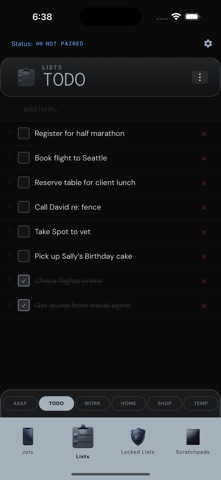
• Lists: Todos and checklists. Rename categories, reorder items, check things off on either device. Changes merge when you reconnect.
• Locked Lists: Gate codes, lock combos, membership numbers, safe combinations. Protected behind biometrics and auto-locked the moment you navigate away.
• Scratchpads: Six freeform text areas. Start a thought on your computer, pick it up on your phone.
HOW SYNC WORKS
Pair once by scanning a QR code. After that, tap Sync whenever you're on your home network. All network traffic is encrypted end-to-end with NaCl. Nothing goes through an external server.
From your computer, download jots as plain files (.txt, .jpg, .m4a, .pdf) into folders you choose. Use them with anything: search tools, scripts, a PKM system, or just File Explorer.
OPEN SOURCE
JotBunker source code is publicly available under the GPL-3.0 license at github.com/johnbrantly/jotbunker.
The companion desktop app is available at jotbunker.com.