

Jottr: AI To-do List
Jottr: AI To-do List is made and published by Evan Qi. AppBrain is an independent app data site and isn't affiliated with Evan Qi. The app name, icon, screenshots and description belong to Evan Qi and are shown as published on the App Store.
AppBrain's verdict
- Last updated
- January 2, 2026
Rankings
App Store top chartsApp Store Rankings for Jottr: AI To-do List
Competitors
Similar apps and more from Evan QiAlternatives to Jottr: AI To-do List


Releases
Updates seen on the App Store- Version
- 1.0
- Launched
- January 2026
No changelog data
User feedback
Ratings and reviews on the App StoreComments on Jottr: AI To-do List for iOS
We don't have enough comments to show example comments. Please check back later.
Technology
Found in the app by AppBrain- Price
- Free
- App size
- 17.3 MB
- Content rating
- Everyone
Technologies used by Jottr: AI To-do List
About the app and developer
About Jottr: AI To-do List
Jottr: AI To-do List is a productivity app developed by Evan Qi.
User Ratings
The app has no ratings yet.
App Information
Jottr: AI To-do List is freely available from the App Store. The app size is 17.30 MB. The latest version available is 1.0. The last update was on January 2, 2026.
Technical Requirements
The app has a content rating of Everyone. The app has been available on the App Store since January 2026.
Developer information for Evan Qi
Address:
Store listing
By Evan Qi, from the App Store


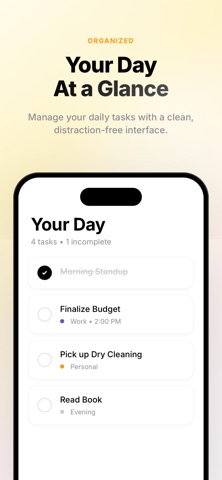
Description by Evan Qi Written by the developer, not by AppBrain. Click to read.
When you tend to get distracted or struggle with focus, traditional to-do apps just don't work. Opening apps feels like a chore, typing takes too long, and there are too many decisions to make.
HOW JOTTR WORKS:
1) Just type or say what you need to do
No complicated forms. No endless tapping. Just tell Jottr what's on your mind:
"Remind me to call Mom tomorrow at 5pm"
"Buy groceries for the week"
2) AI understands and organizes it for you
Jottr's AI instantly extracts:
Task names
Due dates and times
Priority levels
Categories
3) Plan your day in seconds
Select the tasks you want to focus on today, prioritize them with drag-and-drop, and let Jottr guide you through your day one task at a time.
4) Focus on one thing at a time
Enter Focus Mode to work on your top priority without distractions. Complete it, then move to the next. It's that simple.
*AI ANALYSIS RESULTS REQUIRE A SUBSCRIPTION
TERMS: https://www.apple.com/legal/internet-services/itunes/dev/stdeula/