

Journey - Diary, Journal
Journey - Diary, Journal is made and published by Two App Studio Pte. Ltd. AppBrain is an independent app data site and isn't affiliated with Two App Studio Pte. Ltd. The app name, icon, screenshots and description belong to Two App Studio Pte. Ltd. and are shown as published on the App Store.
AppBrain's verdict
EstablishedLoved by users- Rating on App Store
- 4.64
- 5,066 ratings
- Last updated
- April 27, 2026
Users love it: 4.6 stars from 5,066 ratings.
Rankings
App Store top chartsApp Store Rankings for Journey - Diary, Journal
Competitors
Similar apps and more from Two App Studio Pte. Ltd.Alternatives to Journey - Diary, Journal






More from Two App Studio Pte. Ltd.

Releases
Updates seen on the App Store- Version
- 5.6.6
- Launched
- November 2017
No changelog data
User feedback
Ratings and reviews on the App StoreComments on Journey - Diary, Journal for iOS
We don't have enough comments to show example comments. Please check back later.
Technology
Found in the app by AppBrain- Price
- Free
- App size
- 216.8 MB
- Content rating
- Everyone
Technologies used by Journey - Diary, Journal
About the app and developer
About Journey - Diary, Journal
Journey - Diary, Journal is a lifestyle app developed by Two App Studio Pte. Ltd.
What is the rating of Journey - Diary, Journal?
Journey - Diary, Journal is rated 4.64 out of 5 stars, based on 5.1 thousand ratings.
Is Journey - Diary, Journal free?
Journey - Diary, Journal is free. The app size is 216.75 MB. The latest version available is 5.6.6. The last update was on April 27, 2026.
What are the requirements for Journey - Diary, Journal?
The app has a content rating of Everyone. The app has been available on the App Store since November 2017.
Developer information for Two App Studio Pte. Ltd.
Address:
Store listing
By Two App Studio Pte. Ltd., from the App Store






Description by Two App Studio Pte. Ltd. Written by the developer, not by AppBrain. Click to read.
# Capture Beautiful Memories
Capture both moments & memories with photos, videos or audios that you can look back on in the future and remember the events that happened that day.
# Create Stunning Journal Entries
Explore a variety of journaling & note-taking tools in Journey's editor. Change the paragraph style, stylize your text with bold, italics and strikethrough, organize your writing with bullets, tables, and checklists, and play around with text color.
# Throwback to Your Happiest Moments
Get notified and look back at your best memories and your journal entries from a week, a month, or even a year or two ago.
# Tend To Your Emotions With Mood-Tracking
Take note of your feelings while journaling, and keep track of how your mood fluctuates across your journal entries. View how your mood shifts across 30 days in your stories.
# Shared Journal^
Collaborate and create cherished memories with your loved ones, family members, or even friends on an unforgettable journey together.
# End-to-End Encryption^
Enjoy unparalleled peace of mind with end-to-end encryption†. Safeguard your personal moments & memories and ensure your privacy remains intact throughout its journey to the cloud.
# Private & Secure Space
Set up a passcode and Touch ID/Face ID to keep your journaling notes & diary entries private and secure.
# Power Up Your Journal With Plugins
Power up your journaling routine with an extensive range of journal plugins. Explore functions such as exporting to DOCX & PDF, adding images & media, and blog publishing on Journey.
# Journal Coach & Templates
Breeze through journaling with more than 60 curated journaling programs from topics such as self-confidence, boundary making, and practicing mindfulness. Kick-start your reflections with templates that have thought-provoking prompts and questions.
# Create Custom Templates
Take charge of your journaling by creating custom templates that suit your needs. Create, duplicate, and delete custom templates at your convenience.
# Other Features:
- Cloud sync
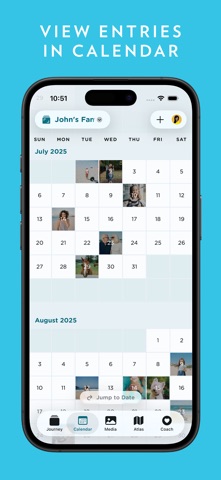
- View entries in the calendar, photos, videos, and on a map
- Passcode & biometric lock
- Available on mobile, desktop, and web
- 14 Color themes
- Add weather & location to entry
- View entries in timeline, calendar, or map
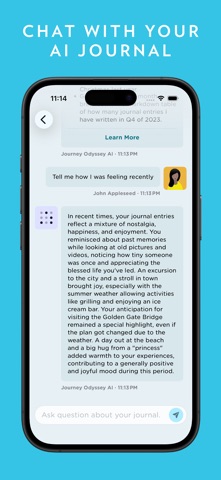
- Advanced search: Activity, mood, favorites
- Compose entries via email
- Zapier integration
- Publish to blogs
- Daily journal reminder
- Siri shortcuts
- Healthkit (Steps count & distance)
^ Only available in Journey Cloud Sync.
# Journey.Cloud Membership
Journey.Cloud membership is an auto-renewing subscription. Pricing: US$6.99/monthly or US$49.99/year. Price may vary by location.
- Daily reminder and inspiration into your email inbox
- Write and attach photos from email
- Unlock paid features on any Mac or other desktop devices
- Unlock paid features on any iPhone or iPads devices
- Unlock paid features on any other phones and tablets.
Payment will be charged to the credit card connected to your iTunes Account when you confirm the initial subscription purchase. Subscriptions automatically renew unless auto-renew is turned off at least 24-hours before the end of the current subscription period. Your account will be charged for renewal within 24-hours prior to the end of the current period, and the cost of the renewal will be identified. You may manage your subscription and auto-renewal may be turned off by going to your Account Settings after the purchase. Any unused portion of a free trial period, if offered, will be forfeited when you purchase a subscription, where applicable.
Privacy Policy: https://journey.cloud/policy/
Terms of Use (EULA): https://journey.cloud/terms/
------
For technical assistance or other inquiries, talk to us at https://help.journey.cloud.