

JoyCut: Sticker Journal is made and published by 拓 王. AppBrain is an independent app data site and isn't affiliated with 拓 王. The app name, icon, screenshots and description belong to 拓 王 and are shown as published on the App Store.
AppBrain's verdict
- Last updated
- September 14, 2026
Rankings
App Store top chartsApp Store Rankings for JoyCut: Sticker Journal
Competitors
Similar apps and more from 拓 王Alternatives to JoyCut: Sticker Journal


Releases
Updates seen on the App Store- Version
- 1.2.0
- Launched
- May 2026
No changelog data
User feedback
Ratings and reviews on the App StoreComments on JoyCut: Sticker Journal for iOS
We don't have enough comments to show example comments. Please check back later.
Technology
Found in the app by AppBrain- Price
- Free
- App size
- 3.95 MB
- Content rating
- Everyone
Technologies used by JoyCut: Sticker Journal
About the app and developer
About JoyCut: Sticker Journal
JoyCut: Sticker Journal is an utilities app developed by 拓 王.
What is the rating of JoyCut: Sticker Journal?
JoyCut: Sticker Journal has no ratings yet.
Is JoyCut: Sticker Journal free?
JoyCut: Sticker Journal is free. The app size is 3.95 MB. The latest version available is 1.2.0. The last update was on September 14, 2026.
What are the requirements for JoyCut: Sticker Journal?
The app has a content rating of Everyone. The app has been available on the App Store since May 2026.
Developer information for 拓 王
Address:
Store listing
By 拓 王, from the App Store

Description by 拓 王 Written by the developer, not by AppBrain. Click to read.
JoyCut removes the background from a photo and turns its subject into a clean sticker. Save it by date, add tags and a note, then reuse your collection in playful creations.
CAPTURE
• Take a photo or import one from your library
• Automatically remove the background
• Save a transparent sticker with a clean outline
COLLECT
• Revisit stickers on a calendar
• Add tags and short notes
• Find favorite moments quickly
CREATE
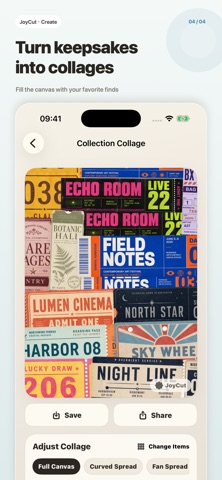
• Build 3:4 collage covers
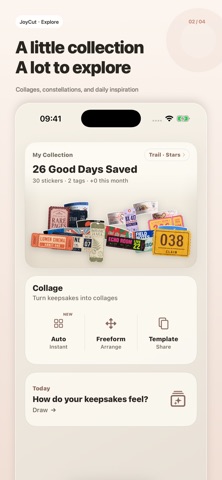
• Draw a mood card from recent stickers
• Explore your collection as a constellation
• Save and share your creations
KEEP YOUR COLLECTION SAFE
Your collection starts on your device. Export a local backup anytime. JoyCut Pro adds cloud backup and restore across devices using Sign in with Apple.
JoyCut is ad-free.
Some features require JoyCut Pro, available as a monthly subscription or a one-time lifetime purchase.